

Helpdesk
Konrado on your help desk's tickets. A draft for your team on every ticket, and replies sent on its own when you let it.
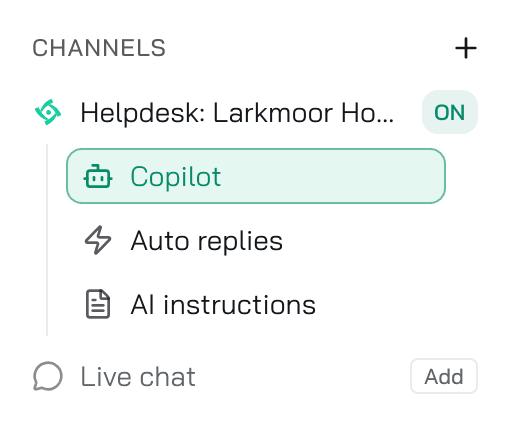
A Helpdesk channel connects an agent to your help desk's tickets. Konrado reads every ticket in scope and helps in two ways. Copilot writes a draft your team sends. Auto replies send the reply without a person when Konrado is sure enough.
How it works
- One help desk per organization, and its connection belongs to one agent. To switch to another help desk, disconnect the first one under Workspace SettingsIntegrations.
- A WHMCS that SupportPal uses as its Billing Platform does not count as a second help desk. Konrado reads clients, services and invoices from it, not tickets.
- The channel row is named after the connection: Helpdesk: WHMCS, Helpdesk: SupportPal, or the name you gave a custom help desk.
- The channel appears in the agent's menu as soon as the connection is saved, with Copilot on.
- Which tickets Konrado may read is set on the connection, under Workspace SettingsIntegrations: the departments, the blocked tags and the blocked senders. Copilot and Auto replies share that choice.
What Konrado reads
| Data | How it helps |
|---|---|
| Tickets and their messages | Konrado writes the draft from what the customer wrote |
| Departments | You narrow drafts and auto replies to the departments you choose |
| The people in your help desk | An auto reply goes out from the Assigned agent you pick |
| Ticket statuses | An auto reply can set the ticket's status after it is sent |
With WHMCS or SupportPal connected, Konrado also knows the client, their services and their invoices. See Connect WHMCS and Connect SupportPal.
The three pages
| Page | What it does |
|---|---|
| Copilot | A draft in the background for every ticket in scope, read in the browser extension and in the Inbox. Set up Copilot |
| Auto replies | Konrado sends the reply itself above the confidence bar you set. Shadow mode lets you watch it decide first. Go from Shadow to Live |
| AI instructions | What the agent is told on this help desk, the guardrails, and the Communication style it learns from example replies. The agent's own instructions are the base. Write the instructions |
Credits
A ticket reply costs 2 credits, whether Copilot drafted it, Konrado sent it on its own, or Shadow mode decided on it. A ticket Konrado skips costs nothing. See plans and credits.
What Konrado cannot do
| Not possible | Why |
|---|---|
| Read a ticket outside the ticket scope | The departments, blocked tags and blocked senders on the connection decide what Konrado sees |
| Connect a second help desk | Your organization has one help desk. Disconnect the first one, then connect the other |
| Serve one help desk with two agents | A help desk connection belongs to one agent |
| Change your help desk's setup | Konrado reads tickets and sends replies. Departments, statuses and people stay in your help desk |
Where to go next
Last updated on