

Connect SupportPal
Connect SupportPal and link your WHMCS, so Konrado answers SupportPal tickets with the client's services and invoices.
With SupportPal connected, Konrado reads your SupportPal tickets as they arrive and can answer them. SupportPal has no billing data of its own, so link your WHMCS to let Konrado see each client's services and invoices. It takes about 10 minutes, in three parts:
| Step | Page | You know it worked when |
|---|---|---|
| 1. Connect SupportPal | This page | Test Connection passes |
| 2. Add the macro | Add the SupportPal macro | A new ticket appears in the Inbox |
| 3. Read drafts in SupportPal | Use Konrado in SupportPal tickets | Your team sees Konrado's draft on the ticket |
What Konrado reads
| Data | How it helps |
|---|---|
| Tickets, their messages and the users who wrote them | Konrado writes the reply from what the customer wrote |
| Departments, operators and ticket statuses | The ticket scope, and the sender and status of an auto reply |
| Services, invoices and products, from a linked WHMCS | Konrado knows what the client pays for, and your catalog joins the Knowledge Base |
| Closed tickets | Past tickets learn from how your team answered. Resolved tickets is on by default. You can pause it in the Knowledge Base |
Konrado writes to SupportPal in two cases only: a reply when Auto replies are Live, and a new ticket when a visitor sends the ticket form in your live chat.
What Konrado cannot do
| Not possible | Why |
|---|---|
| Read services or invoices without WHMCS | SupportPal holds no billing data. Link WHMCS as the Billing Platform |
| Receive tickets without the macro | The macro tells Konrado that a ticket changed. Without it, no ticket arrives |
| Replace your SupportPal permissions | Your team still needs SupportPal access to open and answer tickets |
| Run next to a second help desk | Your organization has one help desk at a time |
Create a SupportPal API token for Konrado alone. After you save it, Konrado shows only its ending. The macro sends ticket events with the Webhook token Konrado makes in the connect form. Konrado keeps only a fingerprint of that token, so it shows it in full once. New token replaces it.
- "Can you check why my site is down? It is on my business plan."
- "Is my last invoice paid?"
- "I already tried clearing the cache. What else can I do?"
- "Which services do I have with you?"
Before you start
- SupportPal admin access, with permission to create API tokens and macros.
- An owner or admin account in Konrado, and no other help desk connected.
- For services and invoices, the Konrado addon in WHMCS: install and activate the addon, the first two steps on that page. Do not connect WHMCS as a help desk, because your organization has one help desk at a time. You link WHMCS in the SupportPal form.
- If SupportPal is behind a firewall, allow Konrado's IP addresses.
Connect
Create an API token in SupportPal
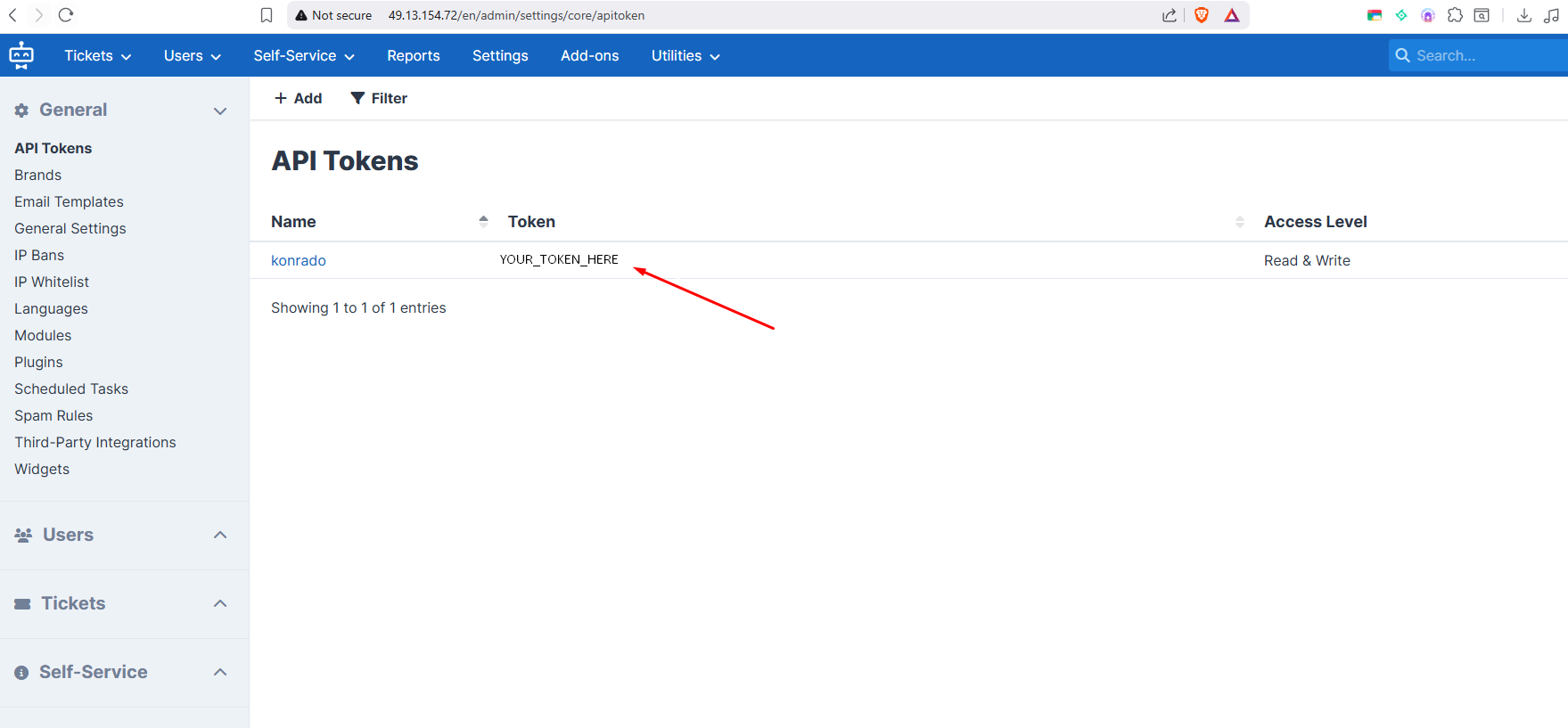
In SupportPal, open Settings › General › API Tokens and create a token for Konrado.
If your SupportPal lets you limit a token, let it read tickets, ticket messages, attachments, ticket custom fields, users, departments, operators, ticket statuses and core settings. For auto replies and tickets from your live chat, it also needs to create tickets and ticket messages.
Fill in the form in Konrado
Open Workspace SettingsIntegrations, click Add integration, choose Help desk, then SupportPal.
| Field | What to enter |
|---|---|
| Integration Name | A name your team knows. The help desk channel carries it |
| SupportPal API URL | The base address of SupportPal, for example https://help.example.com |
| API Token | The token from SupportPal |
| Ticket URL | Optional. Your operator ticket address, for example https://help.example.com/operator/ticket. Konrado fills it in from your first ticket when you test the connection |
| Billing Platform | Your WHMCS. No billing system leaves services and invoices out |
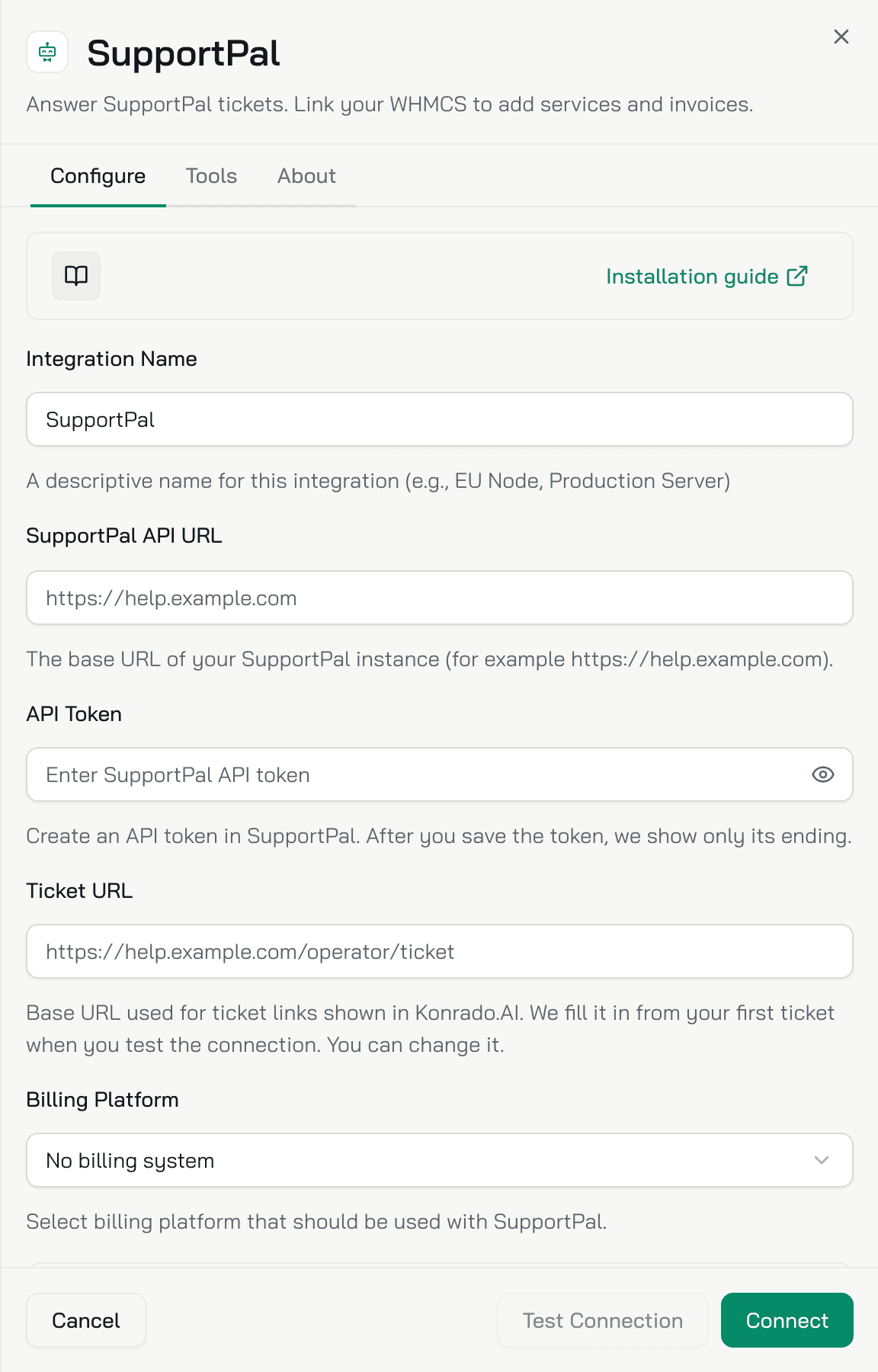
No WHMCS in the list yet? Choose Connect new billing system. The WHMCS form opens with the WHMCS URL and an API Token to paste into the addon. Click Test Connection, then Connect. This WHMCS lends only its billing data, so it does not count as a second help desk. Then open the SupportPal form again and pick it under Billing Platform.
Copy the webhook keys
The Keys for SupportPal box under the form holds the Webhook URL and the Webhook token, each with a copy button. Copy both for the macro now: you see the token in full only until you click Connect.
Test and connect
Click Test Connection. When the test passes, click Connect.
Check it works
SupportPal shows Connected in the table. Konrado adds an agent named Ticket Agent, with a Helpdesk channel for SupportPal and Copilot on. Set up the Helpdesk channel.
Tickets reach Konrado once the macro is in place: add the SupportPal macro.
If something is wrong
| What you see | What to do |
|---|---|
| Test Connection fails | Check that the SupportPal API URL is reachable and is the base address, without an operator path |
| SupportPal refuses the token | Create a new API token with the access listed above |
| Services and invoices are missing | Check that Billing Platform is your connected WHMCS |
| Ticket links open the wrong page | Check that Ticket URL is your operator ticket address |
| Another help desk is already connected. Disconnect it first. | Your organization has one help desk at a time. Disconnect the other one first |
| This help desk is already connected to another organization. | This SupportPal is connected in another Konrado organization. Disconnect it there first |
Remove the integration
Open Workspace SettingsIntegrations, open the SupportPal row menu (...) and click Disconnect. Konrado stops reading tickets. Then delete the macro and revoke the API token in SupportPal.
Last updated on