

Update the WHMCS addon
Copy the new Konrado addon over the old one. The keys you saved in WHMCS stay.
When a new version of the Konrado addon is out, you copy its files over the old ones. The API Token and the Webhook Token saved in WHMCS stay. It takes about 5 minutes.
Before you start
- WHMCS admin access.
- File access to WHMCS: FTP, SFTP, SSH or your hosting file manager.
- A backup of the
modules/addons/KonradoAI/folder.
Update
Download the new version
Open Workspace SettingsIntegrations. The WHMCS row shows Update to and the new version number. Click it, or Update plugin in the row menu (...). The dialog shows the version you have and the latest one. Click Download with the version number, or download repo.konrado.ai/whmcs.zip. Extract the file.
Replace the addon files
Copy the new KonradoAI folder into modules/addons/, so it replaces the old
modules/addons/KonradoAI/ folder. If your upload tool asks whether to merge or overwrite,
overwrite.
Check the addon in WHMCS
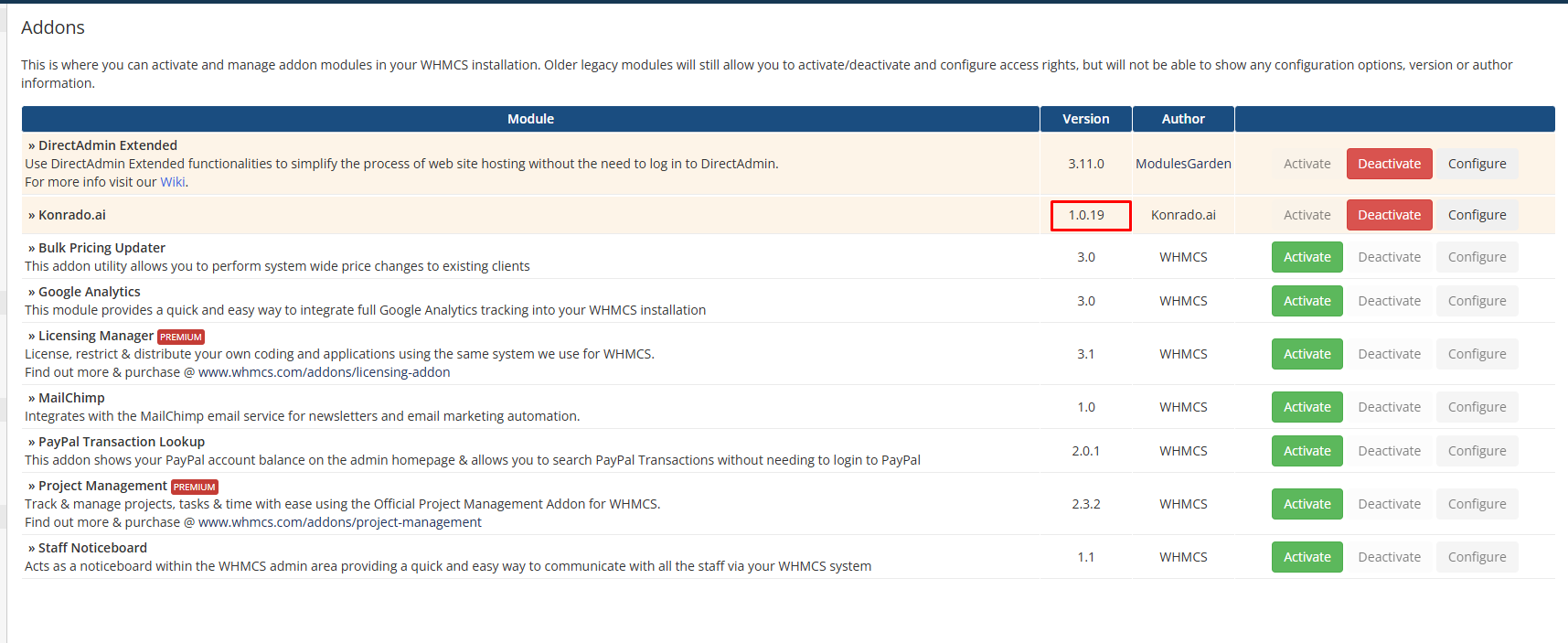
Open System Settings › Addon Modules. Konrado.ai is still active and shows the new version.
Check it works
In Konrado, open the WHMCS row menu (...), click Manage, then Test Connection. The test shows Connected successfully! and the new Module Version.
Roll back
If the new version fails, restore your backup of modules/addons/KonradoAI/ and test the
connection again.
If something is wrong
| What you see | What to do |
|---|---|
| WHMCS still shows the old version | Check that the new KonradoAI folder replaced modules/addons/KonradoAI/, and did not land inside it as KonradoAI/KonradoAI/ |
| Test Connection fails after the update | Restore the backup, then repeat the update and check that the file permissions stayed the same |
| The WHMCS admin pages show errors | Read the WHMCS and PHP error logs for the first fatal error after the upload |
Last updated on