

Usage & Billing
Your plan and the trial, the credits you used, buying or changing a plan, invoices and the low-credit warnings.
Usage & Billing shows your plan, the credits you spent this period and your invoices. Open Workspace SettingsUsage & Billing. It has three tabs: Overview, Usage and Invoices. Only owners and admins see it. Prices are only in the console. See what a credit buys and how many each plan includes.
The trial
Every new organization starts with a 14-day trial: 500 credits, no card. Your plan reads Free with the Trial badge, and Credits used says when the trial ends. The plan card on Home counts the days left and links to the plans with See plans.
Two days before the end, owners and admins get the email Your trial ends soon. After the 14 days the organization is on Free, with 50 credits a month. Unused trial credits do not carry over. Buying a plan ends the trial at once.
Overview
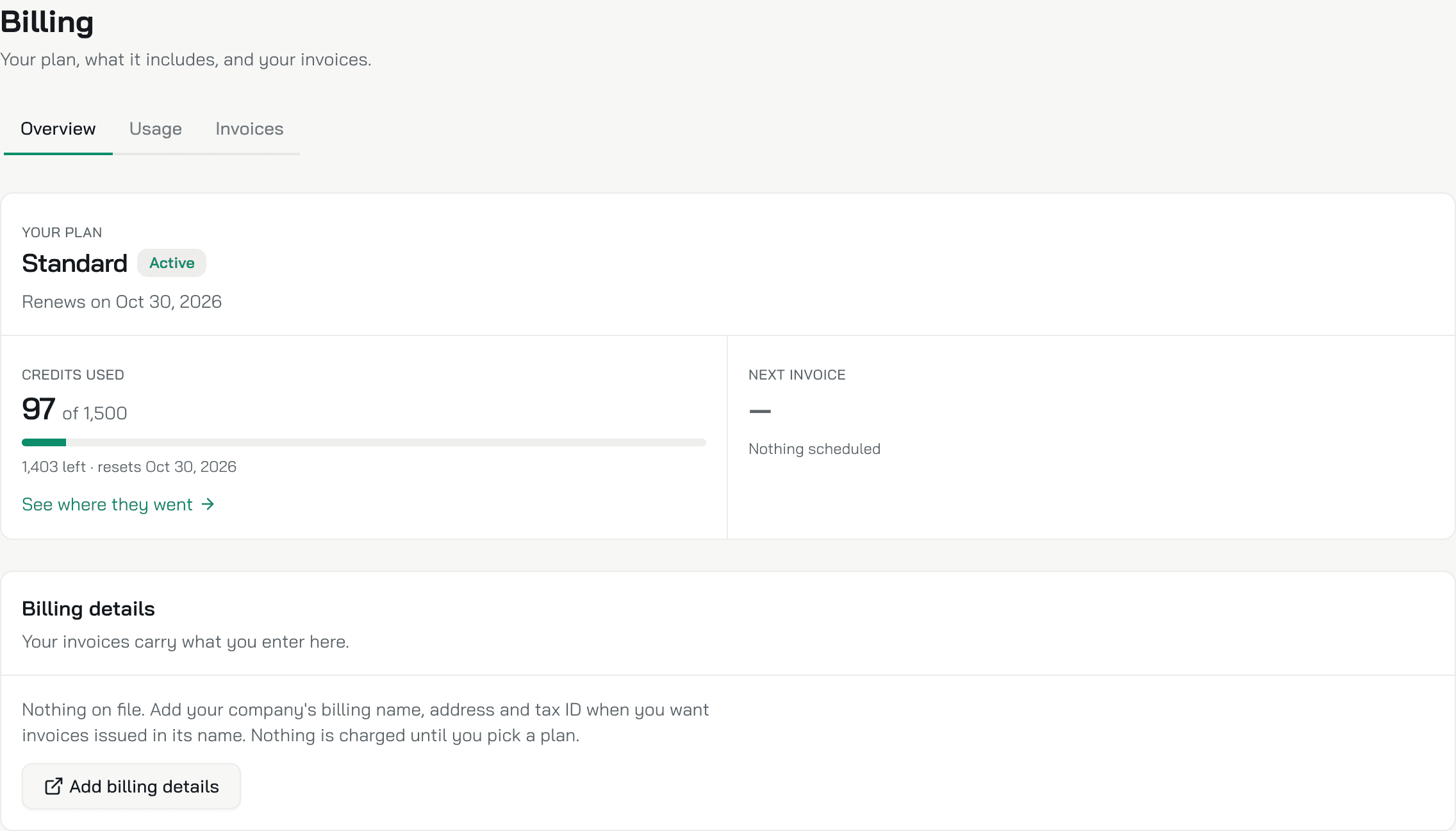
Your plan
The plan's name, with a badge for its state:
| Badge | What it means |
|---|---|
| Active | The plan runs normally. Free, Pilot and Enterprise show it too |
| Trial | The 14-day trial |
| Ending | The subscription is cancelled. Ends on shows its last day |
| Payment failed | Stripe could not take the last payment |
| Limit reached | This period's credits are used up |
A subscription also shows Renews on and the date.
Credits used shows what you spent of this period's credits, what is left and the day they reset. On the trial it shows the day the trial ends. A plan with no cap says No credit cap on this plan. See where they went opens Usage.
Next invoice shows the amount and the date of your next Stripe invoice, or Nothing scheduled.
Billing details
The name, email, address and tax ID your invoices carry, and your default card. The first time, Add billing details opens Stripe's billing portal, where you enter them. After that the button is Manage billing. In the portal you also change the card. You pay nothing until you pick a plan.
Plans
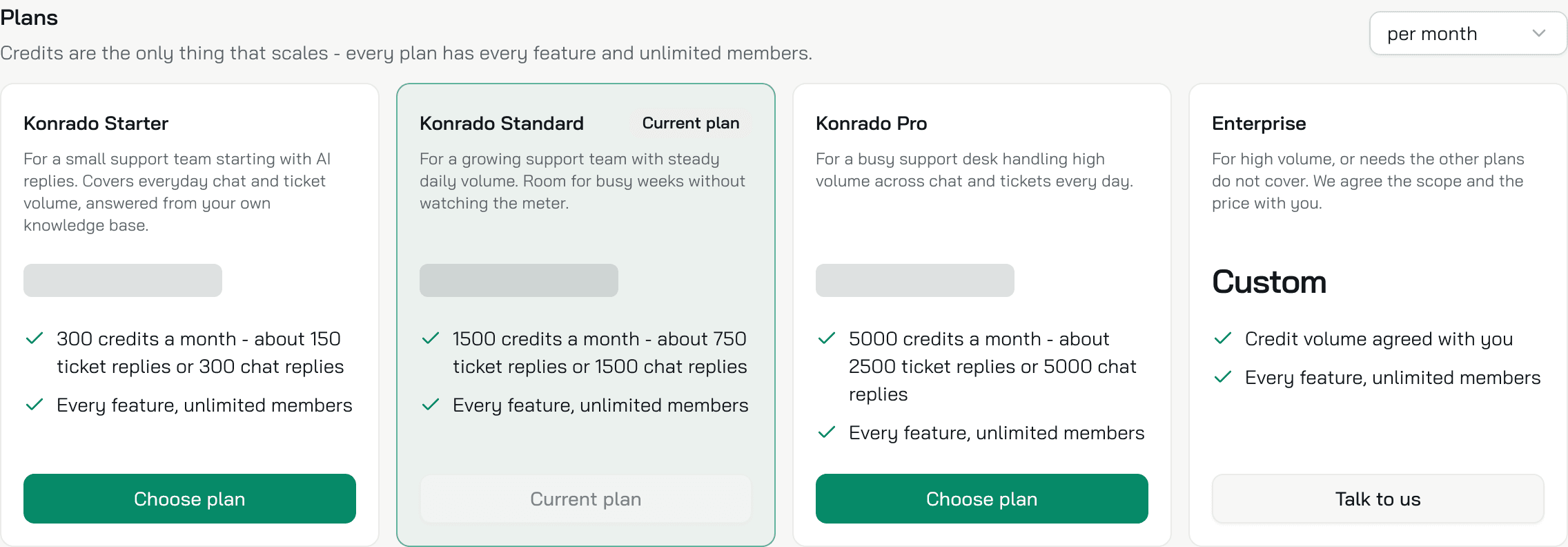
Starter, Standard and Pro, each with its credits a month and Choose plan. Your own plan says Current plan, and Standard carries Popular when it is not yours. The menu above the cards switches the prices between per month and per year. The Enterprise card has Talk to us, which opens an email to support@konrado.ai. An organization on an assigned Enterprise plan sees no plans here.
Buy or change a plan
- Under Plans, pick per month or per year in the menu above the cards.
- Click Choose plan on the plan you want.
- The first time, you pay on Stripe's checkout page. Back in the console, a message says Your plan is updated.
On a running subscription:
- A bigger plan opens a Stripe page where you confirm it. It applies at once, and Stripe charges the difference for the rest of the period.
- A smaller plan needs no confirmation. It starts when the period you paid for ends. Until then the Overview says which plan comes next and on what date.
- To cancel, write to support@konrado.ai. The plan shows Ending and runs to the end of the period. Then the organization is on Free.
A yearly plan still gives its credits month by month: they reset on the 1st of each month, in UTC. A monthly plan resets them on its renewal date.
Plans the Konrado team assigns
The Konrado team assigns Enterprise and Pilot. You cannot buy them in the console. Enterprise is for high volume, with the credits and the price agreed with you. Pilot has no credit cap and is for an organization that evaluates Konrado with the Konrado team. Click Talk to us, or write to support@konrado.ai.
Usage
Credits this period gives the period's dates, the day of it you are on, and what each reply costs. Below it:
- Credits used against your plan's credits, and where you finish the period at this pace.
- Live chat replies, at 1 credit each.
- Helpdesk replies, at 2 credits each. Copilot drafts and auto replies both count.
- A chart of the credits used each day, by channel, with your busiest day.
- Usage by agent: each agent and, under it, each channel, with its replies and credits.
Konrado counts usage from the replies themselves, and the tab refreshes about once a minute. The days run in UTC.
Invoices
Each invoice shows its Invoice #, Status (Paid, Open, Uncollectible or Void), Date, Frequency and Amount. Pay opens an open invoice to pay it, View opens its page on Stripe, and Download gets the PDF.
Konrado reads the invoices from Stripe each time you open the tab and keeps no copy. Until you add billing details or buy a plan, the tab says No billing for your account yet. After that, until Stripe issues the first invoice, it says No invoices yet. The name, address and tax ID on an invoice come from Billing details on the Overview.
When credits run low
A bar appears above every page of the console, with Go to Billing. Only owners and admins see it.
| What the bar says | When | What it means |
|---|---|---|
| N of M credits used this period. Replies keep working until the pool runs out. | At 80% of your credits | Replies keep going out |
| All M credits used this period. AI replies are paused until the period resets. | At 100% | Konrado writes no chat replies and no ticket drafts until the credits reset. Choose a bigger plan to start again sooner |
| Your last payment didn't go through. Update your card details to keep your subscription active. | Stripe could not take a payment | Replies keep going out while Stripe retries, even past 100%. Update the card in Manage billing |
A failed payment shows its bar instead of the credit bars. While replies are paused, the chat on your website tells visitors We can't reply right now. Please try again a little later, or contact us directly. The test chat on Overview still answers.
On a plan where the Konrado team agreed that replies continue past the credits, the bar at 100% says All M credits used this period. Replies still work for now. instead, and the Konrado team bills you for the extra credits.
Owners and admins also get an email:
| When | |
|---|---|
| Your credits are running low | At 80% of the credits |
| AI replies are paused | At 100% of the credits, when replies stop |
| All your credits are used | At 100% of the credits while replies keep going: a failed payment Stripe is retrying, or a plan agreed with the Konrado team |
| Your payment did not go through | At the first failed payment of an invoice |
| Your trial ends soon | Two days before the trial ends |
Each credit email goes out once per period and plan, and the payment email once per invoice.
What Konrado cannot do
| Not possible | What to do instead |
|---|---|
| Carry unused credits into the next period | Pick a plan that covers your busiest month |
| Buy extra credits on top of a plan | Move to a bigger plan, or click Talk to us |
| Buy Enterprise or Pilot in the console | Write to support@konrado.ai |
| Edit billing details in the console | Manage billing opens Stripe's portal |
| Cancel a plan in the console | Write to support@konrado.ai |
| Turn off the billing emails | They go to every owner and admin. Change who is an admin under Team |
Related
Last updated on