

Leads
The visitors who left their contact details in the chat, graded hot, warm or cold.
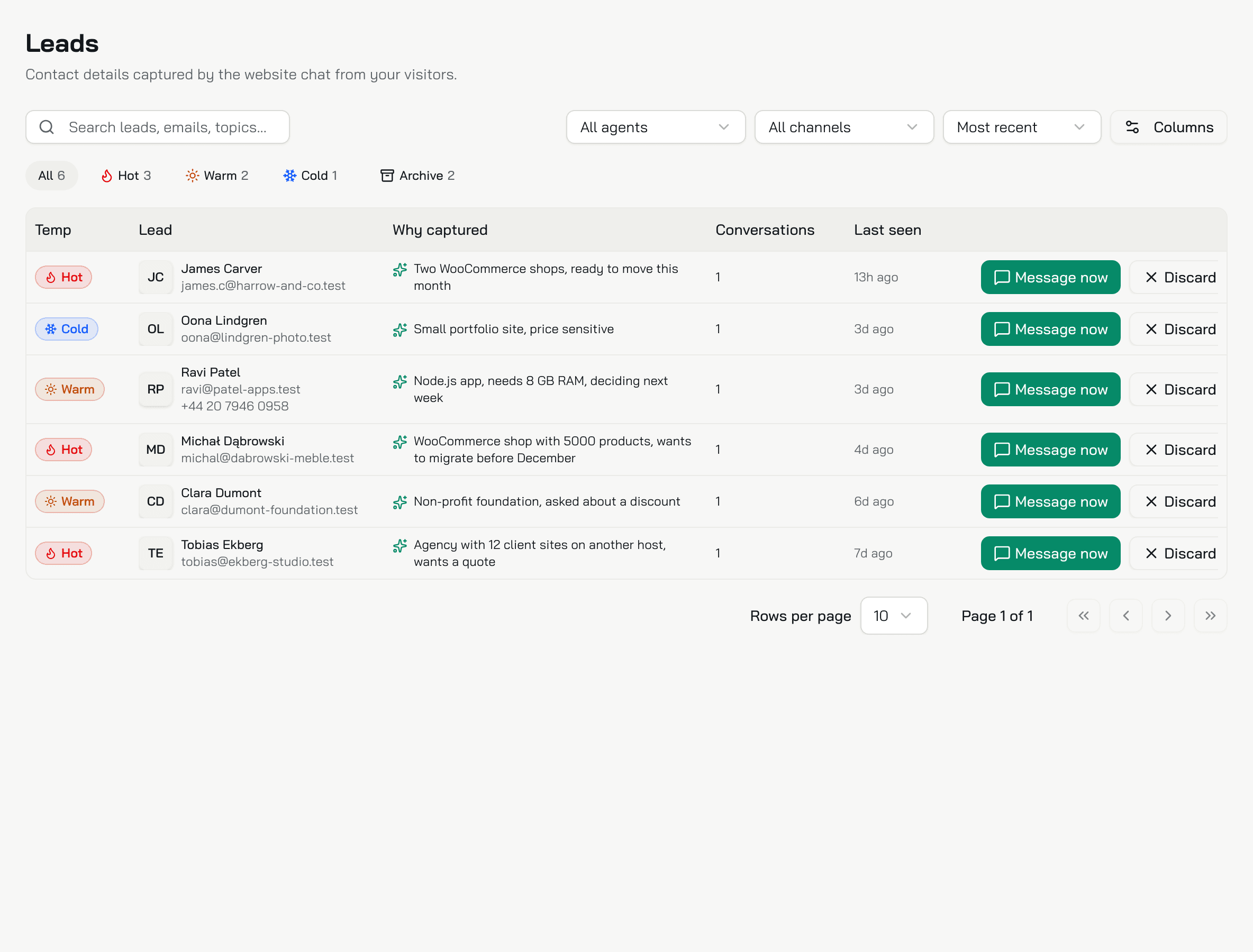
A lead is a visitor who left their name and email in the chat's contact form. Leads lists them for your whole organization, one row per person. Owners and admins see it. The number on the Leads row in the sidebar counts the people waiting in the list.
Where a lead comes from
From the Collect leads chat action, on in every new Live chat. By default Konrado offers the form when a visitor wants a person to follow up: a quote, a demo, a call with sales. The visitor gives a name, an email and, if they like, a phone number. Once the visitor sends it, the form does not show again in that chat. Set up Collect leads.
Konrado grades each lead when it offers the form. The visitor never sees the grade.
| Grade | What Konrado saw |
|---|---|
| Hot | A clear wish to buy now: a quote, a contract, a timeline, a budget |
| Warm | Comparing options: a demo, a trial, plans |
| Cold | Early curiosity |
The list
| Column | What it shows |
|---|---|
| Temp | The grade |
| Lead | The name, the email, and the phone number when given |
| Why captured | Konrado's reason: what the visitor wants and why that grade |
| Conversations | How many chats this email left details in |
| Last seen | The latest message in those chats |
The same email in two chats is one row, with the latest name, phone number and grade. Click a row to open the person's chats in the Inbox.
Find a lead
- Search leads, emails, topics... finds a name, an email, a phone number or a word in Why captured.
- All agents and All channels narrow the list to one agent or one chat. They offer only those with leads.
- The sort menu puts the Most recent first, or the Hottest first.
- All, Hot, Warm and Cold show their counts. Click one to filter, click it again to clear it.
Your filters stay in the page address, so you can bookmark or share a filtered list.
Follow up
Message now opens your own mail app with an email to the lead, the subject "Following up on your chat" and their name. Konrado sends nothing and keeps no record of it.
Discard moves the person to Archive, in every agent and channel. There is no confirmation: the archive is the undo. Click Archive to see them, and Restore to bring one back. A discarded person who leaves their details in a new chat comes back on their own.
Where the details go
- Each address under Send a copy to in the Collect leads settings gets an email about 10 minutes after the form. It says "New lead from" and your chat's name, with the grade, the details, the reason, how the conversation ended and an Open Leads button. With nobody listed, every owner and admin of your organization gets it, each in their own language.
- The visitor gets the conversation by email. When you listed someone, the visitor's reply reaches them. With nobody listed, it does not reach your team.
- Put your help desk's email intake address under Send a copy to, and each lead opens a ticket there.
- Through the MCP Connection, Claude, ChatGPT or Codex read your leads, without the archived ones.
What Konrado cannot do
| Not possible | Why |
|---|---|
| Export leads or send them to a CRM | There is no export and no webhook. The emails and the MCP Connection carry them out |
| Edit a lead or delete it for good | Discard archives it. Nothing is deleted |
| Collect a lead from a ticket | Only the live chat's contact form makes leads |
| Ask a signed-in customer for their details | The chat already knows them: a customer is not a lead |
| Change the form's fields | The name and email are required, the phone number optional. When to offer the form sets when it shows |
Related
Last updated on