

Chat Actions
The chat suggests the next question, collects leads, hands over to your team and checks a domain.
Chat Actions are what the chat does for visitors beyond answering. Open AgentsLive chatChat Actions. Four actions, each a tile with a switch and a Preview or Configure button. A tile with a green border is on. The settings belong to this chat alone.
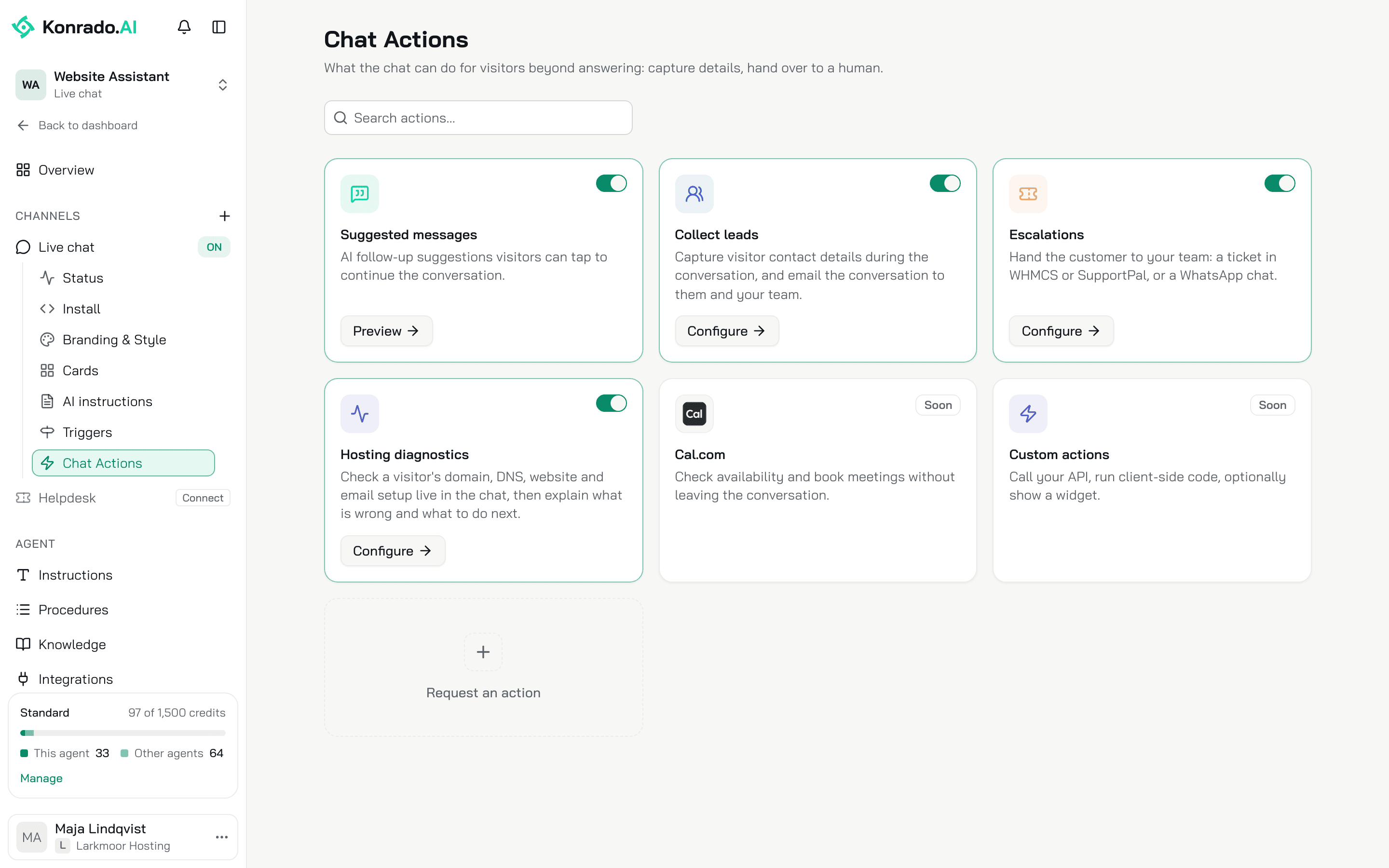
| Action | What it does | On a new chat |
|---|---|---|
| Suggested messages | Follow-up questions the visitor can tap after each reply | On |
| Collect leads | A contact form when a visitor is worth following up, and the conversation by email | On |
| Escalations | A ticket in your help desk, or a WhatsApp chat, when Konrado cannot help | Off |
| Hosting diagnostics | Checks on a visitor's domain, DNS, website and email, live in the chat | Off |
No action costs a credit on its own. A chat reply costs 1 credit, whatever it does.
Suggested messages
After each reply Konrado writes up to 3 follow-up questions in the visitor's language, each up to 80 characters, and shows them as buttons under the latest reply. A tap sends the question. None appear when the conversation is clearly over. Preview shows how it looks. There is nothing to configure.
These are not the Suggested questions from Branding & Style, which the visitor sees before the first message.
Collect leads
When a visitor looks worth following up, Konrado shows a form, Leave your details, with Name, Email and Phone (optional). The form shows once per conversation. Konrado's rule is to ask for a name, an email or a phone number only through the form. A signed-in customer never sees it: a customer is not a lead.
Ten minutes after the visitor sends the form, they get the conversation by email, branded as your organization. The wait lets the email hold what they said after the form. Everyone under Send a copy to gets an email with the lead's details, the grade and the last turns of the chat. The lead lands in Leads, graded hot, warm or cold with the reason. In the Inbox the row carries LEAD and the thread holds the Contact form card.
Configure holds:
- Send a copy to: people from your organization, or any address, up to 50. Point one at your ticketing system's email intake and each lead opens a ticket there. With nobody listed, every owner and admin gets the lead email instead.
- When to offer the form: the agent's rules for when to ask, up to 2,000 characters. Edit them to offer the form sooner or later. Clear the field to restore the default.
Escalations
The switch stays off until a hand-off is set up in Configure. Hand off to is Ticket form or WhatsApp, one or the other per chat.
Ticket form
Needs a connected help desk. Tickets open in shows it with its status.
Departments in the ticket form lists the departments synced from your help desk. Each is set to Everyone, Logged in or Hidden, and one of the Everyone departments is the Default, used when nothing else fits. Logged in needs identity verification. A department synced later starts as Everyone, or as Hidden once any department is hidden. Resync departments fetches the list again. When to escalate holds the agent's rules, up to 2,000 characters, with the same clear-to-restore behaviour.
What the visitor sees: Konrado drafts the ticket, a Title, a Message in the visitor's words, the Email (filled in for a signed-in customer, or from a lead form earlier in the chat) and the Department that fits best, preselected. The visitor reviews it and clicks Send. Nothing is created until they do, and one ticket per conversation. The ticket number reaches the visitor by email from your help desk, never in the chat.
What your team gets: a ticket that opens with "Escalated from the website chat assistant", the visitor's name and email, the reason, what the visitor asked for and the last turns of the chat, up to 20. Auto replies skip these tickets, so a person answers them. For a signed-in customer the ticket is on their account. In the Inbox the row reads Needs a human or Ticket created, or Escalation failed when the ticket could not be opened. The Escalation section in the details holds the ticket number, linked to your help desk, the department, the requester and the subject. Passed to humans on Status counts these tickets.
No integration needed. WhatsApp number is the number your team answers on; visitors never see it typed out in the chat. Under Message, Add the page the visitor is on adds the page's address to the message. When to offer it holds the rules.
What the visitor sees: a card, Continue on WhatsApp with a person, with a message Konrado wrote in the visitor's words and the button Open WhatsApp. The visitor can change the message and sends it themselves. Konrado sends nothing.
What your team gets: the message on WhatsApp. No ticket and no lead is created. The Inbox thread shows Offered WhatsApp and the card with the number and the message Konrado drafted.
Hosting diagnostics
Konrado runs checks on a domain the visitor names, explains what it found in plain words, and offers to hand over to your team when the problem is on your side, or the checks cannot tell. Nothing changes on the visitor's account and no login is needed. The checks read public data only.
Configure lists the checks in three groups. Every check starts ticked.
| Group | Checks |
|---|---|
| Domain | Domain registration (WHOIS), Expiry warning, DNS records, DNS propagation, Nameservers vs your servers, Reverse DNS |
| Website | Is the server up, Website response, SSL certificate, Open ports, Database server |
| Email deliverability, Blacklist check, Mail server (SMTP) |
Four of them, Nameservers vs your servers, Open ports, Database server and Mail server (SMTP), are marked Signed-in visitors only and never run for an anonymous visitor. When to run checks holds the agent's rules, up to 2,000 characters.
What the visitor sees: a line Checking with the domain, then Checked with the checks run, then the diagnosis in plain words. The raw report never shows. Konrado checks a host the visitor names and, for a signed-in customer, the domain and server of their own service. It runs each check at most twice per reply.
What your team sees: each check as a step in the Inbox thread.
A signed-in customer gets every check on their own service, even when this action is off, when you use identity verification and a server integration.
Calendly and Base.com
Two more things the chat can do are set up under Workspace SettingsIntegrations, not on this page:
- Calendly: the chat shows the open times of your Calendly meeting types, and the visitor books the time they pick, in the chat or on Calendly's page. Connect Calendly.
- Base.com: the chat finds a customer's order. It adds a note for your team to an order only when you allow that tool, and by default the customer approves the note first. Connect Base.com.
What Konrado cannot do
| Not possible | Why |
|---|---|
| Open a ticket without the visitor's say-so | The visitor reviews the form and sends it |
| Send the WhatsApp message for the visitor | The visitor sends it from their own WhatsApp |
| Answer an escalated ticket on its own | Auto replies skip those tickets. A person answers them |
Related
Last updated on