

Identity verification
Tell the chat which signed-in customer is writing, so Konrado can answer about their own account.
At the end of this page the chat knows which signed-in customer is writing, and Konrado can read that customer's own services, invoices, tickets and hosting setup instead of asking who they are.
How it works
Your server signs a short token for the signed-in customer on every page render and puts it in the chat snippet. The chat hands the token to Konrado once. Konrado checks the signature with the secret key from the console and ties the conversation to that customer. A missing, expired or wrong token gives a normal anonymous chat, never an error.
Only your server and Konrado know the key, so nothing in the browser can forge a customer.
Before you start
- The chat is installed on a site where customers sign in.
- You can run code on the server that renders the page. The console writes it for Node.js, PHP and a WHMCS client area, and any language with an HS256 JWT library works. On WordPress the Konrado plugin signs the token for you.
- A connected help desk. The ID you sign is the customer's ID there. When SupportPal is linked
to WHMCS, sign the WHMCS client ID, or the SupportPal ID with
platformset tosupportpal. Without a help desk, Konrado learns the name, email and ID in the token, with no account behind them.
Steps
Generate the secret key
Open AgentsLive chatInstall and unfold Identity verification under the install steps. Click Generate secret key. Generating a key turns identity verification on, and removing it turns it off.
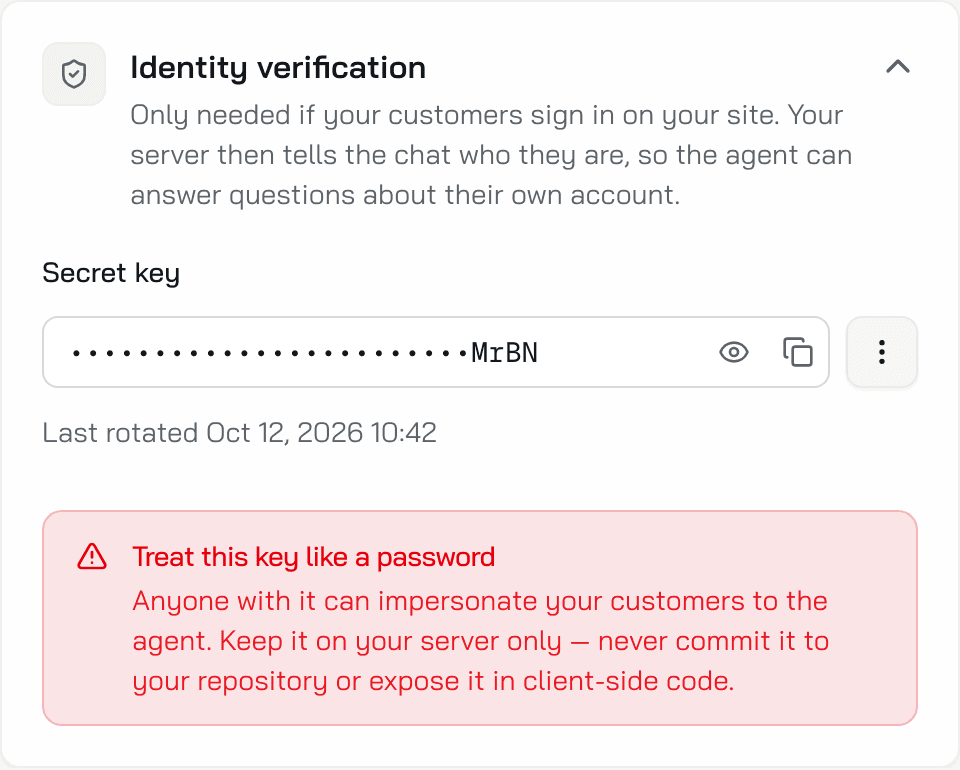
The key is 43 characters and shows masked, with its last 4 characters visible. The eye button, Reveal, shows it. The copy button, Copy secret key, copies it. The menu next to the key (three dots) holds Rotate and Remove.
Treat the key like a password. Anyone with it can impersonate your customers to the agent. Keep it on your server only, never in your repository or in client-side code.
Sign a token on your server
On every page render, when a customer is signed in, sign a JWT with these claims and the secret key. The algorithm is HS256 and the key is the secret as written, not decoded.
| Claim | Required | Value |
|---|---|---|
sub | Yes | The customer's ID in your help desk, or the WHMCS client ID when SupportPal is linked to WHMCS, unless platform says otherwise. A string of up to 256 characters. Send "1234", not the number 1234: a number is refused |
iat | Yes | Now, in whole seconds. A fraction is refused |
exp | Yes | When the token stops working, in whole seconds. The recipes use now + 300: the chat redeems it within seconds of the page load |
jti | Yes | A random string, new on every render. Konrado accepts each jti once |
email | No | Shown to the agent, up to 320 characters. When there is none, leave it out or send null |
name | No | Shown to the agent, up to 256 characters. When there is none, leave it out or send null |
platform | No | Which system sub comes from, whmcs or supportpal, when one chat runs on WHMCS pages and on SupportPal pages. Without it, Konrado reads sub as the WHMCS client ID when SupportPal is linked to WHMCS, else as the ID in your help desk. With supportpal, it reads sub as the SupportPal client and finds the WHMCS client by email. If it names a system this chat is not connected to, Konrado reads no account. Up to 64 characters. The WHMCS hook sends whmcs. The Node.js and PHP recipes carry the line commented out |
Sign exactly that ID, never one from another system, such as your shop's user ID. Konrado reads the account with the ID you sign, so a wrong ID can show the agent another customer's account.
The console writes the code for you. Pick your platform under Choose your platform and click Copy. On PHP and WHMCS the copy carries your real key while the screen shows it masked, so keep the copied file out of your repository.
Uses the jsonwebtoken package. Put the key in the AI_AGENT_IDENTITY_SECRET environment
variable, never in the code.
// SERVER - runs on your backend, so the secret never reaches the browser.
const jwt = require('jsonwebtoken');
const crypto = require('crypto');

function konradoIdentityToken(user) {
  const now = Math.floor(Date.now() / 1000);

  return jwt.sign(
    {
      sub: String(user.id),           // your id for this customer
      email: user.email ?? undefined, // optional, shown to the agent
      name: user.name ?? undefined,   // optional, shown to the agent
      // platform: 'supportpal',      // optional: the connected system this id is from
      iat: now,                       // required
      exp: now + 300,                 // 5 minutes - the chat redeems it on page load
      jti: crypto.randomUUID(),
    },
    process.env.AI_AGENT_IDENTITY_SECRET,
    { algorithm: 'HS256' },
  );
}

app.get('/*', (req, res) => {
  // Sign on every page render - the token is short-lived by design.
  res.render('page', { token: req.user ? konradoIdentityToken(req.user) : '' });
});

// TEMPLATE - signed-out visitors render the same tag with an empty token attribute,
// which the loader treats as anonymous.
<script async src="https://app.konrado.ai/website-chat/v1/loader.js"
        data-konrado-chat-id="wgt_9808d383733f4e62925c14e2e876eb3a"
        data-konrado-user-token="{{ token }}"></script>
One block for any PHP site, pasted just before </body>. No Composer package. Swap
$_SESSION['user'] for however your app exposes the signed-in user.
<?php
/**
 * Konrado.ai chat - paste this block into your page template,
 * just before the closing </body> tag.
 */

// Your Konrado Chat signing key goes here - the dashboard's Copy button fills it in.
// Leave it empty to embed the chat anonymously.
if (!defined('KONRADO_IDENTITY_SECRET')) {
    define('KONRADO_IDENTITY_SECRET', '');
}

// Your signed-in user - swap this for however your app exposes the current user.
// Leave it null for visitors who aren't logged in: they get the same chat, anonymously.
$konradoUser = $_SESSION['user'] ?? null;

$konradoToken = '';

if (KONRADO_IDENTITY_SECRET !== '' && !empty($konradoUser['id'])) {
    $konradoNow = time();
    $konradoClaims = array_filter([
        'sub'   => (string) $konradoUser['id'],   // your id for this customer
        'email' => $konradoUser['email'] ?? null, // optional, shown to the agent
        'name'  => $konradoUser['name'] ?? null,  // optional, shown to the agent
        // 'platform' => 'supportpal',            // optional: the connected system this id is from
        'iat'   => $konradoNow,                   // required
        'exp'   => $konradoNow + 300,             // 5 min - redeemed on page load
        'jti'   => bin2hex(random_bytes(16)),     // random per render - single-use
    ], static function ($value) {
        return $value !== null;
    });

    // Minimal HS256 JWT signer - no Composer dependency needed. A closure rather than a
    // named function so pasting this block into more than one template can't fatal on a
    // duplicate declaration.
    $konradoEncode = static function ($part) {
        return rtrim(strtr(base64_encode(json_encode($part)), '+/', '-_'), '=');
    };
    $konradoPayload = $konradoEncode(['alg' => 'HS256', 'typ' => 'JWT'])
        . '.' . $konradoEncode($konradoClaims);
    $konradoToken = $konradoPayload . '.' . rtrim(strtr(base64_encode(
        hash_hmac('sha256', $konradoPayload, KONRADO_IDENTITY_SECRET, true)
    ), '+/', '-_'), '=');
}
?>
<script async src="https://app.konrado.ai/website-chat/v1/loader.js"
        data-konrado-chat-id="wgt_9808d383733f4e62925c14e2e876eb3a"
        data-konrado-user-token="<?= htmlspecialchars($konradoToken, ENT_QUOTES) ?>"></script>
A hook file, saved as includes/hooks/konrado_chat.php. WHMCS loads it on its own and prints
the tag in the client area. A logged-in client gets a signed token with their WHMCS client ID;
everyone else gets the plain tag.
<?php
/**
 * Konrado.ai chat for the WHMCS client area.
 * Upload this file to /includes/hooks/ - WHMCS picks it up automatically.
 */

if (!defined('WHMCS')) {
    die('This file cannot be accessed directly');
}

// Your Konrado Chat signing key goes here - the dashboard's Copy button fills it in.
// Leave it empty to embed the chat anonymously.
define('KONRADO_IDENTITY_SECRET', '');

add_hook('ClientAreaFooterOutput', 1, function (array $vars) {
    $client = $vars['clientsdetails'] ?? [];

    // Signed-out visitors - and installs with no key yet - get the plain tag. Same
    // install, no second snippet.
    if (KONRADO_IDENTITY_SECRET === '' || empty($client['id'])) {
        return '<script async src="https://app.konrado.ai/website-chat/v1/loader.js"
        data-konrado-chat-id="wgt_9808d383733f4e62925c14e2e876eb3a"></script>';
    }

    $now = time();
    $name = trim(($client['firstname'] ?? '') . ' ' . ($client['lastname'] ?? ''));
    $token = konrado_identity_token([
        'sub'   => (string) $client['id'],   // your id for this customer
        'email' => $client['email'] ?? null, // optional, shown to the agent
        'name'  => $name !== '' ? $name : null, // optional, shown to the agent
        'platform' => 'whmcs',               // the system this id belongs to
        'iat'   => $now,                     // required
        'exp'   => $now + 300,               // 5 min - redeemed on page load
        'jti'   => bin2hex(random_bytes(16)),
    ]);

    return str_replace('{{ token }}', htmlspecialchars($token, ENT_QUOTES), '<script async src="https://app.konrado.ai/website-chat/v1/loader.js"
        data-konrado-chat-id="wgt_9808d383733f4e62925c14e2e876eb3a"
        data-konrado-user-token="{{ token }}"></script>');
});

if (!function_exists('konrado_identity_token')) {
    /** Minimal HS256 JWT signer - no Composer dependency needed. */
    function konrado_identity_token(array $claims): string
    {
        $encode = static function ($part) {
            return rtrim(strtr(base64_encode(json_encode($part)), '+/', '-_'), '=');
        };

        $payload = $encode(['alg' => 'HS256', 'typ' => 'JWT'])
            . '.' . $encode(array_filter($claims, static function ($value) {
                return $value !== null;
            }));
        $signature = hash_hmac('sha256', $payload, KONRADO_IDENTITY_SECRET, true);

        return $payload . '.' . rtrim(strtr(base64_encode($signature), '+/', '-_'), '=');
    }
}
No code. In WordPress open SettingsKonrado AI, tick Recognize customers
who are logged in to WordPress and paste the key into Signing secret. The plugin signs
the token for every logged-in user. Out of the box it sends wp: and the WordPress user ID
as sub, which matches no help desk client, so the agent knows the name and email and not the
account. Set up the WordPress plugin shows how to map a user to a
help desk client.
Put the token in the tag
The tag carries the token in data-konrado-user-token. The chat reads it once, when the page
loads, and never puts it in a URL. For a signed-out visitor render the tag with an empty
attribute, or with no attribute at all: both give the anonymous chat.
Check it works
Sign in to your site as a test customer, open the chat and ask "which plan am I on". Konrado names the service. In the Inbox the conversation's details show the customer's name, their email with signed in, and Client # with their ID, linked to your help desk.
What changes for a verified visitor
| What | Anonymous visitor | Verified visitor |
|---|---|---|
| Who the agent sees | Nothing, until the visitor says so | Name, email and the customer ID. The agent can greet them by name |
| Account data | None | The customer's services, invoices, tickets and profile, read-only. On SupportPal, tickets and profile. When SupportPal is linked to WHMCS, services and invoices come from WHMCS. A WHMCS client with no SupportPal client gets only those two: no tickets, profile or own service |
| Their own service | None | With a server integration connected, Konrado reads the customer's own service on your server, read-only: PHP version, website and domain settings, email accounts, databases, disk use, backups and error logs. It also runs every Hosting diagnostics check on that service, the four marked Signed-in visitors only included, even when the action is off |
| Lead form | Offered when the visitor is worth following up | Never. A customer is not a lead |
| Escalation ticket | Opened on the email the visitor types | Opened on the customer's own account, with name and email filled in. Departments marked Logged in are offered |
| Triggers | Every audience but one | Also triggers aimed at Signed-in customers |
| In the Inbox | A plain avatar | A check mark on the avatar, signed in next to the email, Client # linked to your help desk, and the Signed in filter |
Log out and switching customers
On every page load the chat compares the token with the session it already has in that
browser tab. A missing platform counts as a value of its own. So to the chat, a token with
sub: "5", platform: "whmcs" and a token with sub: "5" and no platform are two customers.
| The page renders | What the chat does |
|---|---|
| No token, after a sign-out | Drops the signed-in session and starts a new anonymous conversation |
A token with another sub or another platform | Starts a new session and a new conversation |
A token with the same sub and the same platform | Keeps the session. The token is not redeemed again, so a reused jti is no problem here |
| A token where there was none | Upgrades the session. The conversation continues, now verified |
With or without a help desk, the next person on the same browser cannot open the previous customer's conversations. When that customer signs in again, their conversations are back under Recent chats. A conversation from before 13 October 2026 whose customer had no help desk account stays with the browser until that customer writes in it again while signed in. A chat session lasts 3 hours in a tab.
Rotate and remove the key
- Rotate generates a new key at once. The previous key keeps working until the next rotation, so deploy the new key before you rotate again. If the old key may have leaked, deploy the new key, rotate once more and deploy that key too: the leaked key stops working at the second rotation.
- Remove turns identity verification off. New sessions are anonymous and read no account data. A session verified before keeps its customer until it ends, up to 3 hours.
What Konrado cannot do
| Not possible | Why |
|---|---|
| Verify a customer from a plain HTML snippet | The tag cannot sign anything. The signing needs your server, or the WordPress plugin |
| Report a bad token | A wrong or expired token gives the anonymous chat, with no error to the visitor or in the console. Check the Inbox instead |
| Change the customer's account | Account data is read-only. Changes stay in your help desk and your panel |
If something is wrong
| What you see | What to do |
|---|---|
| A signed-in customer chats as a guest | Open the page source: data-konrado-user-token must hold a token. Check that your server has the current key, that sub is a string, that iat and exp are whole seconds and that jti is present. Your server's clock must not be more than 5 minutes slow, or every token arrives expired. A token over 4096 characters is dropped. |
| Customers chat as guests on some pages only | Those pages come from a page cache, so they carry an old token that was already used or has expired. Each token works once: keep signed-in pages out of the cache. |
| A signed-in customer's conversation starts over when they open another page | That page signs them with another sub or another platform, for example platform on your WHMCS pages and none on the others. The chat takes that for another customer. Sign the same sub and the same platform on every page. |
| The agent knows the name but not the account | sub is not the customer's ID in your help desk, or not the WHMCS client ID when SupportPal is linked to WHMCS. If you send platform, it must name a system the chat is connected to. WordPress sends wp: and the user ID unless you map it. |
| With SupportPal linked to WHMCS, only part of the account reaches the agent | The other system finds the customer by email: exactly one client there must carry the email of the client you signed. Without platform you sign the WHMCS client, so tickets and the profile need that match. With platform set to supportpal, services and invoices need it. |
| The Inbox shows no signed in mark | No help desk is connected to the agent, or platform names a system the chat is not connected to. The agent still has the name and email from the token, and the next person on the browser still cannot open the chat. |
| Recognition stopped after a second rotation | Your server signs with a key two rotations old. Copy the current key from Identity verification and deploy it. |
Last updated on