

Tickets
View and manage AI-processed support tickets
The Tickets section shows all support tickets that Konrado.AI has processed, along with their AI-generated responses.
What This Helps You Improve
Tickets is the main review surface for understanding whether Konrado.AI has enough context and whether agents trust the generated replies.
Common Support Scenarios
| Scenario | Where to look |
|---|---|
| A customer says the reply missed their issue | Open the ticket detail and compare conversation context with the generated variants |
| AI did not generate a reply | Check Missed Replies and use the reason to improve Knowledge Base, integrations, or Tweaking |
| Agents keep rewriting replies | Review the generated draft, then adjust custom instructions or source content |
| Customer context looks incomplete | Check Client Services and integration status |
Success Signals
- Agents can find processed tickets quickly.
- Missed replies have clear reasons.
- Generated replies include the expected ticket and customer context.
- Common rewrite patterns become Tweaking or Knowledge Base improvements.
Overview
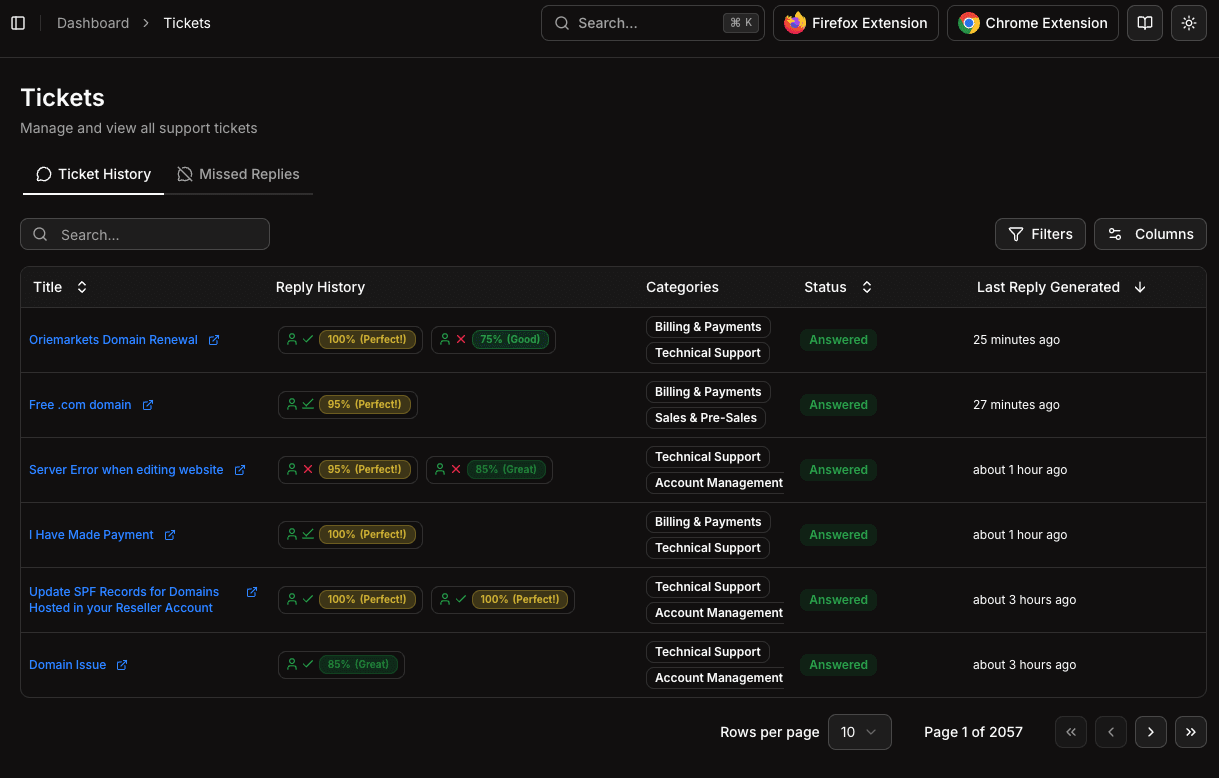
Navigate to Tickets in the sidebar. The page provides two views:
- Ticket History — Browse all tickets with their AI-generated replies
- Missed Replies — View tickets where the AI couldn't generate a response
Ticket History
The ticket history table displays all processed tickets with key information:
| Column | Description |
|---|---|
| Title | Ticket subject with link to external support system |
| Reply History | AI reply statuses — quality scores, auto-reply indicators, and waiting states |
| Categories | AI-detected ticket categories (e.g., Billing & Payments, Technical Support) |
| Status | Current ticket status (Open, Answered, Customer-Reply) |
| Last Reply Generated | When the most recent AI response was created |
Use the search bar, filters, and column toggles to find and customize your view.
Ticket Detail View
Click on any ticket to open the full detail view with multiple tabs:
- Conversation — The complete ticket thread with customer messages, staff replies, and AI-generated responses side by side
- Details — Ticket metadata and processing information
- Client Services — Customer's active services pulled from your integrations
- Client Other Tickets — Other tickets from the same customer for context
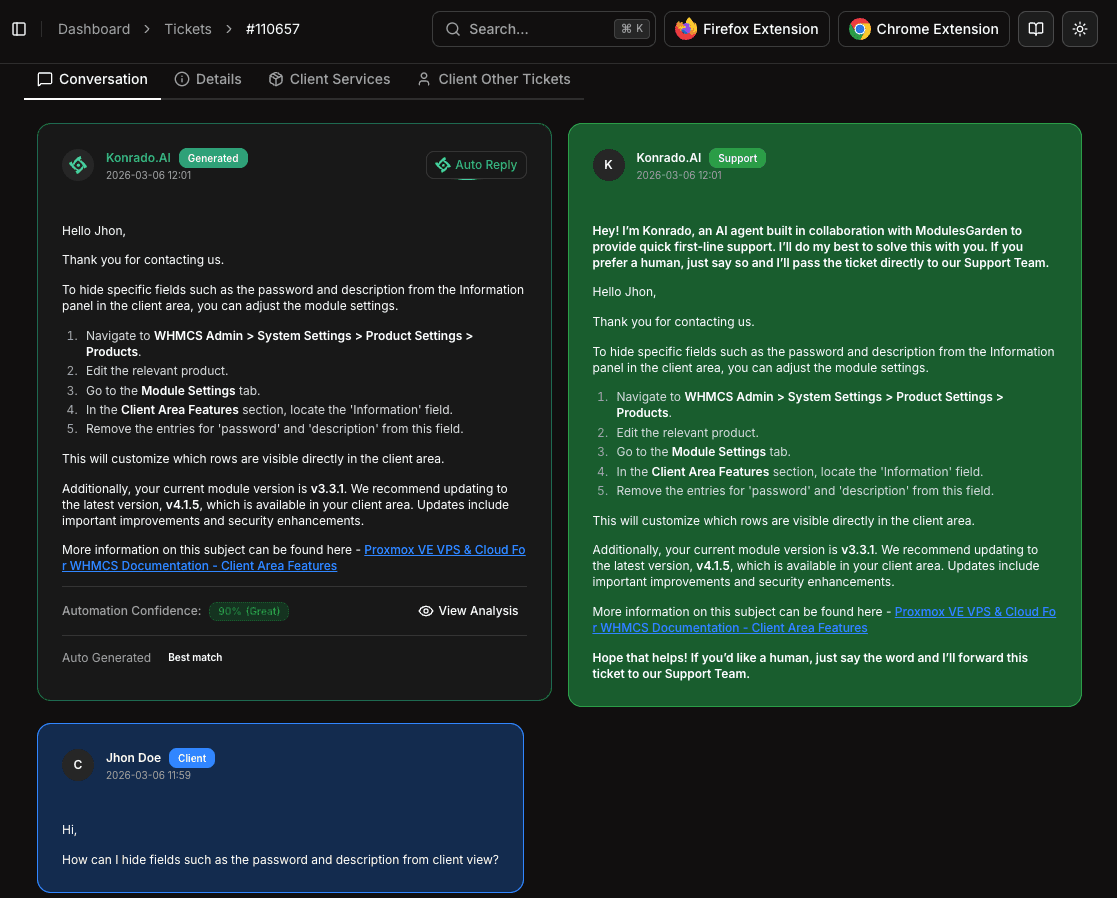
Each AI-generated response shows:
- Quality score — Accuracy percentage (e.g., 100% Perfect, 85% Great)
- Variants — Multiple response versions you can browse through
- Auto Reply / Waiting Reply — Whether the response was sent automatically or is pending review
Missed Replies
The Missed Replies tab shows tickets where the AI was unable to generate a response. Common reasons include:
| Reason | Solution |
|---|---|
| Insufficient context | Add more content to your Knowledge Base |
| Ticket too complex | Review your Tweaking instructions for edge cases |
| Integration error | Check your integration connections |
Reviewing missed replies helps you identify gaps in your knowledge base and improve AI coverage over time.
Using Tickets for Improvement
The Tickets section is valuable for ongoing optimization:
- Spot patterns in missed replies to identify knowledge gaps
- Review AI quality by reading generated responses alongside actual agent replies
- Refine instructions in Tweaking based on common issues you observe
- Track adoption by seeing which responses your team uses vs. edits
Tickets are synced in real-time from your support platform. New tickets appear as soon as they're received via webhook.