

Knowledge Base
Manage the content that powers AI-generated responses
The Knowledge Base is where you manage the content that Konrado.AI uses to generate accurate, context-aware support responses. The more relevant content you provide, the better the AI performs.
What This Helps You Improve
Knowledge Base quality affects whether the AI can answer common questions without guessing. Use it to ground replies in your own installation guides, policies, troubleshooting docs, and product explanations.
Common Support Scenarios
| Scenario | Content that helps |
|---|---|
| Customer asks how to configure a service | Product guides, setup docs, screenshots, FAQs |
| Customer asks about a policy | Refund, cancellation, SLA, abuse, and billing policy pages |
| AI misses common questions | Add or improve articles for the missed-ticket pattern |
| Replies include outdated steps | Update the source page and wait for refresh or trigger reprocessing |
Success Signals
- Crawl errors stay low.
- High-value pages show as processed.
- Missed replies decrease for documented topics.
- Generated replies cite the same steps your agents would use.
Overview
Navigate to Knowledge Base in the sidebar. The page has two tabs:
- Web Content — Sitemaps and individual URLs from your website
- Tickets — Historical ticket data used for learning
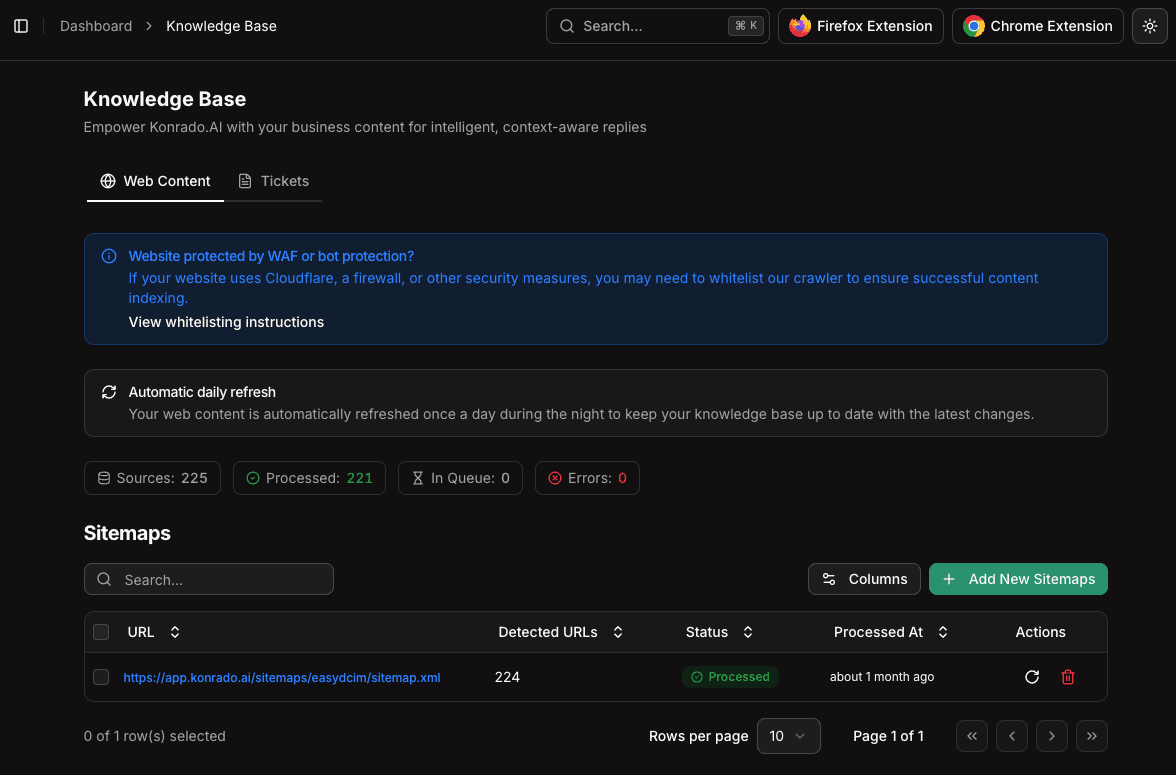
Web Content
Sitemaps
Sitemaps let you index entire sections of your website at once. The system reads your XML sitemap and automatically discovers all linked pages.
To add a sitemap:
- Click Add New Sitemaps
- Enter your sitemap URL (e.g.,
https://yourdomain.com/sitemap.xml) - The system will fetch the sitemap and queue all discovered URLs for processing
The sitemaps table shows:
| Column | Description |
|---|---|
| URL | The sitemap URL |
| Detected URLs | Number of pages found in the sitemap |
| Status | Processing status (Pending, Processing, Completed, Error) |
| Processed At | When the sitemap was last processed |
Individual URLs
You can also add specific pages that aren't covered by your sitemaps:
- Click Add New URLs
- Enter one or more page URLs
- Each URL will be crawled and indexed individually
This is useful for:
- Internal documentation pages not listed in public sitemaps
- Specific FAQ or help articles
- Third-party pages relevant to your support
Content Statistics
At the top of the Web Content tab, you'll see four key metrics:
- Sources — Total number of sitemaps and URLs configured
- Processed — Successfully crawled and indexed pages
- In Queue — Pages waiting to be processed
- Errors — Pages that failed to crawl (check for access issues)
Web content is automatically refreshed once a day during the night. You don't need to manually re-index unless you've made urgent content changes.
WAF / Bot Protection
If your website uses Cloudflare, a firewall, or other bot protection, the crawler may be blocked. Look for the whitelisting instructions banner at the top of the Knowledge Base page and follow the steps to allow Konrado.AI's crawler through.
Tickets Tab
The Tickets tab shows how historical ticket data is being used to improve AI responses. Past tickets and their resolutions help the AI learn patterns specific to your business.
Best Practices
- Add all relevant sitemaps for your main website and documentation
- Monitor the Errors count and fix any crawl failures
- Add individual URLs for high-value pages that aren't in sitemaps
- Keep your source content up to date — the AI can only be as good as the content it has access to
For a deeper understanding of how content is processed, see Knowledge Pipeline.