

Copilot
A draft for every ticket, written in the background, read beside the reply box.
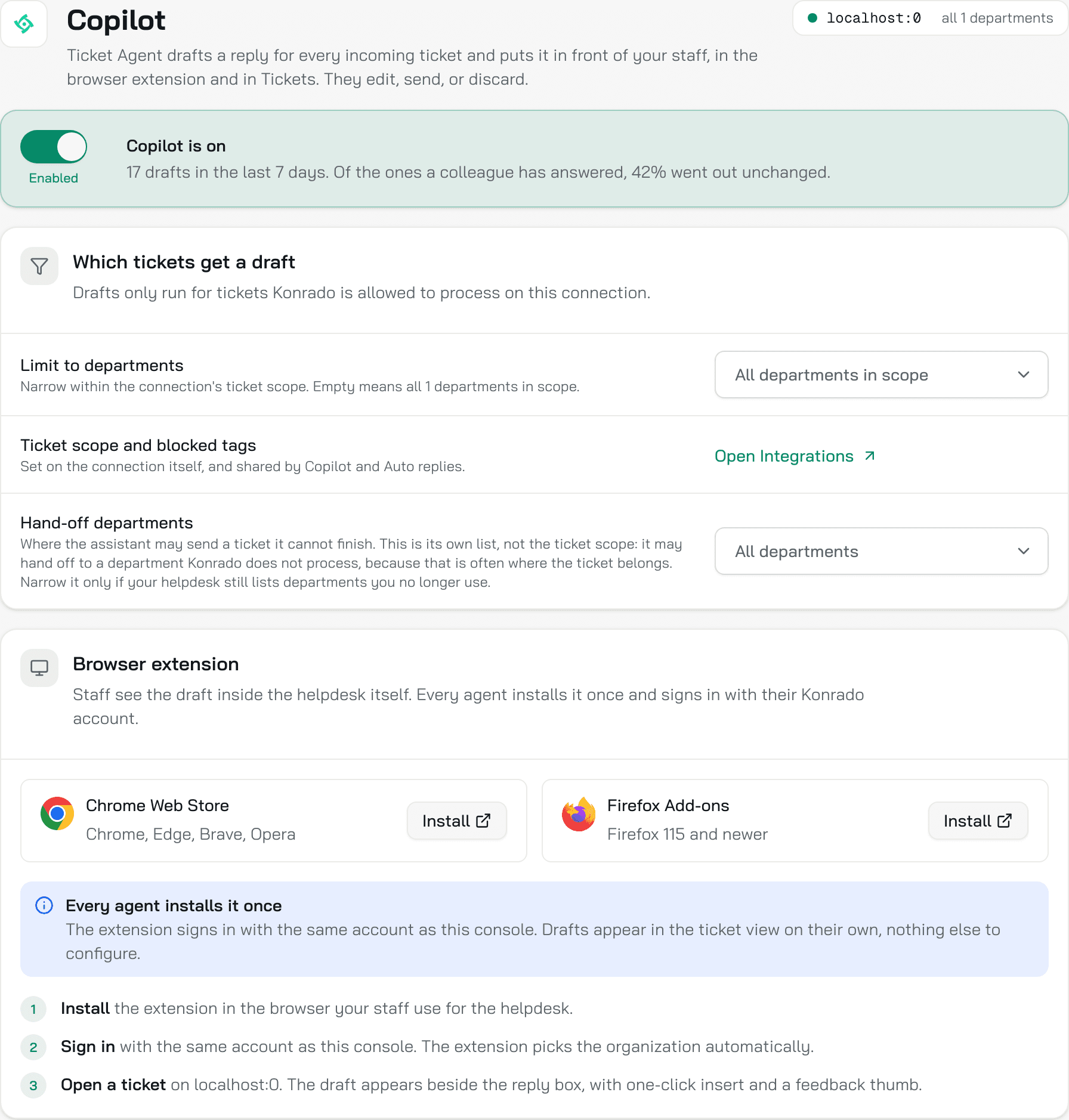
Copilot writes a draft reply for every ticket in scope as it arrives, before anyone opens it. Your team reads the draft in the browser extension beside the reply box, or in the Inbox, and edits, sends or discards it. Each draft costs 2 credits.
Controls
Prepare drafts in the background
The switch at the top. On, Konrado drafts as tickets arrive. Off, nothing is drafted ahead: the extension still writes a draft when a team member opens a ticket that needs a reply, so the switch decides whether the draft is ready before the ticket is opened. A new connection starts with it on. The switch saves at once.
The line under it keeps score: how many drafts in the last 7 days and, of the ones a colleague has answered, what share went out unchanged. Unchanged means the sent reply is the draft's text, with only capital letters and the spaces at the start and end ignored.
Limit to departments
Narrows drafts within the connection's ticket scope. Empty means every department in scope. The picker is dimmed while Copilot is off.
Ticket scope and blocked tags
Set on the connection itself, under Workspace SettingsIntegrations, and shared by Copilot and Auto replies. Open Integrations takes you there. A ticket with a blocked tag or from a blocked sender never reaches Konrado and costs nothing.
Hand-off departments
Where Konrado may send a ticket it cannot finish. This is its own list, not the ticket scope: Konrado may hand a ticket to a department it does not process, because that is often where the ticket belongs. Empty means every department. Narrow it only if your help desk still lists departments you no longer use. The list belongs to the connection, not to the agent.
Browser extension
The two Install buttons open the Chrome Web Store (Chrome, Edge, Brave, Opera) and Firefox Add-ons (Firefox 115 and newer). Every team member installs it once and signs in with the same account as the console. Install the browser extension.
Where drafts show
- In your help desk, through the extension. The draft sits beside the reply box with a one-click Insert and a feedback thumb.
- In the Inbox, on the row named after your help desk. Ticket History lists every ticket Konrado has seen and, in the Reply History column, how close each sent reply was to its draft. Open a ticket to read the draft and what your team sent.
- Missed Replies, on the same row, lists the good drafts nobody used.
Used or edited: what the analytics count
The Analytics page scores Copilot by what your team does with the drafts.
| Analytics says | What happened |
|---|---|
| Used By Your Team | The person who replied had seen the draft, and the sent reply still resembles it: a wording match above 30 out of 100. An edited draft still counts |
| Could be used | A draft with a quality score above 80 that nobody used. Review opens them under Missed Replies |
| Not counted | A reply written from scratch, or sent by someone who never opened the draft |
The Copilot page's own number is stricter: "went out unchanged" counts only a draft sent as it was. Read the Analytics page.
What Konrado cannot do
| Not possible | Why |
|---|---|
| Send a draft on its own | A draft waits for a person. To send without one, go from Shadow to Live |
| Draft a ticket outside the ticket scope | The connection decides which departments, tags and senders Konrado sees |
| Draft in a tone the agent was not taught | The draft follows the channel's AI instructions: the instructions, the guardrails, the Communication style |
Related
Last updated on