

Analytics
How much of the agent's work your team ships, how much it handles alone, and how good the replies are.
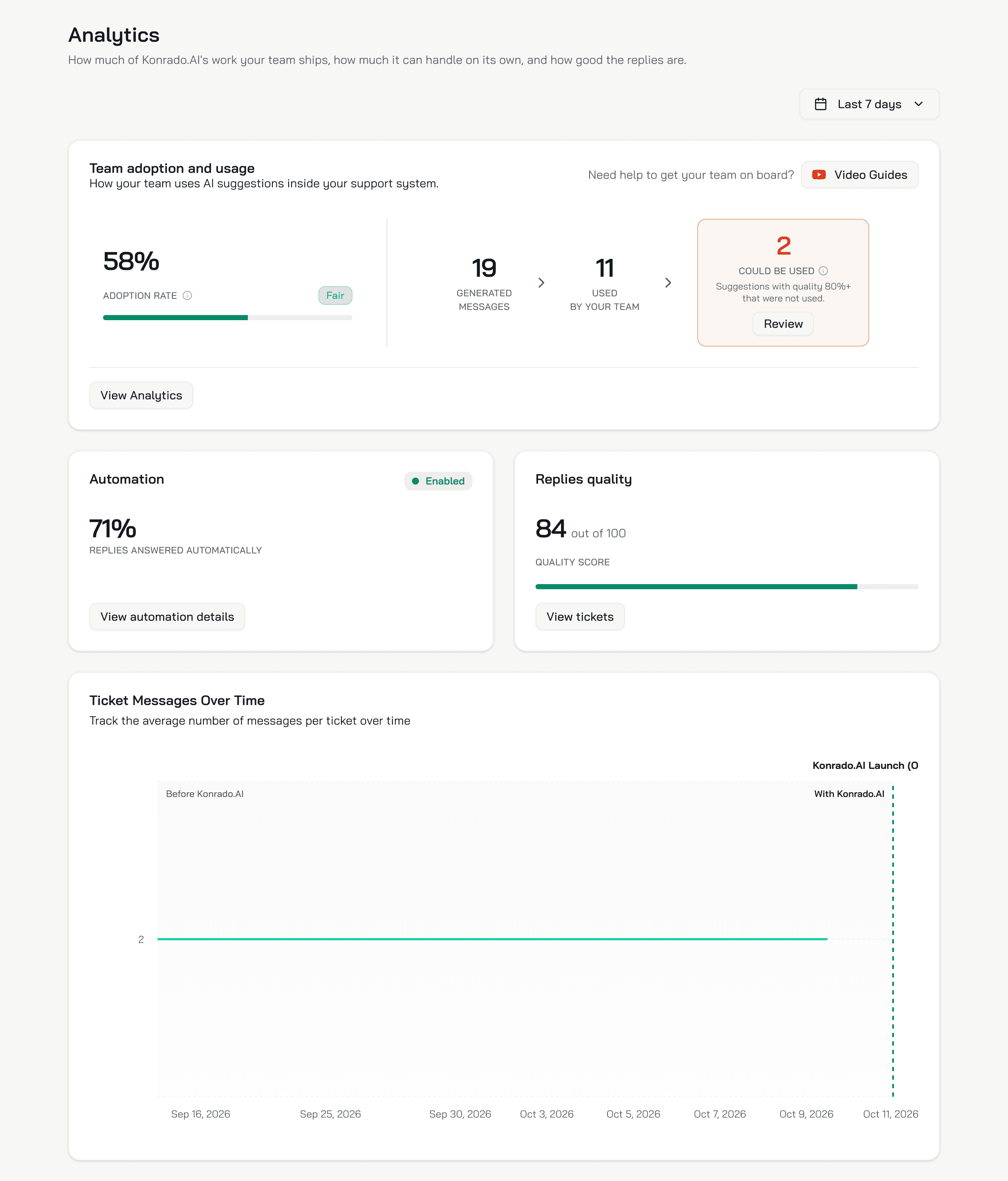
Analytics is the agent's ticket numbers: how much of its work your team ships, how much it can handle on its own, and how good the replies are. It shows for an agent with a Helpdesk.
Date range
The three cards cover Last 7 days by default. The menu offers Today, Yesterday, Last 7 days, Last 30 days, Last 90 days, This week, Last week, This month, Last month, This year and Custom range.... The range is part of the page address, so a copied link shares it. Konrado computes the numbers when you open the page, and your browser keeps them for 5 minutes.
Team adoption and usage
Adoption rate is Used By Your Team divided by Generated Messages: the share of Konrado's drafts your team sent. A draft counts as used when the person who replied had seen it and the sent reply still resembles it, a wording match above 30 out of 100. A reply written from scratch does not count.
Could be used is the drafts with a quality score above 80 that nobody used. Review opens them in the Inbox under Missed Replies, so you can see what your team rewrote and why.
The badge next to the rate:
| Adoption rate | Badge |
|---|---|
| 95% and up | Perfect! |
| 81% to 94% | Great |
| 61% to 80% | Good |
| 41% to 60% | Fair |
| 40% and under | Getting started |
Video Guides holds two short videos for your team. View Analytics opens Insights.
Automation
The card says Enabled when the help desk's Auto replies are Live, and Off otherwise, Shadow mode included.
- Enabled: Replies answered automatically is the share of the agent's runs in the period that passed the confidence bar, so were sent.
- Off: Automation could handle is an estimate of that share, from the decisions Shadow mode made in the period or, before any, from the quality of the drafts.
Replies quality
Quality score runs out of 100. For every reply your team sent in the period, Konrado scores how close the draft's meaning was to what went out. The card shows the average: 100 when the draft's meaning matched 95% or more, down to 20 at 40% or less. +N vs previous period shows when the score rose against the same length of time before. View tickets opens the Inbox.
Messages per ticket
Ticket Messages Over Time is the average number of messages per closed ticket, by the day the ticket closed, from six months before your organization joined Konrado to today. A dashed line marks the day you joined. Fewer messages per ticket means fewer back-and-forths before a ticket closes.
What a good week looks like
- Adoption rate at Good or above: 61% and up.
- Could be used close to 0: every good draft went out.
- Replies quality holding or rising: the +N vs previous period badge shows.
- Automation at Enabled, with its share rising week over week.
- Messages per ticket flat or falling after the dashed line.
A low adoption rate in the first weeks is normal. It rises as your team sees the drafts, and as the instructions and the memory catch up with how your team answers.
What Konrado cannot do
| Not possible | Why |
|---|---|
| Show one agent's numbers apart from another's | The cards count every ticket of the organization. With one help desk they are this agent's |
| Show live chat numbers here | Analytics is ticket numbers. Chat conversations are in the Inbox and Insights |
| Narrow the chart to the date range | The chart runs from six months before you joined to today |
Related
Last updated on