

Memory
What the agent learned from your team and your customers, and how to correct it.
Memory is what the agent remembers beyond its knowledge base: what your team taught it, what it learned about customers, and what is happening across tickets right now. Konrado writes every memory itself. There is no button to add one. What you want to write down from scratch goes in the instructions, a procedure or the Knowledge Base.
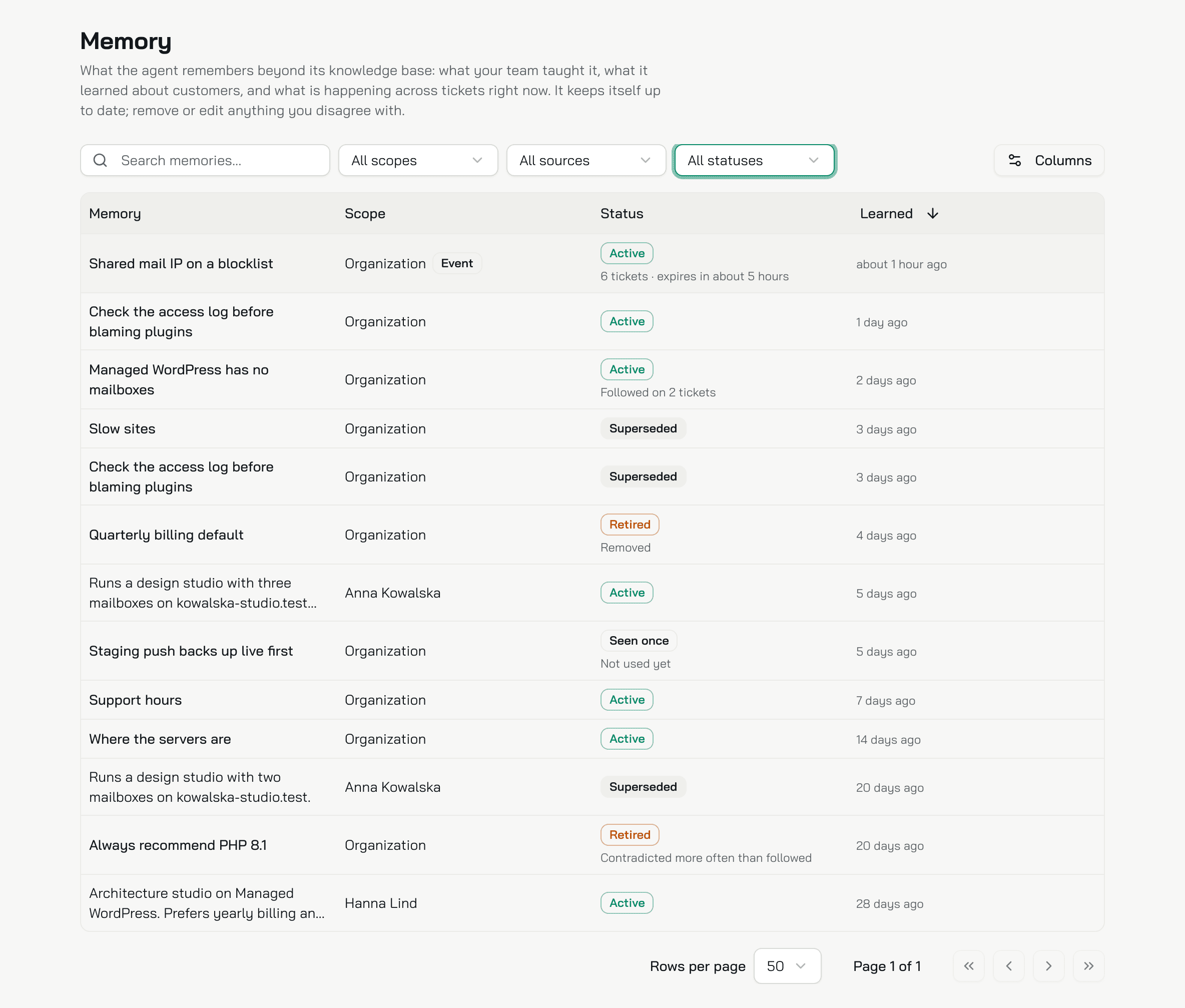
Memory shows for an agent with a Helpdesk. It is one memory for the organization: every agent reads the same one. Only an owner or an admin opens the page.
Where a memory comes from
| Source | What Konrado learns | When |
|---|---|---|
| Team | A fact or a rule from a correction a team member typed to the assistant on a ticket. Improve in the browser extension counts, and so does a line in the assistant chat | Right away. At most one memory per correction |
| Agent | A fact about one customer: their setup, their preferences, who they are. Also a fact or a rule for every customer, from a reply your team corrected before sending it | After a ticket closes, or when a signed-in customer's chat goes quiet. At most 2 per conversation. From a corrected reply: once the reply is scored, as Seen once |
| Events | An issue many tickets report at once | When one category gets at least 5 tickets in 4 hours and more than 3 times its usual count |
| Admin | The new wording after someone edits a memory in the console | On Save |
Konrado does not keep one ticket's state, one reply's tone or length, pasted logs, a whole reply or one person's preference. A correction longer than 2,000 characters teaches nothing.
Your team's sent replies also grade the memories. When a team member changes the substance of a draft that used a memory, Konrado marks that memory followed or contradicted on that ticket. The count shows under the status.
Kinds, scopes and statuses
Kind
| Kind | What it is |
|---|---|
| Fact | Something true for every customer, such as support hours, or about one customer |
| Rule | How replies should be written, or what to do in a class of situations |
| Event | An issue confirmed across tickets right now. It expires on its own |
Scope
| Scope | What it is |
|---|---|
| Organization | About your business and your team. Every agent reads it |
| Customers | About one customer, tied to their help desk record. Deleting the customer deletes their memories |
Status
| Status | What it means |
|---|---|
| Active | The only status the agent reads |
| Seen once | Learned from one reply your team corrected. Not used yet. It turns Active when a reply on a second ticket teaches the same thing within 14 days. You can remove it, not edit it |
| Superseded | An older wording that a newer memory replaced. Kept, and shown in the new one's History |
| Retired | Stopped and kept. The note says why: Removed, Contradicted more often than followed, or Over the customer's limit of 50 |
| Expired | Past its lifetime. A customer fact 12 months after it was learned or last edited; an event after 8 hours, or up to 24 while the tickets keep coming; a Seen once memory after 14 days |
Konrado retires a memory as contradicted when, over 30 days, your team's replies contradicted it on at least 2 tickets and more often than they followed it. Only customer facts, events and Seen once memories expire. What your team taught never expires.
The table
Open AgentsMemory. Three filters sit above the table: scope (Organization by default, Customers, All scopes), source (All sources, Team, Agent, Events, Admin) and status (Active by default, All statuses). The search matches the name and the text.
The columns are Memory, Scope, Status and Learned, newest first. Under the status a note says how the memory fared: Followed on N tickets or Contradicted on N tickets. For an event it says how many tickets it covers and when it expires.
Edit, remove and history
Click a row. The drawer shows the memory, its Scope, its Status, who taught it under Taught by, the tickets under Follows and contradictions, Learned and Expires.
Edit
Edit changes the Memory, up to 300 characters, and for an organization memory its Name, up to 80. The kind and the scope never change. Save writes a new memory marked Admin, and the old wording becomes Superseded. The agent follows the new wording on the next drafts.
Remove
Remove asks Remove this memory? and says what happens: the agent stops following it on the next drafts, it stays in the history, and if your team teaches it again later, it is learned again. The memory becomes Retired with the note Removed.
History
History lists the earlier wordings of a memory, newest first, with when each was learned. It shows only when the memory has been reworded.
How the agent uses memory
On every reply, Konrado reads the active organization memories: rules first, then facts, then the customer's own facts. When there are more than fit, it keeps the ones most relevant to the conversation. The ticket agent can load the rest by name.
A memory wins over the instructions, the Knowledge Base and the example replies. A matched procedure and the guardrails win over a memory. An active event goes in separately, as what is happening now. The agent checks that the ticket's symptoms match before it blames the event.
On the live chat, the organization's memories reach every visitor. A customer's own facts reach only that customer, and only when signed in.
What Konrado cannot do
| Not possible | What to do instead |
|---|---|
| Add a memory by hand | Write it in the instructions, a procedure or the Knowledge Base |
| Edit an event | Remove it. The category stays quiet for the rest of the event's window |
| Delete a memory | Remove retires it. It stays in the history |
| Learn from a test chat or a guest visitor | Only tickets and signed-in customer chats teach |
Related
Last updated on