

Procedures
The steps the agent follows when a request matches a trigger.
A procedure is the steps the agent follows when a ticket matches its trigger. Instructions apply to every reply. A procedure applies to one kind of request, such as a refund or a plan change, and Konrado follows it step by step.
Controls
The list
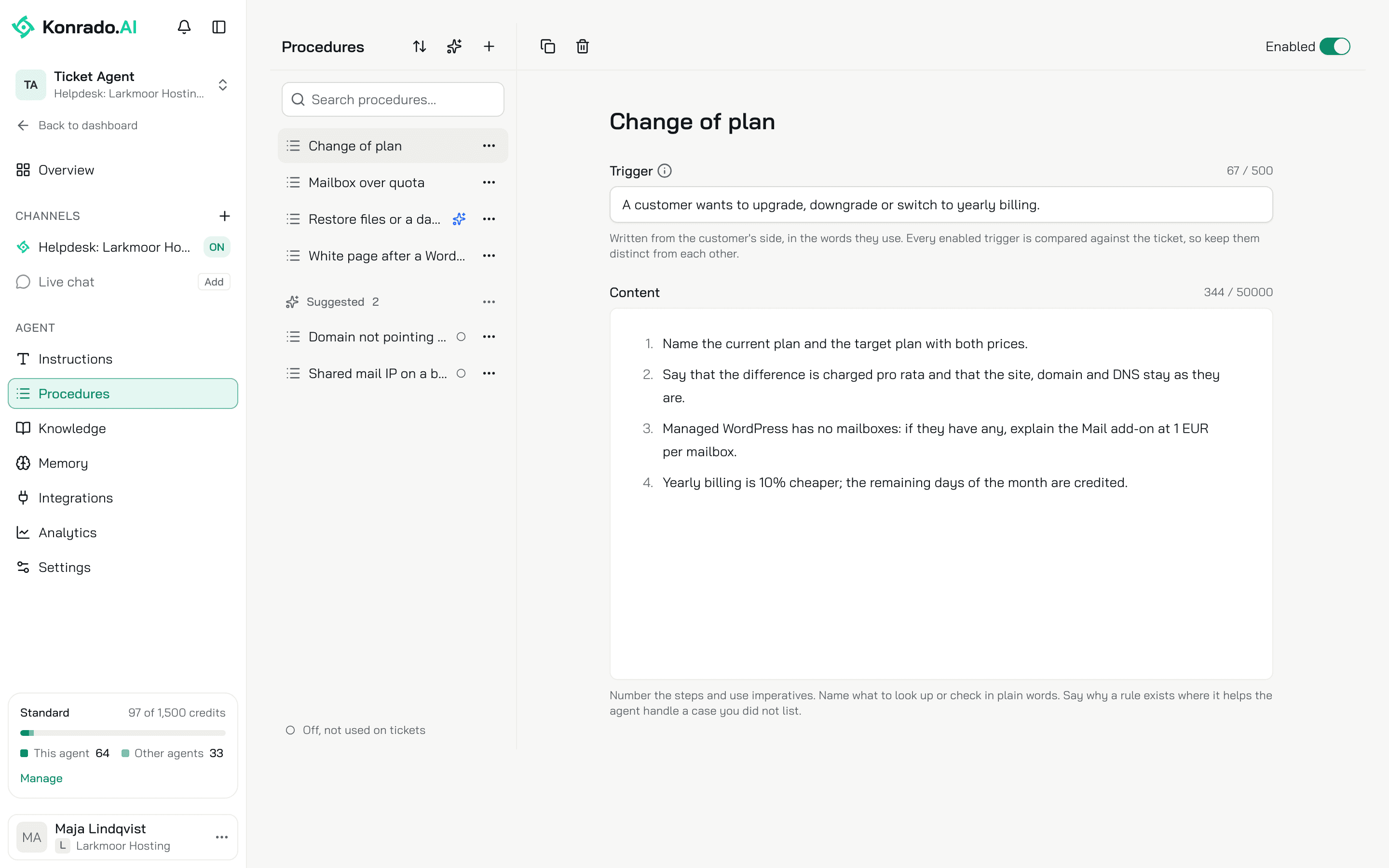
Open AgentsProcedures. The left column lists the procedures, sorted by Name or Last edited. The search matches the name and the trigger. A hollow dot marks a procedure that is Off, not used on tickets.
+ creates an Untitled procedure, off. The row menu offers Duplicate, which makes an off copy, and Delete, which stops the agent using it on new tickets. A name is up to 120 characters.
Trigger
One sentence, up to 500 characters, written from the customer's side in the words they use, such as "When the customer asks for a refund or disputes a charge". Konrado compares every enabled trigger with the ticket, so keep them distinct from each other.
Content
The steps, up to 50,000 characters. Number them and use imperatives. Name what to look up or check in plain words. Say why a rule exists where it helps the agent handle a case you did not list.
Enabled
On, Konrado uses the procedure on new tickets and chats. Off, it keeps the procedure and ignores it. A procedure with empty Content cannot be enabled.
The page saves on its own about a second after you stop typing and shows Saving…, Saved or Not saved with the reason.
Start from an example
With no procedures yet, the page offers New procedure, Suggest from tickets and three starters under Or start from an example: Refund, Cancel a plan and Verify account owner. A starter opens off with its trigger and steps filled in. Read it, change what differs for you, then switch Enabled on.
Suggested procedures
Konrado can read your closed tickets and propose the procedures your team already follows the same way every time. Click the sparkles button, Suggest from tickets.
The Suggest procedures from tickets dialog asks for three things:
- Helpdesk: the help desk this agent answers.
- Tickets to read: the newest closed tickets, 50 to 1000, from the last 12 months. After the first run, only tickets closed since the last run are read.
- Add suggestions to my procedures right away, on by default. On, they become your procedures at once, enabled and editable. Off, they land in the Suggested group for you to review first.
Click Start. Konrado keeps a pattern only when at least 3 tickets show the same request handled the same way. A run may end with no suggestion at all. One run goes at a time.
A suggestion opens read-only with Suggested from N tickets above it. Accept makes it yours and opens the editor. Dismiss drops it for good; Konrado never suggests it again. The group's menu offers Accept all and Dismiss all.
A run can also propose a change to a procedure you already have. The procedure shows a Suggested update banner with the reason and Based on N new tickets. Nothing changes until you accept it. Show changes puts Now and Suggested side by side. Then Accept update or Dismiss.
How the agent uses a procedure
On every ticket, and on every live chat message, Konrado compares the customer's latest message with the name and trigger of every enabled procedure. It picks at most 2. A shared keyword is not a match, and no match is a common answer. A wrong procedure harms a reply more than a missing one.
The matched steps go into the reply as written, in order. They rank with the instructions and above general knowledge. The guardrails still apply. On a ticket the agent can also load a procedure partway through, when what it found shows that another one applies. On the live chat, a step that needs a tool the chat does not have makes the agent tell the visitor what happens next.
When a procedure beats an instruction
| Use | For |
|---|---|
| A procedure | One kind of request with fixed steps: a refund, a cancellation, verifying an owner, a restore |
| An instruction | A rule for every reply: what to check first, how to give a fix, when to hand over |
Related
Last updated on