

Instructions and guardrails
What the agent is told, what it must never do, and how each channel sounds.
Instructions tell the agent who it is, what it handles and when it hands over to your team. Guardrails are the rules it never breaks. Both live on the agent and reach every channel, unless a channel has instructions of its own.
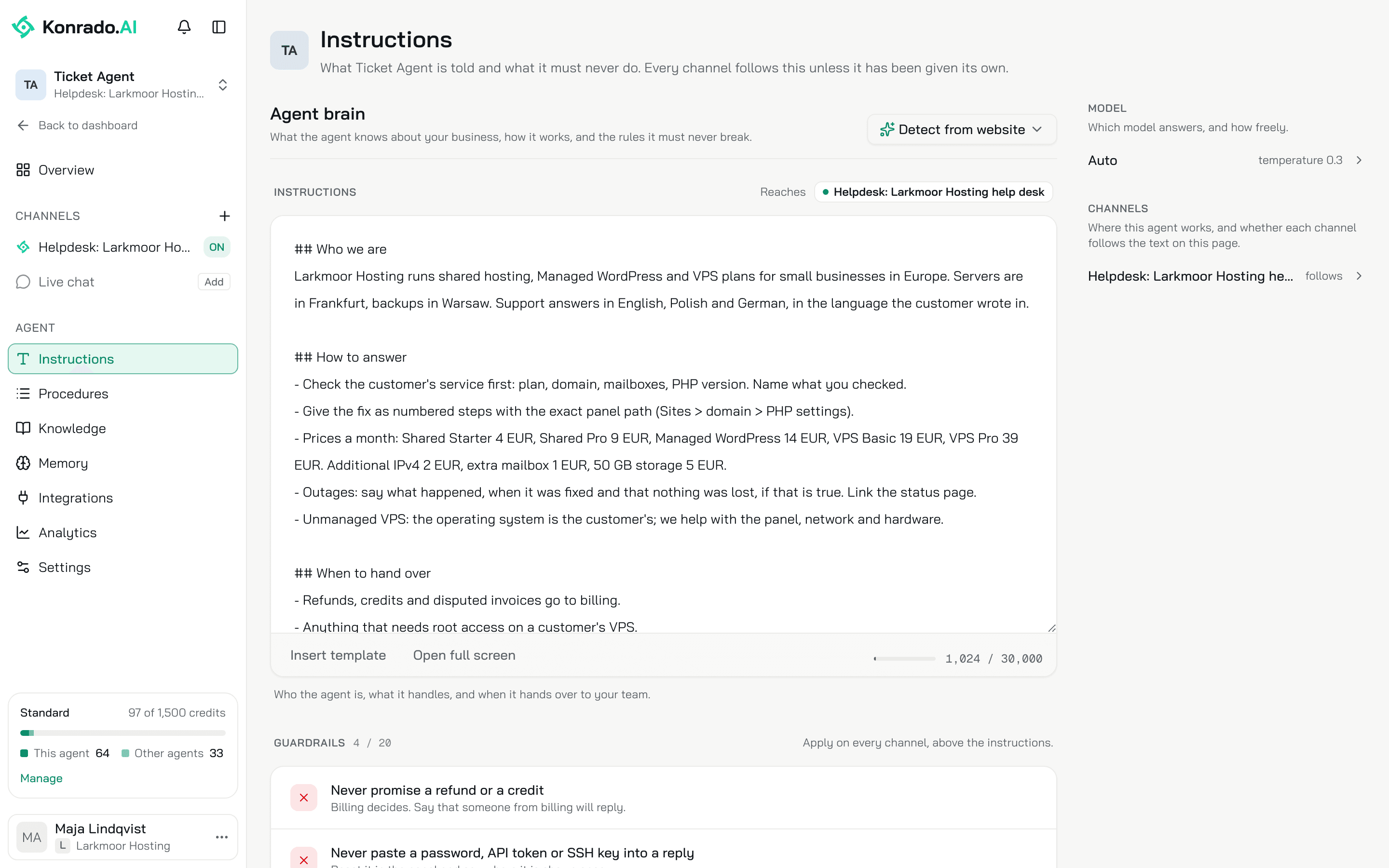
Instructions
Open AgentsInstructions. The editor is plain text, up to 30,000 characters. Write it as a short brief: who you are and what you sell, how to answer, when to hand over.
- Insert template fills the editor with a starter brief you then edit. It replaces what is in the editor, after asking.
- Detect from website reads your website and proposes a brief. You check every suggestion. Nothing is saved until you press Save.
- Reaches lists the channels this text reaches. A channel with instructions of its own is struck through, because this edit does not reach it.
Any change shows an Unsaved changes bar with Save and Reset. Konrado uses the new text on the next reply.
An example you can paste
## Who we are
We host websites: shared plans, managed WordPress and VPS. Support answers in the language the customer wrote in.

## How to answer
- Check the customer's service first: plan, domain, mailboxes. Name what you checked.
- Give the fix as numbered steps with the exact panel path.
- For a website that is down, ask for the domain and the exact error message if the service context is missing.
- Do not promise a resolution time unless the ticket already has one.

## When to hand over
- Refunds, credits and disputed invoices go to billing. Ask for the invoice number if it is missing.
- Data loss, a security incident, an ownership dispute, a legal threat or an abuse report goes to a senior team member. Summarise the request and what you already checked.
Guardrails
A guardrail is one rule the agent follows on every reply and every tool call, ranked above the instructions. Up to 20 per agent, the channels' own included.
Click Add guardrail. The drawer asks for the Rule, up to 80 characters, and What it means (optional), up to 500. Done adds it to the page; Save saves it. A rule that starts with a negation, such as "Never" or "Do not", shows a Never mark; any other rule shows Always. The mark is a hint for your team. Konrado reads the rule as written.
Four rules a hosting company keeps:
| Rule | What it means |
|---|---|
| Never promise a refund or a credit | Billing decides. Say that someone from billing replies |
| Never paste a password, API token or SSH key into a reply | Reset it in the panel and say where it is shown once |
| Never share an internal IP address or hostname | Give the public address from the panel instead |
| Recommend a backup before any server change | One line before the steps |
Model
The Model panel shows Auto and the temperature. Auto means Konrado picks the best available model for each reply and falls back on its own when one is down.
Temperature runs from 0 (Reserved) to 1 (Creative) in steps of 0.1, and starts at 0.3. Lower is more predictable, higher more varied. Some models ignore this setting.
Channels
The Channels panel lists every channel the agent is on, each marked follows or own instructions. Click a row to open that channel's AI instructions page, the only place a channel switches between the two.
A channel's own instructions
Open AgentsHelpdeskAI instructions or AgentsLive chatAI instructions. Above the editor you pick one of two:
- Shared with all channels, the default. You are editing the agent's text, and the line under the switch names the other channels that use it.
- Only for this channel. The editor starts from a copy of the agent's text. Change it and the channel keeps its own. Changes to the agent's instructions no longer reach it. Switch back and Save to follow the agent again.
The channel page shows the agent's guardrails under From the agent · always on, locked, with Edit on the agent beside them. Rules you add here sit under Only on this channel. A channel adds rules; it never removes the agent's.
Agent and Model on the channel page are read-only: everything not set on the channel comes from the agent.
Communication style
Only a help desk has a Communication style, set on the help desk and never on the agent. The live chat has none: it talks like a person.
Rules
Tone and format the examples must follow, in a few lines. Only what an example cannot show. Rules and Example replies share 30,000 characters per help desk.
Short paragraphs. Open with the customer's first name. Say what you checked before you say what to do. Close with one line that invites a reply. No sign-off block, the help desk adds it.Example replies
Real replies your team sent. Click Add example and fill in the Situation, the Language and The reply, as it was sent. Paste it unedited: names and numbers teach the format, and Konrado does not copy them.
Each reply Konrado writes uses up to five examples, in the language it is answering in, so add a few per language your customers write in. Detect from replies proposes a style from the replies your team already sent.
Instructions, Knowledge Base or a procedure
| Put it in | When it is |
|---|---|
| Instructions | Who the agent is, what it handles, how it answers, when it hands over. Read on every reply |
| Guardrails | A rule it must never break, on any channel. Ranked above the instructions |
| Knowledge Base | What customers ask about: plans, prices, how-tos, policies. Konrado reads what matches the question |
| Procedures | The steps for one kind of request, used only when a request matches its trigger. See Procedures |
Related
Last updated on