

Triggers
Greet visitors with a message of your own on the pages where a question usually comes up.
A trigger is a message that appears as a bubble over the chat button when a visitor does something: lands on the pricing page, stays 30 seconds, heads for the tab bar. It never opens the chat by itself. When the visitor opens the chat, the trigger's message is the first thing they read, and its starter questions replace the usual ones. Open AgentsLive chatTriggers.
The list
- The switch at the top turns all triggers on or off. On, the banner reads Triggers are on. Off, it reads Triggers are off, and visitors only see the welcome message from Branding & Style. Each trigger keeps its Live or Paused state for when you switch back on.
- Triggers are checked top to bottom and the first match wins. Drag a row to change the order. When no Live trigger fits a page, the welcome message shows.
- On a page with a Simple trigger, its message also greets a visitor who opens the chat before the delay, or after the trigger has fired as often as How often allows. An Advanced trigger greets only when it fires.
- A row holds the name, a summary such as After 10 seconds on /pricing* · Everyone, the first path, SHOWN and REPLIED for the selected days (Last 7 days unless you change it), the Live or Paused switch, Edit, a copy and a delete. The copy is added Paused.
- SHOWN counts the page views where a visitor saw the trigger's message, in the bubble or as the first message of a chat they opened. REPLIED is the share of those that became a conversation. Console previews and the preview link from the Install page do not count.
- New trigger offers Blank trigger and Detect my pages.
- Up to 20 triggers per chat.
Detect my pages
Detect my pages reads your website and adds a trigger for each key page: pricing, product, support, documentation, sign-up and contact pages. Legal, blog, careers and login pages are skipped. It reads up to 12 pages, from the Knowledge Base when your website is in it, else from your sitemap, else from the links on your home page.
Each detected trigger starts Live, in Simple mode, on the page and everything under it, for Everyone, on both devices, Once per visitor, with a message and a few starter questions written from the page. A page that already has a trigger is skipped. The run takes up to a minute and continues when you leave the page. Konrado runs it once for you during setup. Review the result and pause any trigger you do not want.
The editor
Live
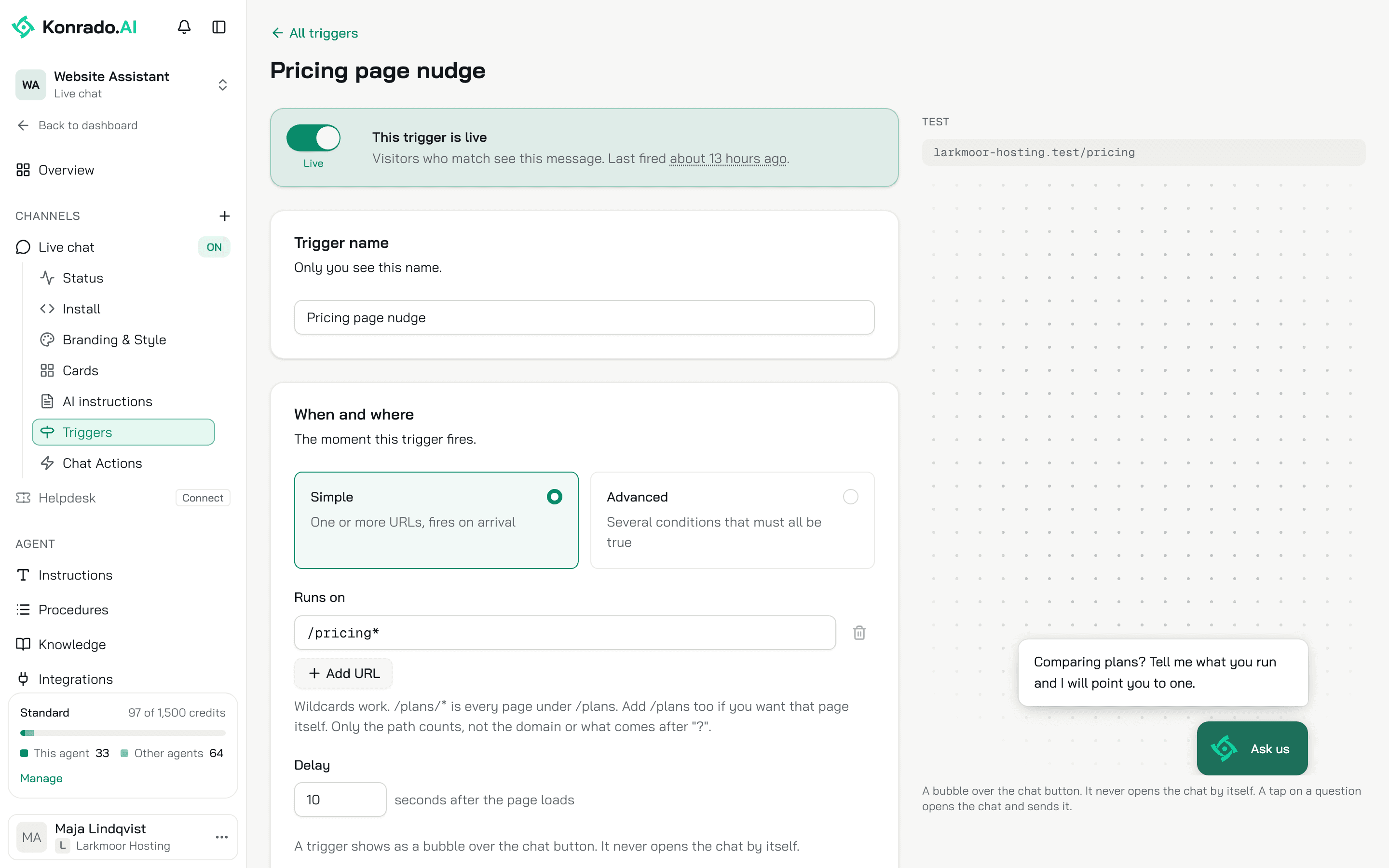
The switch at the top: This trigger is live means visitors who match see the message, This trigger is paused keeps your edits and shows nobody the message. A new trigger starts Live. Once it has fired, the banner says when it last fired.
Trigger name
Only you see it. Up to 80 characters.
When and where
Simple is one or more paths, fired on arrival. Runs on takes paths like /plans/*.
The * matches anything, so /plans/* is every page under /plans. Add /plans too if you
want that page itself. Only the path counts, not the domain or what comes after ?, and case
does not matter. Each path takes up to 200 characters.
Delay is the number of seconds after the page loads, 0 or more, counted only while the tab is visible. Above 300 the page warns that most visitors have left by then.
Advanced is several conditions that must all be true, each type once:
| Condition | Fires |
|---|---|
| Page URL | On any one of the paths listed. Wildcards work |
| Time on page | After the number of seconds you set, counted only while the tab is visible |
| Pages viewed | On that page number of the visit, or later |
| Exit intent | When the cursor leaves the page towards the tab bar. Desktop only |
| Returning visitor | When the visitor first came more than 30 minutes ago |
With no page condition the trigger can fire on any page.
Who
| Control | Options |
|---|---|
| Audience | Everyone, First-time visitors only, Returning visitors, or Signed-in customers. The last one needs identity verification |
| Devices | Desktop, Mobile, at least one. Mobile is a screen up to 480 px wide, where the chat opens full screen. Tablets count as desktop |
| How often | Once per visitor, Once every 24 hours or Every time conditions match |
Message
Message is what the bubble says, up to 500 characters. Leave it empty to use the welcome message from Branding & Style. Suggest with AI reads the pages the trigger runs on and writes the message and the starter questions for the conditions and the audience. It replaces what is in both fields. It works from the text of those pages, and suggests nothing when it cannot read one.
Starter questions are up to 6 questions of 80 characters, shown under the message. Leave them empty to use the questions from Branding & Style.
The preview on the right shows the bubble on the first path.
On the visitor's side
- A trigger fires only while the chat is closed, once per page view.
- Closing the bubble, or opening the chat, stops every trigger for the rest of that tab session.
- Once per visitor is remembered in the visitor's browser.
- If you hide the chat button, no trigger shows.
- When the visitor opens the chat, from the bubble or the button, the trigger's message is the first message. Its starter questions wait under it, and a tap on one sends it.
- The conversation starts when the visitor sends a first message. In the Inbox it reads "Started by the Pricing page nudge trigger", with your trigger's name. The trigger's message costs no credit; each reply after it costs 1.
What Konrado cannot do
| Not possible | What to do instead |
|---|---|
| Open the chat window from a trigger | A trigger shows a message over the chat button, and the visitor opens the chat. Your site's own link or button can open it: open the chat from your site |
| Match on the domain or the query string | Only the path counts. A chat that loads on two sites fires the same trigger on both |
| Fire on exit intent on a phone | Exit intent is desktop only. A mobile-only exit intent trigger is refused |
Related
Last updated on