

Branding & Style
The chat's name, colours, button, font, welcome message, notices and languages.
Branding & Style is how the chat looks to your customers. Open AgentsLive chatBranding & Style. Five tabs: Branding, Styles, Messages, Notices and Language. The chat on the right previews every change as you type, before you save.
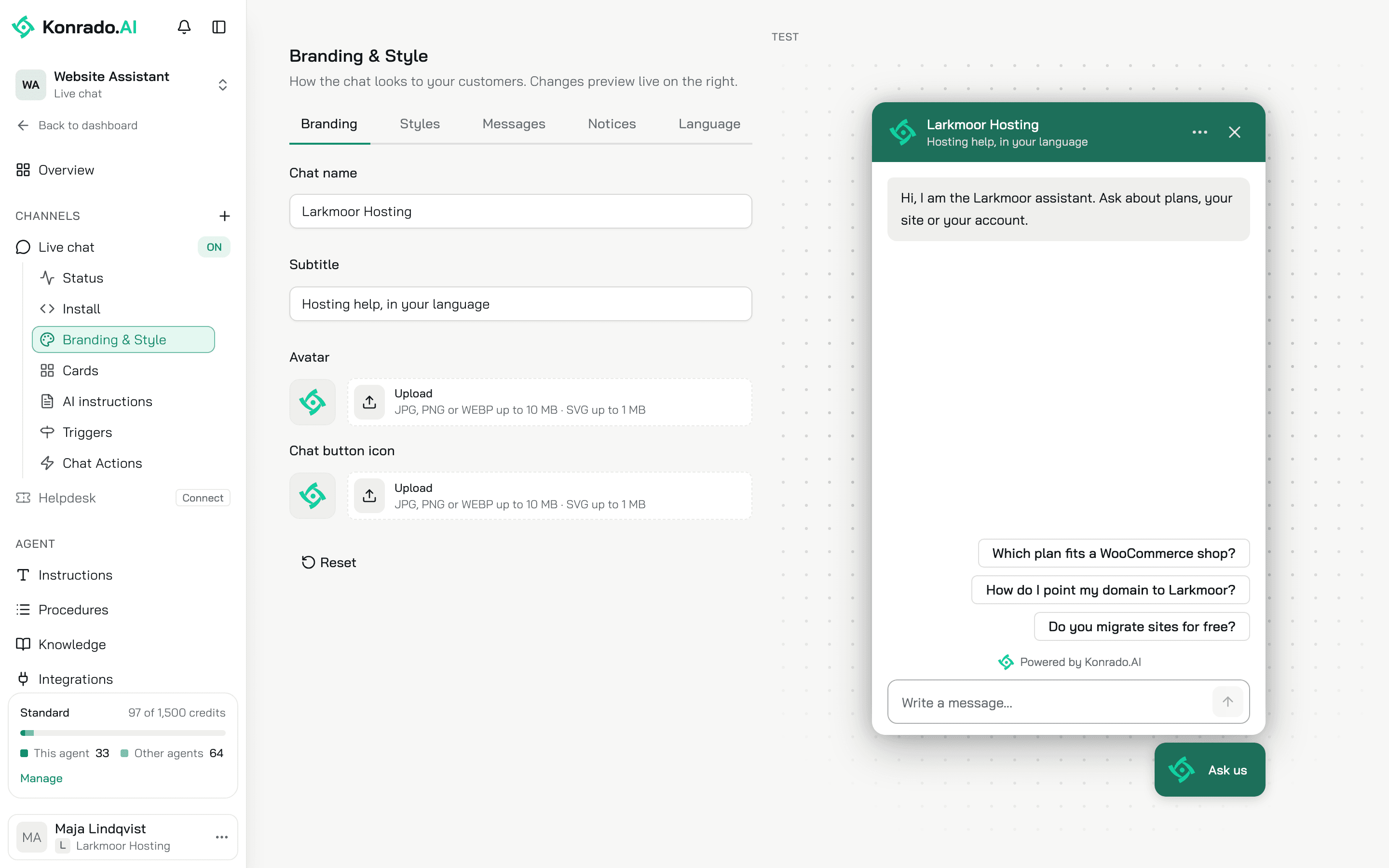
During setup Konrado fills these in from your website. The chat name and primary colour come from your company name and brand colour, and the avatar and the chat button icon from your logo. The welcome message, three suggested questions, the message box hint and the subtitle are written in your tone. Konrado writes over its own defaults only, so anything you change stays yours.
Install and Branding & Style share one Save, which saves every tab of both at once. When a field on another tab is invalid, Save takes you to it.
The preview carries a Test chip. It is the real agent with real actions: a lead or a ticket you create in it is sent for real.
Branding
| Control | What it does |
|---|---|
| Chat name | The name in the chat header, up to 80 characters. Required |
| Subtitle | The line under the name, up to 120 characters |
| Avatar | The picture in the chat header. JPG, PNG or WEBP up to 10 MB, SVG up to 1 MB. A photo is cropped square |
| Chat button icon | The picture on the chat button, same formats. Setup puts your logo here. With no logo, the button shows the Konrado mark |
Reset puts the four back to Konrado's defaults. Nothing reaches your site until you click Save.
Styles
| Control | What it does |
|---|---|
| Primary color | The main colour of the chat, used for buttons and message bubbles. A 6-digit hex code |
| Chat button color | The colour of the floating button. Use primary color puts it back to the primary colour |
| Use primary color for header | On by default |
| Theme | Auto, Light or Dark. Auto follows the visitor's device |
| Position | Bottom left or Bottom right |
| Button size | XS to XL, 52 to 84 px. M, 68 px, is the default |
| Show text in the chat button | Adds a short text next to the icon, like "Ask AI". Button text holds up to 40 characters, Icon side puts the icon left or right |
Advanced styling
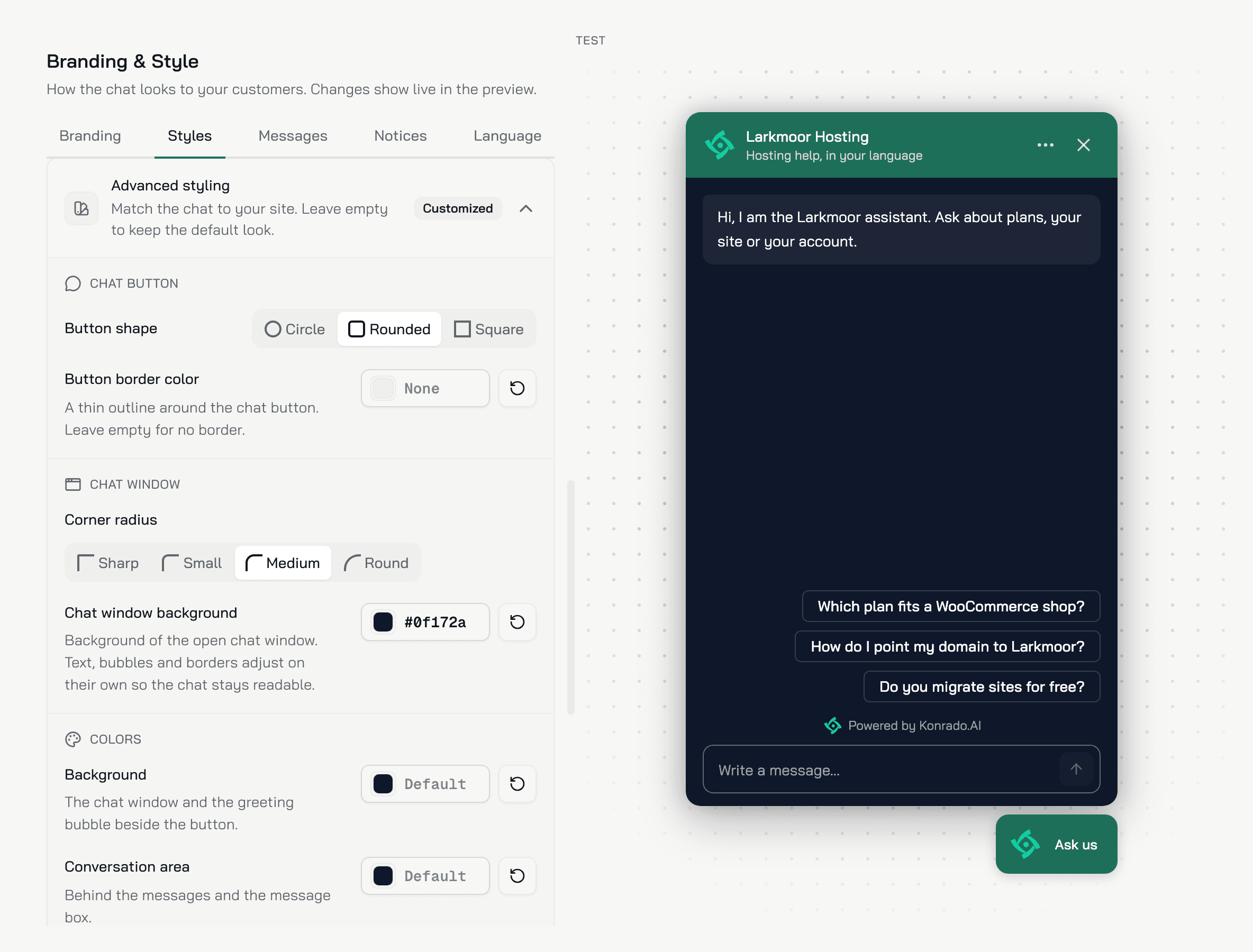
Advanced styling is the last group on the Styles tab. It matches the chat to your site. The group is closed by default: click it to open it. Leave a colour empty and the chat keeps its default look. The preview shows every change as you make it. A Customized badge on the group means at least one field differs from the default.
Chat button
| Control | What it does |
|---|---|
| Button shape | Circle, Rounded or Square. Rounded is the default |
| Button border color | A thin outline around the chat button. Empty means no border |
Chat window
| Control | What it does |
|---|---|
| Corner radius | Sharp, Small, Medium or Round, for the chat window, the message bubbles and the message box. Medium is the default |
| Chat window background | One colour for the open chat window and the welcome bubble above the chat button. The text, the bubbles and the lines adjust to it on their own, so the chat stays readable. A dark site gets a dark chat with this one field. The window keeps this colour whatever the Theme |
Colors
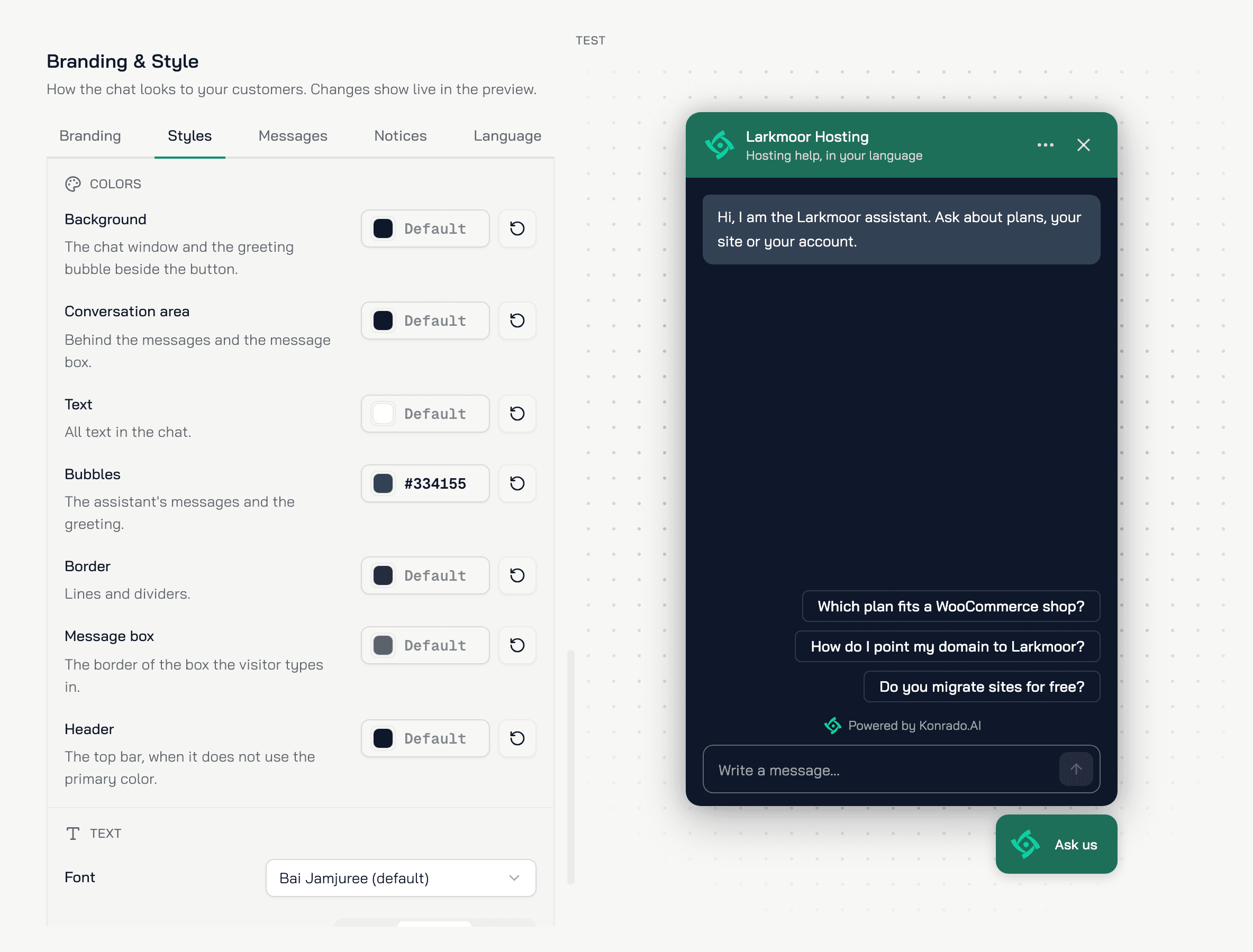
Each row sets one colour of the chat, for the cases the window background does not cover. An empty row follows the Chat window background, or the Theme when that is empty too. Its swatch shows the colour the chat uses now. A colour you set here is the same in light and dark.
| Control | What it colours |
|---|---|
| Background | The chat window, and the welcome bubble above the chat button |
| Conversation area | Behind the messages and the message box |
| Text | The main text in the chat |
| Bubbles | Konrado's messages in the open chat, the welcome message included. The text on them turns dark or light so it stays readable |
| Border | Lines and dividers |
| Message box | The border of the box the visitor types in |
| Header | The top bar, when Use primary color for header is off |
Text
| Control | What it does |
|---|---|
| Font | Bai Jamjuree (default), Visitor's system font, Inter, Roboto, Open Sans, Lato, Poppins or Montserrat. Konrado serves the font itself, so nothing loads from another site |
| Text size | Small, Medium or Large: 13, 14 or 16 px for the messages, the welcome bubble above the chat button, the suggested questions and the message box. Medium is the default. On a phone or a tablet the message box stays at 16 px, so the screen does not zoom in when the visitor types |
Reset restores every style, Advanced styling included, and keeps the chat name.
Messages
| Control | What it does |
|---|---|
| Message | The welcome message, up to 500 characters. Each line is its own bubble, and lines after the fifth are not shown. Required |
| Suggested questions | Up to 6 questions of 80 characters, shown as buttons the visitor can tap before the first message. Drag to reorder |
| Greet visitors automatically | Opens the welcome bubble above the button on its own, after Show after 1 to 60 seconds. On, 3 seconds, by default |
| Message box hint | The grey text in the empty message box, up to 80 characters. Required |
| Voice input (speech-to-text) | Lets the visitor speak a message instead of typing it. Off by default |
| Read the page the visitor is on | Konrado reads the page the visitor is chatting from, so it can answer about what is on it. On by default |
A greeting for one page, with its own starter questions, is a trigger. Set up triggers.
Notices
| Control | What it does |
|---|---|
| Dismissible notice | A short message on top of the message box, inside the chat, up to 300 characters. The visitor can close it, and it goes away once they send a first message |
| Footer | A disclaimer or privacy line under the message box, up to 400 characters. It stays for the whole chat |
Both take formatting, links and emoji.
Language
The chat's buttons and labels follow the visitor's browser language when it is in the list, and the Default otherwise. English (EN) and Polish (PL) are available: Add language adds one, Make default picks the default. Konrado's replies do not depend on this list. It answers in the language of the visitor's latest message.
What Konrado cannot do
| Not possible | What to do instead |
|---|---|
| Hide the Powered by line above the message box | It shows until the visitor sends a first message, then goes away |
| Place the button anywhere but a bottom corner | Bottom left or Bottom right, no offsets |
| Show the chat's own labels in a third language | The labels come in English and Polish. The replies follow the visitor's language |
| Style the chat with your own CSS | Advanced styling sets the button shape and border, the colours, the corners, the font and the text size |
Related
Last updated on