

Ticket changes
Konrado suggests a priority, a department, a clearer subject or closing a thank-you ticket. Your team applies each change. Needs Copilot. Off by default.
At the end of this page Konrado suggests changes to your tickets, and your team decides which ones reach your help desk.
Konrado reads each ticket update. It suggests a priority, a department, a clearer subject, or closing a ticket that only says thanks. Your team ticks the changes it wants and applies them in the browser extension. Nothing changes on its own. Later you can let Konrado apply the changes your own rules ask for.
Rules are optional. You write them in plain words, one per line. For example: billing questions go to Billing, mark outages High, close a ticket whose last customer message is only thanks.
Ticket changes are off until you turn them on. They need Copilot, because the suggestions wait next to its draft. They use no credits: credits count only chat replies and ticket reply drafts.
Before you start
- A connected help desk. The table under What each help desk supports shows what each one can change. For WHMCS, ticket changes need the Konrado addon 1.4.0 or newer, and priority changes need 1.4.2 or newer. Update the WHMCS addon.
- Konrado on for the help desk, with the switch on its Status page. Turn Konrado on or off.
- The Konrado browser extension with the Suggested changes card, for your team to apply the changes. Update the extension if the card does not show. Install the browser extension.
One page for everything
Everything is on one page. Open HelpdeskTicket changes. The row sits right under Copilot.
The page opens with How ticket changes work: the three steps, an example of the card your team sees in the extension, and a link to this guide.
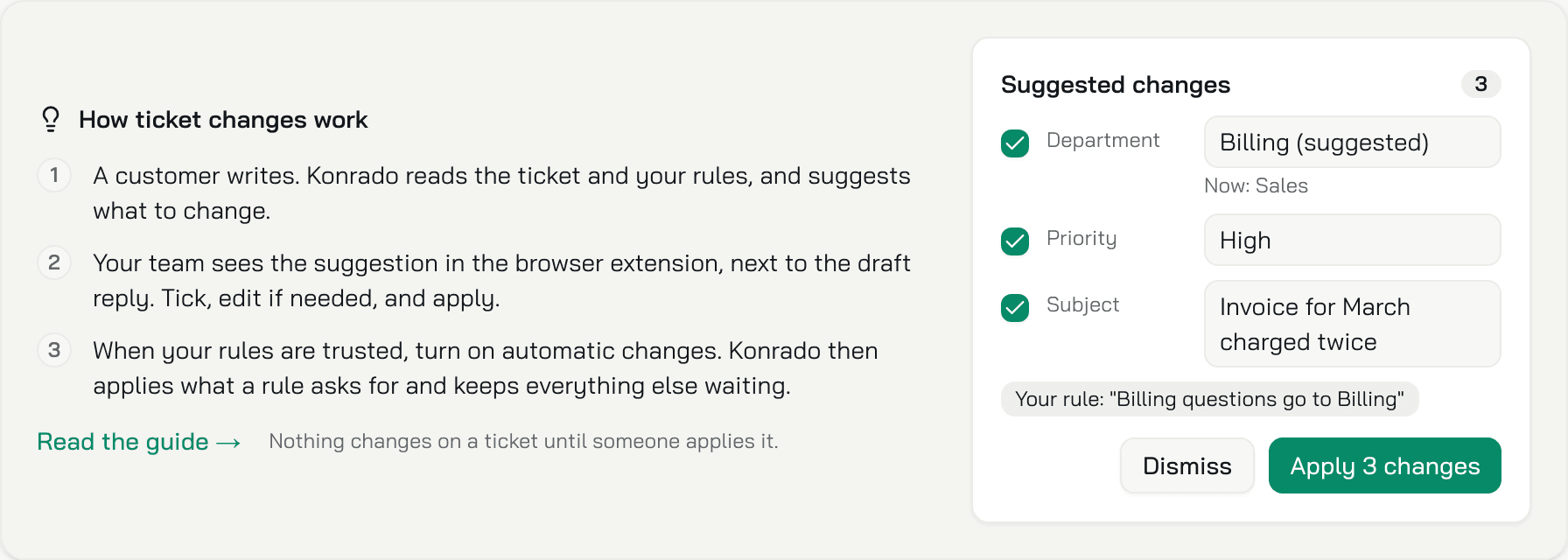
Under it are three cards:
| Card | What it holds |
|---|---|
| Suggestions | The switch Suggest ticket changes and the box Your rules (optional) |
| Automatic changes | The switch Apply automatically and the numbers of the last 30 days |
| History | Every suggestion and every change, newest first |
Steps
Turn on suggestions
Open HelpdeskTicket changes. In the card Suggestions, turn on Suggest ticket changes. It saves at once.
Write your rules (optional)
In Your rules (optional), write one rule per line, up to 5,000 characters. Use the department names your help desk uses. Click Save rules. The button shows once you change the text.
Your rules come first. Konrado suggests something on its own only where your rules say nothing. With no rules, Konrado still suggests, from its own judgment alone.
Apply the changes in the extension
Open a ticket in the browser extension. When Konrado has a suggestion, the Suggested changes card shows between Key Insights and the draft. Tick the changes you want, edit a value if you like, and click Apply N changes. Details are in the next section.
Check it works
Write the rule Billing questions go to Billing. When a billing question comes in under another department, its page in the extension shows the Suggested changes card with the department ticked and the source Your rule: Billing questions go to Billing.
Then open HelpdeskTicket changes. In the card History, the ticket has a row that says Suggested.
When Copilot is off
Ticket changes stop while Copilot is off. Konrado makes no suggestions and no automatic changes. Your settings and your history are kept.
The row Ticket changes stays in the menu. The page shows your settings and history faded, under a box Ticket changes need Copilot: "Konrado suggests ticket changes next to its draft in Copilot, so they pause while Konrado is off on this help desk. Switch it on from the Status page to use them. Your settings and history are kept." Click Open Status to switch Konrado on again, or Read the guide to open this page.
What Konrado suggests
| Change | When |
|---|---|
| Priority: Low, Medium or High | A rule asks for it, or the current priority is clearly wrong, for example a minor question marked High. Never the priority the ticket already has, and never together with closing the ticket. Only when your help desk sends the ticket's current priority: on WHMCS, addon 1.4.2 or newer |
| Department | A rule asks for it, or the ticket clearly belongs to another department your help desk lists |
| Subject | A rule asks for it, or the current subject is vague, such as "urgent" or "help". A clear subject stays as it is |
| Close the ticket | A rule asks for it, or the last customer message only says thanks and nothing is left open |
When Konrado is unsure, it suggests nothing. It reads only open tickets.
Closing is a normal close in your help desk. If WHMCS sends a feedback request when a ticket of that department closes, your customer gets it, as when your team closes the ticket. Konrado itself sends nothing.
The card in the browser extension
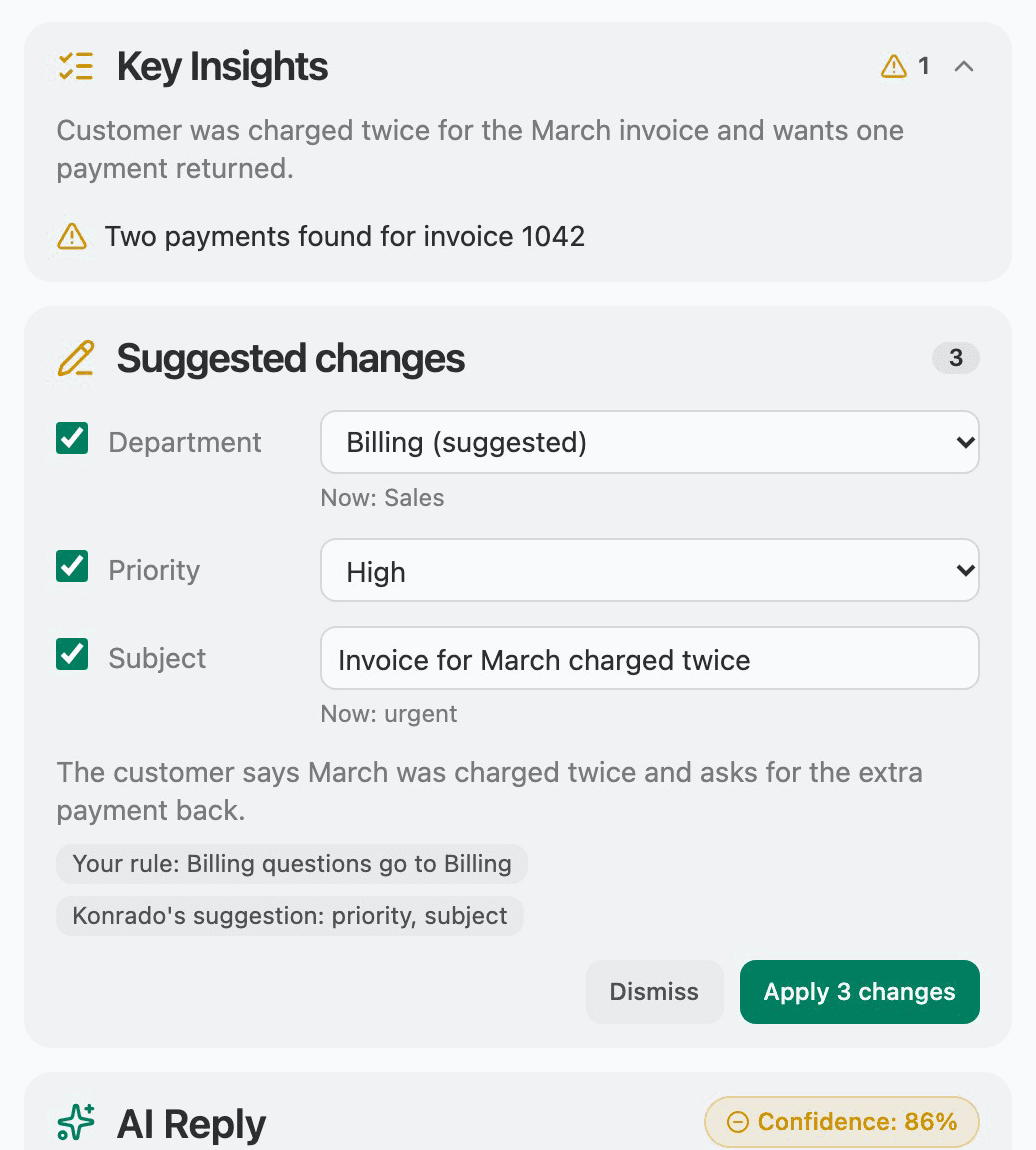
The Suggested changes card lists each change with a tick box, and a number for how many changes it holds. Under the list you see the reason in one sentence and the source:
- Your rule: ... with the rule line, when one of your rules asks for the change.
- Konrado's suggestion: priority (or subject, department, closing), when Konrado chose it on its own.
A new subject shows with the old subject struck through before it.
Konrado changes a priority only when your help desk tells it the ticket's current priority. The WHMCS addon does from version 1.4.2. With an older addon Konrado suggests no priority at all, even when a rule asks for one.
You can edit a priority, a department and a subject before you apply. Edit a suggestion before you apply it.
A change starts ticked or unticked:
| Change | Starts |
|---|---|
| A change one of your rules asks for | Ticked |
| Konrado's own priority or subject | Ticked |
| Konrado's own department move | Unticked |
| Konrado's own close | Unticked |
Click Dismiss to drop the suggestion. Click Apply N changes, for example Apply 2 changes, to send the ticked ones to your help desk. The button is off while nothing is ticked.
Dismissing writes nothing to the ticket and sends nothing to your customer. Once your team dismisses a change, leaves it unticked or edits its value before applying, Konrado does not suggest that change again on this ticket. It does not apply it automatically either.
After a click the card becomes one line:
| What the card says | What it means |
|---|---|
| Applied: priority High. Reload the ticket page to see it. | Your help desk took the change. Reload the page in your help desk to see it. |
| Konrado set the priority to High. | Konrado applied the change on its own, with the rule it followed. See Apply automatically. |
| The ticket changed after this suggestion. | The ticket has a newer customer message or is closed. Nothing was written. Konrado makes a new suggestion for the newer message. |
| These changes were already handled. | Someone applied or dismissed them first. |
| Your help desk cannot set the priority. If it uses the Konrado addon, update the addon. | The help desk, or an old addon, cannot take that change. |
| Could not apply the priority. | The help desk answered with an error for that change. |
There is no undo. To reverse a change, change the ticket in your help desk.
Edit a suggestion before you apply it
Konrado's value is a starting point. Change it in the card before you click Apply N changes:
| Change | How you edit it |
|---|---|
| Priority | A list with Low, Medium and High. The current priority is marked (now) and Konrado's choice is marked (suggested). |
| Department | A list of the departments your help desk has. The current one is marked (now) and Konrado's choice is marked (suggested). |
| Subject | A text box. The subject needs 1 to 255 characters. When it is empty or too long, the card says The subject must have 1 to 255 characters. and Apply N changes is off. |
| Close the ticket | Not editable. Tick it or leave it. |
When you change a value, its row is ticked for you. Apply N changes sends only the ticked rows, with your values. Your help desk gets your value, not Konrado's.
Your help desk can refuse a value. The priority must be Low, Medium or High. The department must be one your help desk lists. The subject must have 1 to 255 characters. When a value is refused, nothing is written and the suggestion stays waiting. The card shows the message so you can correct the value and apply again.
On SupportPal Konrado does not suggest a priority, so there is no priority to edit.
In Details, an edited change says You changed it. Konrado suggested X. In the History card the row says who changed it and what Konrado suggested, for example Department: Sales. Changed by Anna; Konrado suggested Technical Support.
Details
When something was applied, the line has a Details button on its right. It shows after you apply, after Konrado applies on its own, and when only some changes were applied. The details are closed at first. Click Details to open them, and Hide to close them.
Opened, they show:
- Each change with its new value. After you apply, the old subject and the old department show struck through. The old priority does not show.
- Not applied: it was unticked under a change you left unticked.
- Your help desk cannot set it. If it uses the Konrado addon, update the addon. under a change the help desk cannot take.
- Under a change you edited: You changed it. Konrado suggested X., with Konrado's own value in place of X.
- The reason and the source, as on the card.
- A last line: Applied by you, just now, or Applied automatically at the time, in your local time.
A line where nothing was applied has no Details button. Nor has the line for a ticket that changed.
Apply automatically
Once your team trusts the suggestions, you can let Konrado apply some of them. Open HelpdeskTicket changes. The card Automatic changes holds the switch Apply automatically. Two things must be true first:
- Suggest ticket changes is on, in the card Suggestions above. Until then the switch is off, and the card says Turn on Suggest ticket changes above first.
- The channel has an Assigned agent, set on HelpdeskAuto repliesReply settings. Without one, the console does not turn the switch on and shows a message with a link to that page, and Konrado refuses to save automatic mode.
When you turn the switch on, Konrado asks Let Konrado change tickets on its own? and lists four promises. Click Turn on. To stop, turn the switch off. Turning off Suggest ticket changes stops both.
Under the switch, the card counts the last 30 days: how many changes were suggested, applied by your team, dismissed and, once automatic is on, applied automatically. Read these before you turn it on. A team that dismisses many suggestions needs better rules first.
What automatic does and does not do:
| Konrado does not | Why |
|---|---|
| Apply its own idea | It applies only a change that one whole line of your rules backs. Konrado's own ideas keep waiting for your team. |
| Change a subject no rule asks for | A subject change is applied only when a rule asks for it. |
| Change a ticket a person has answered | Those changes stay suggestions. |
| Close a ticket whose last customer message asks something | A ticket left open costs little. A ticket closed by mistake costs a customer. This holds when automatic is off too. |
| Close a ticket without a status named Closed | A close needs a help desk status named exactly Closed, in any capitals. Without one, the ticket stays open and the history says so. |
| Take orders from the ticket text | Only your rules count. Text in a ticket is read as data, not as an instruction. |
When one decision holds a change Konrado may apply and a change that must wait, Konrado applies the first and leaves the second as a suggestion. When Konrado closes a ticket on its own, it writes no draft for that ticket.
The history
The card History on HelpdeskTicket changes lists every suggestion and every change, newest first. Each row shows What happened, the Ticket (linked to the inbox), the Changes, and the Reason and source. The source reads Your rule: "..." or Konrado's suggestion.
| What happened | What it means |
|---|---|
| Suggested | The change waits. Apply applies every change in the row. Edit opens the same choices as the card in the extension: tick the changes you want, change a value, then Apply N changes. Dismiss drops it. |
| Applied | The change reached your help desk. The row says by whom: a name, automatically, or a team member. |
| Dismissed | Your team dropped the suggestion. |
| Not supported | Your help desk cannot take the change. The row says what to do, for example update the addon. |
| Failed | Your help desk answered with an error. |
| Skipped | Konrado left something out and the row says why, for example that the last customer message asks something. |
The list leaves out two kinds of rows: a suggestion that a newer customer message replaced, and a ticket where no rule and no idea of Konrado applied.
What each help desk supports
| Change | WHMCS | SupportPal | Custom help desk |
|---|---|---|---|
| Set the priority (Low, Medium or High) | Yes, with addon 1.4.2 or newer | No | No |
| Move to a department | Yes, with addon 1.4.0 or newer | Yes | No |
| Change the subject | Yes, with addon 1.4.0 or newer | Yes | No |
| Close a ticket | Yes, with addon 1.4.0 or newer | Yes | No |
On WHMCS the whole feature needs addon 1.4.0 or newer. Below it, Konrado makes no suggestions and no automatic changes. Priority changes need addon 1.4.2 or newer, because from that version the addon tells Konrado each ticket's current priority. With addon 1.4.0 or 1.4.1 Konrado suggests and applies no priority, even when a rule asks for one, and the page shows no banner. A custom help desk cannot take ticket changes, because the API your developer builds has no way to change a ticket. The page then says Your help desk can't take ticket changes and its switches stay off. Konrado sends the changes one at a time, so one change a help desk cannot take does not stop the others.
What you see on an older addon
When the WHMCS addon is older than 1.4.0, HelpdeskTicket changes shows a banner above the cards: Update the Konrado addon to use ticket changes. It says which addon version the help desk runs, and has the button Open Integrations.
- Konrado suggests nothing and changes nothing, in suggest mode and in automatic mode.
- Both switches, Suggest ticket changes and Apply automatically, are off. You cannot turn them on.
- The History is read only. You can read every row, but Apply and Dismiss are gone.
- Your settings, your rules and your history are kept. They work again after you update the addon.
A help desk that has not reported its addon version yet is treated the same way. The banner then says the help desk has not reported its addon version yet. The version is reported after a connection check. Update the WHMCS addon.
What Konrado does not do
| Konrado does not | Why |
|---|---|
| Read a whole long ticket | It reads the last 10 messages, up to 4,000 characters each. |
| Send passwords or keys to the model | Konrado masks values that look like passwords, keys or tokens before the model reads the ticket. |
| Hold up your drafts | The step stops after 10 seconds. Then drafting goes on with no change. |
| Suggest twice for one message | Each customer message gets one suggestion. A newer customer message replaces an older suggestion. |
| Apply a suggestion to a ticket that moved on | Apply is refused when the ticket is closed or has a newer customer message. |
| Look at closed tickets | Only open tickets are read for changes. |
Rules are one text per help desk channel, up to 5,000 characters.
Related
Last updated on