

Customers
Every customer your help desk knows, with their tickets, chats and last contact.
Customers lists every customer your help desk knows: everyone with a ticket Konrado synced, and everyone who signed in to your live chat. It sits under Contacts in the sidebar, above Leads, and a click on Contacts opens it. Owners and admins see it.
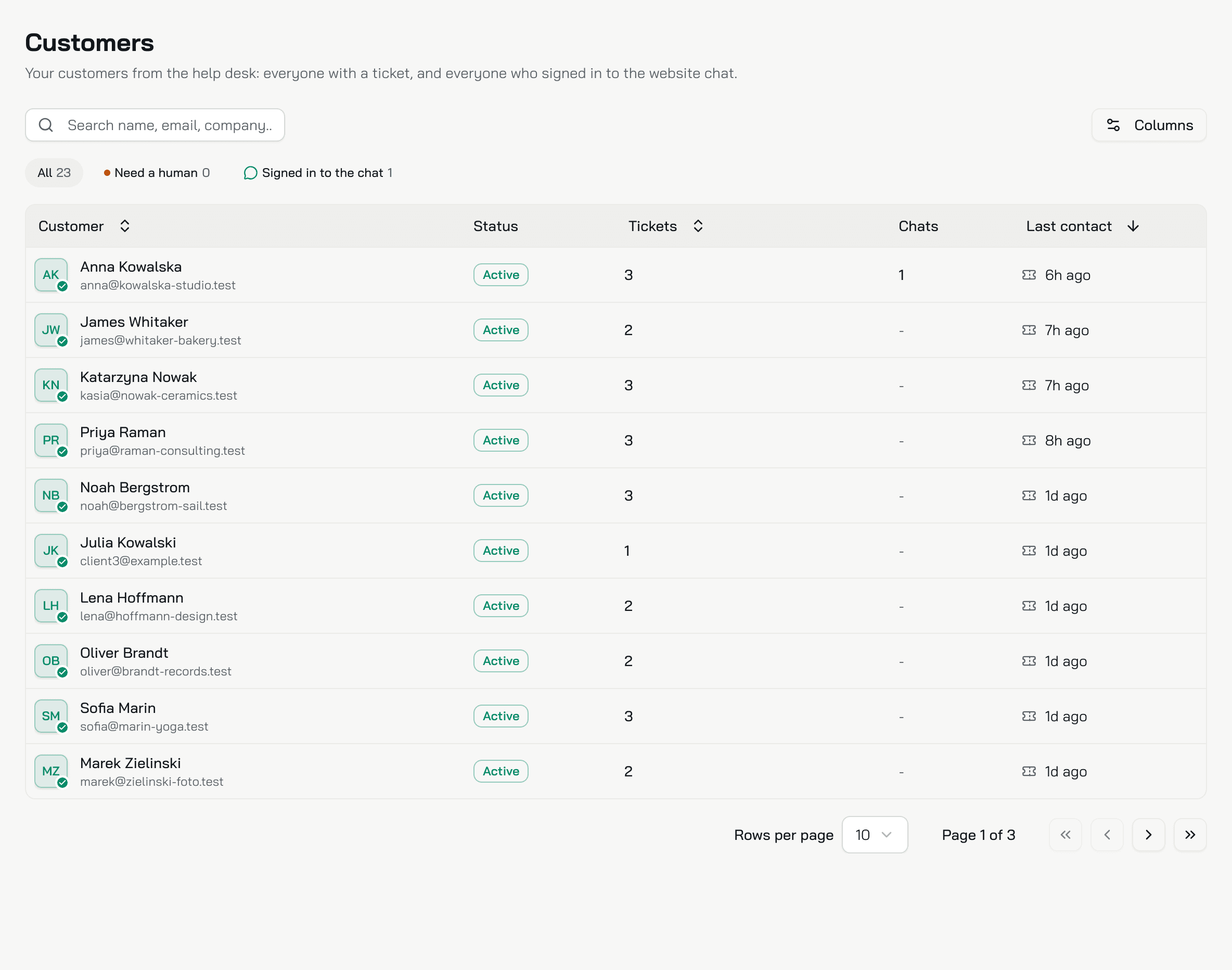
Who is listed
- A customer of your help desk, once Konrado synced one of their tickets.
- A customer who signed in to the live chat, even with no ticket. They appear after their first message while signed in. Set up Identity verification.
A visitor who only left their details in the chat's contact form is a lead, not a customer. They are on Leads. With two help desks, the same person is one row in each, each with their own page.
The list
| Column | What it shows |
|---|---|
| Customer | The name, the group in your help desk, the company and the email |
| Help desk | The help desk the customer is in. Only with two or more help desks |
| Status | The customer's status in your help desk, such as active or closed |
| Tickets | How many tickets, and how many of them need a human, counted as the Inbox counts them |
| Chats | How many chats they signed in to |
| Last contact | Their newest ticket or chat message, with an icon for which one. Hover it for the date |
A dash means none. Click a row to open the customer's page.
Find a customer
- Search name, email, company... finds a name, an email or a company.
- All, Need a human and Signed in to the chat show their counts. Click one to filter, and All to see everyone again.
- Click Customer, Tickets or Last contact at the top of the list to sort by it. The newest contact comes first.
- With two or more help desks, All help desks narrows the list to one.
Your search, filter and page stay in the page address, so you can bookmark or share a list.
The customer page
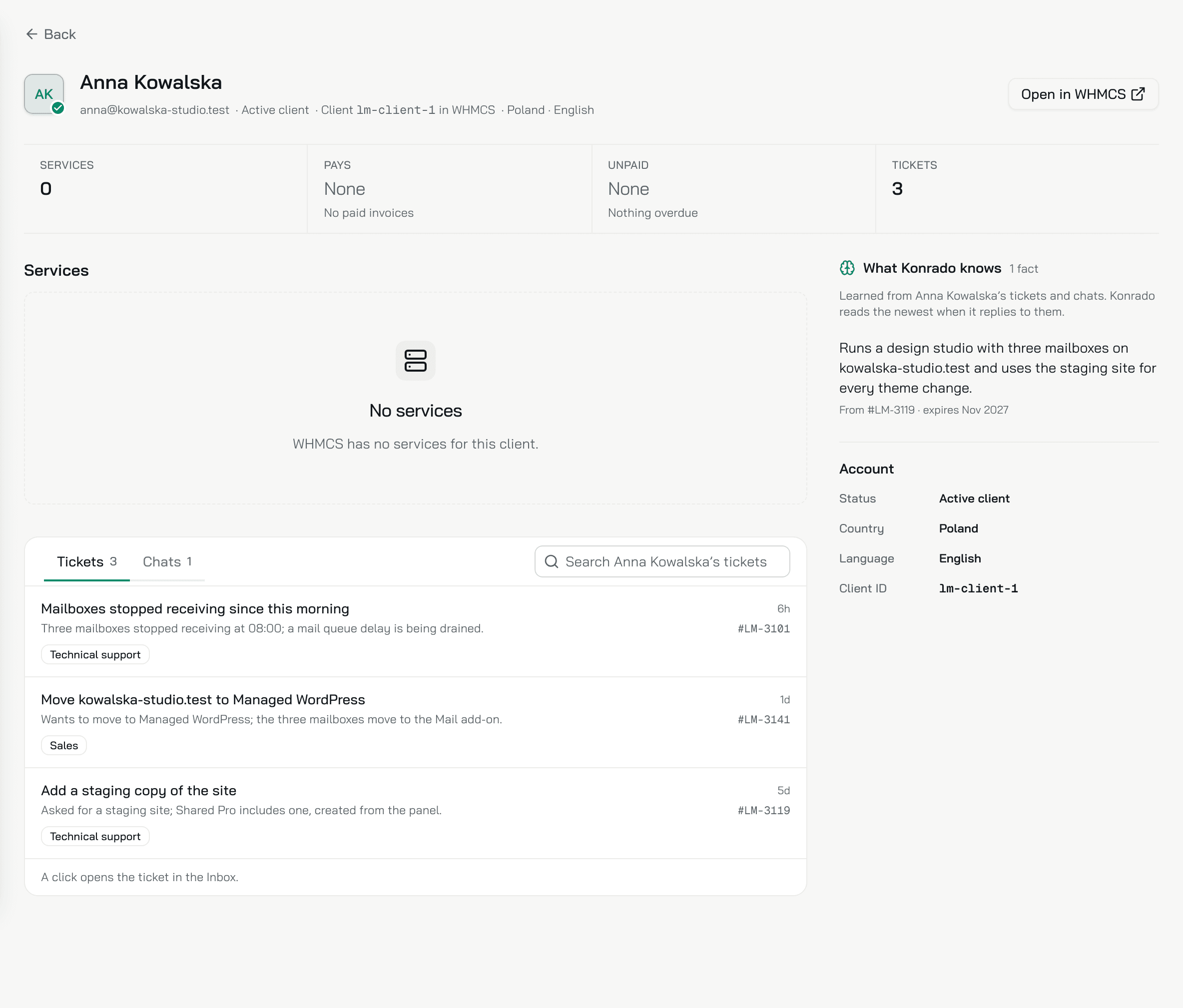
Opened from the list, Back returns to the list as you left it. A ticket in the Inbox links to its customer's page too, and then Back returns to the Inbox.
- At the top: the email, the status and the client number in your help desk. Open in and your help desk's name opens the customer there.
- Services, Pays, Unpaid and Tickets: how many services, what the customer pays a month from paid invoices, any overdue invoices, and how many tickets need a human.
- Services: each service with its last invoices. Konrado reads them from your help desk when you open the page.
- Tickets and Chats: the customer's tickets, and the chats they signed in to. A click opens one in the Inbox.
- What Konrado knows: what Konrado learned about this customer in their tickets and chats. It reads the newest when it replies to them. Correct what an agent learned.
- Account: the details your help desk holds, such as the company, the status, the country, the language and the client ID.
What Konrado cannot do
| Not possible | Why |
|---|---|
| Edit a customer | Konrado reads your help desk. Change the customer there |
| Show services or invoices in the list | Konrado reads them from your help desk one customer at a time, on the customer's page |
| List a visitor who did not sign in | Konrado cannot tell who they are. A visitor who left their details is on Leads |
| Export the list | There is no export |
Related
Last updated on