

Connect a custom help desk
Connect a help desk Konrado has no ready integration for. Your developer builds a small API, and Konrado reads and answers your tickets through it.
With a custom help desk connected, Konrado reads your tickets, drafts replies and knows the client behind each ticket, the same way it does with WHMCS. It takes developer work on your side. Your help desk must answer the Konrado plugin API: a set of web addresses that return tickets, clients and products in the format Konrado reads. The Konrado addon for WHMCS answers the same API.
What Konrado reads
| Data | How it helps |
|---|---|
| Tickets and their messages | Konrado writes the reply from what the customer wrote |
| Departments | You choose which departments Konrado works with |
| The people on your team in the help desk | An auto reply goes out from the person you pick |
| Ticket statuses | An auto reply can set the ticket's status |
| Clients, their services and invoices | Konrado knows who wrote and what they pay for |
| Products, add-ons, promotions and domain prices | Your catalog becomes part of the Knowledge Base |
| Closed tickets | Past tickets learn from how your team answered. Resolved tickets is on by default. You can pause it in the Knowledge Base |
What Konrado writes
| Write | When |
|---|---|
| A reply on a ticket | Only when Auto replies are Live. Konrado never posts a Copilot draft itself |
| A new ticket | When a visitor sends the ticket form in your live chat, under Escalations |
What Konrado cannot do
| Not possible | Why |
|---|---|
| Change anything else in your help desk | Konrado calls only the routes your developer builds. See the routes |
| Read a ticket outside the ticket scope | The departments, blocked tags and blocked senders on the connection decide what Konrado sees |
| Run next to a second help desk | Your organization has one help desk at a time |
| Work while your API is down | The connection turns Not working until the API answers again |
Konrado calls your API with the API Key. Your help desk sends ticket events to Konrado with the Webhook token. Konrado made the API Key for your module, so an admin can read it again under Manage. Konrado keeps only a fingerprint of the webhook token, so it shows the token in full once. New token replaces it.
- "Is my invoice from last week paid?"
- "Which plan am I on, and when does it renew?"
- "Why was my service suspended?"
- "Can you check the status of my other ticket?"
Before you start
- Your developer has built the API on your help desk, and the module that sends ticket events. The console calls them your Konrado module. See what your developer builds.
- An owner or admin account in Konrado.
- No other help desk connected in Konrado.
- If your help desk is behind a firewall, allow Konrado's IP addresses.
Connect
Open the form
Open Workspace SettingsIntegrations, click Add integration, choose Help desk, then Custom help desk.
Fill in the address
| Field | What to enter |
|---|---|
| Integration Name | A name your team knows. The help desk channel carries it |
| API Base URL | Where your API answers, for example https://yourdomain.com/api. Konrado adds /v1/tickets and the other routes to it |
| Ticket URL | Optional. Where your team opens a ticket. Konrado fills it in from your first ticket when you test the connection |
Copy the keys into your module
The Keys for your Konrado module box holds two values, each with a copy button. Paste both into your module.
- API Key: Konrado made it. Use my own key lets you type one your module already has.
- Webhook token: you see it in full only now. Copy it before you click Connect.
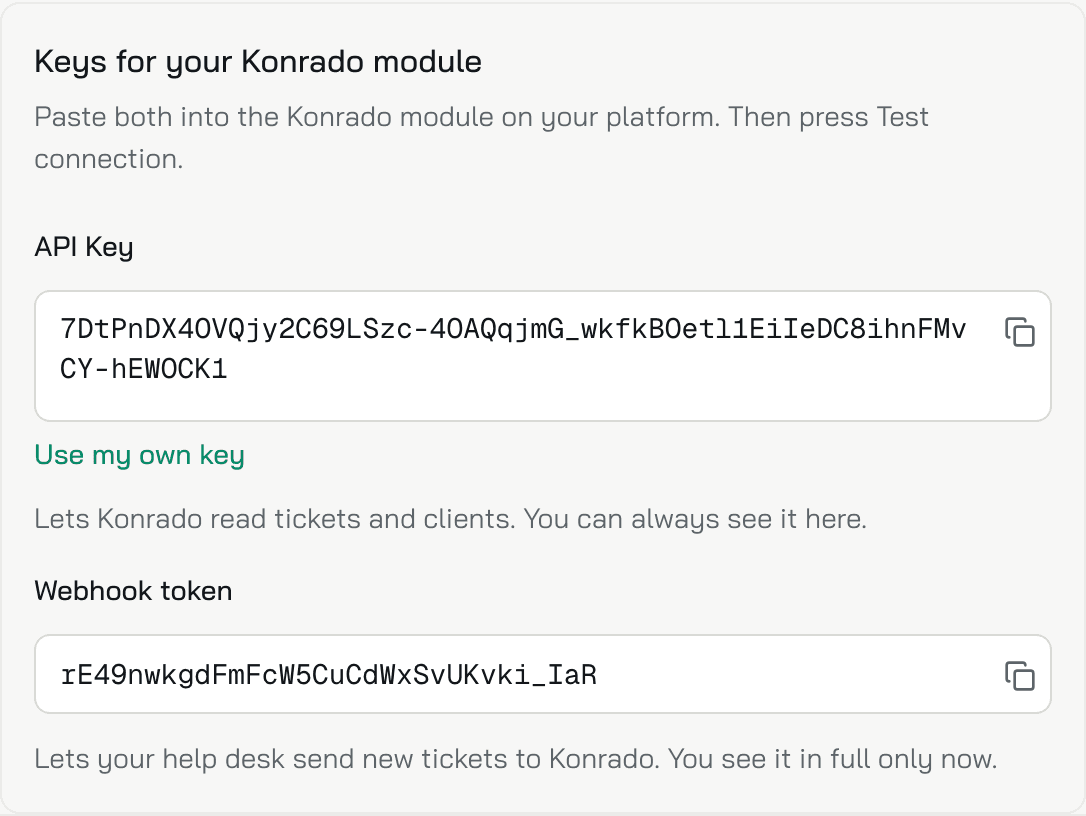
Keep the form open while you paste. The keys are saved only when you click Connect.
Test and connect
Click Test Connection. Konrado reads one ticket through your API. When the test passes, click Connect.
Check it works
The integration shows Connected in the table. Konrado adds an agent named Ticket Agent, with a Helpdesk channel for this help desk and Copilot on. Open a test ticket in your help desk: it appears in the Inbox. Set up the Helpdesk channel.
What your developer builds
The API
Konrado calls these routes under your API Base URL. Every call carries the API Key in the
Authorization header as Token <API Key>, and the same value in AuthorizationX for servers
that drop Authorization.
| Routes | Konrado uses them for |
|---|---|
GET /v1/tickets, GET /v1/tickets/{id} | The connection test, reading tickets and Past tickets |
POST /v1/tickets/{id}/send-reply | Sending an auto reply: the text in Markdown, the sender's e-mail and the new status |
POST /v1/tickets | Opening a ticket from the live chat |
GET /v1/departments | The ticket scope and the live chat's ticket form |
GET /v1/agents, GET /v1/ticket-statuses | The sender and the status of an auto reply |
GET /v1/clients, GET /v1/clients/{id} | Finding the client behind a ticket or a chat |
GET /v1/clients/{id}/services, GET /v1/clients/{id}/invoices | The client's services and invoices |
GET /v1/clients/{id}/services/{service_type}/{service_id}/invoices | The invoices of one service |
GET /v1/clients/{id}/services/{service_type}/{service_id}/sso | SSO to server in the browser extension |
GET /v1/products, GET /v1/product-addons, GET /v1/promotions, GET /v1/tlds/pricing | The product catalog |
GET /v1/info | The version shown on the connection |
GET /v1/check-domain-availability/{domain} | Checking whether a domain is free |
The connection test calls GET /v1/tickets?limit=1&offset=0. GET /v1/info, the catalog routes
and the domain route are optional. A catalog route that answers 404 tells Konrado the catalog
is not available, and Konrado keeps the copy it stored.
POST /v1/tickets gets department_id, subject, message and requester_email, plus
client_id for a signed-in customer and requester_name when Konrado knows it. It answers with
the new ticket's id under data.
Open the API reference for the fields of each route.
The ticket events
When a ticket changes, your module posts an event to Konrado:
- URL:
https://app.konrado.ai/api/v1/webhooks/ticket, methodPOST. Authorizationheader: the webhook token as it is, with no prefix.Content-Typeheader:application/json.
eventType | Send it when | The body carries |
|---|---|---|
ticket.updated | Anything about a ticket changes: a new ticket, a reply, a note, the status, the subject, the department | data: the whole ticket, in the shape GET /v1/tickets/{id} returns |
ticket.deleted | A ticket is deleted | ticketId |
ticket.merged | Tickets are merged | ticketId of the ticket that stays and mergedTicketIds of the ones merged into it. Send the ticket that stays as ticket.updated too |
Every body also carries source, the name of your platform. Konrado knows your help desk by the
token, not by source. After a ticket.updated, Konrado reads the ticket again through
GET /v1/tickets/{id}.
{
  "source": "my-helpdesk",
  "eventType": "ticket.deleted",
  "ticketId": "1042"
}
Konrado answers 202 when it queued the ticket, 200 when it handled the event at once, and
401 when the token is missing or wrong.
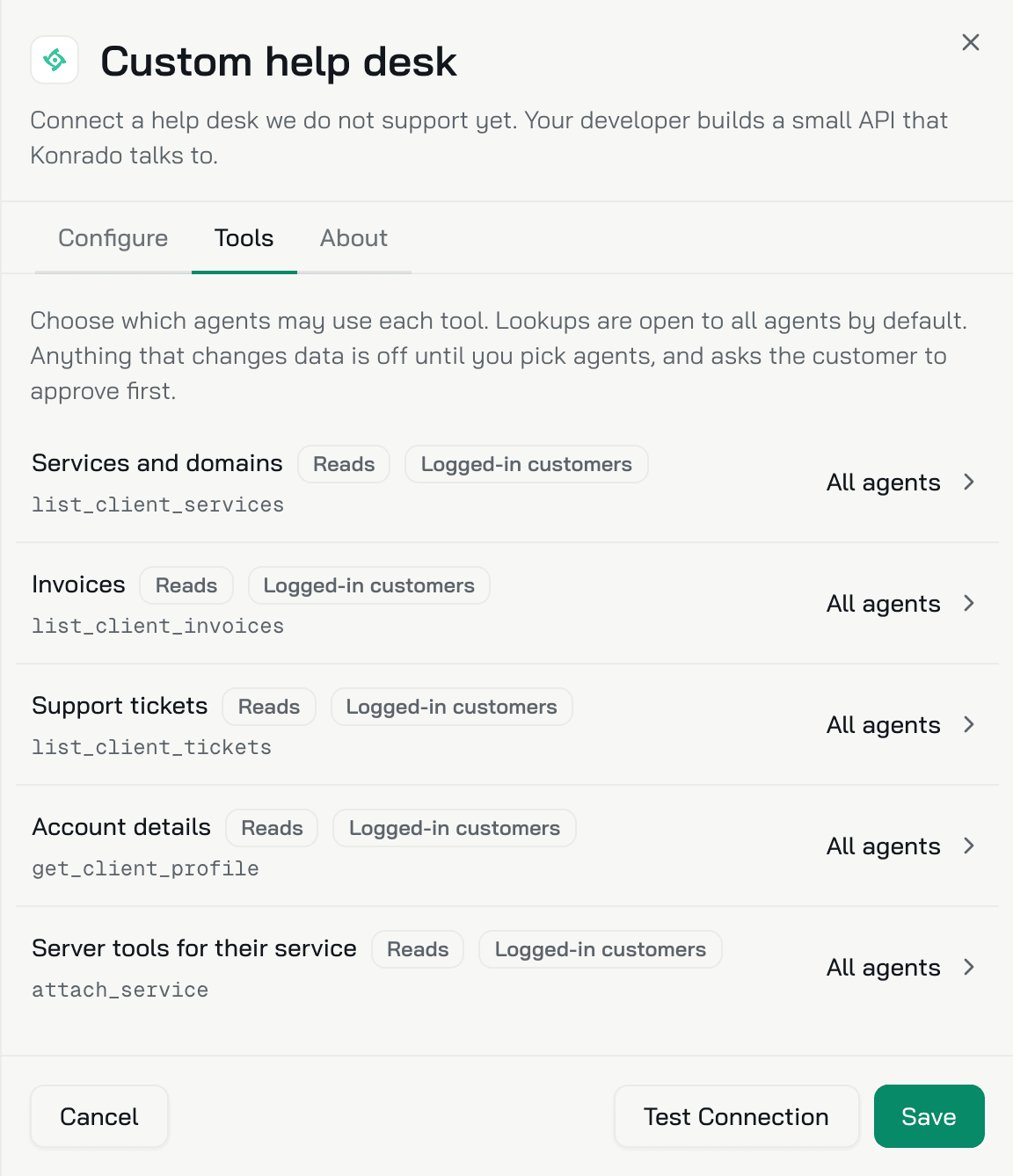
Choose which agents use the lookups
In your live chat, Konrado can look up a signed-in customer's services, invoices, tickets and account details, and the server tools of their service. The Tools tab of the connection lists these lookups. Every agent may use them. To limit one, click it and choose Chosen agents.
The lookups run only for customers your website signs in to the chat. Set up identity verification.
If something is wrong
| What you see | What to do |
|---|---|
| Test Connection fails | Your API must answer GET /v1/tickets?limit=1&offset=0 under the API Base URL, with the API Key from the form |
| Another help desk is already connected. Disconnect it first. | Your organization has one help desk at a time. Disconnect the other one under Integrations |
| The integration turns Not working | Check that your API is online and that your module still has the API Key shown under Manage |
| Tickets do not reach Konrado | Check that your module posts to the URL above with the current webhook token. A 401 means the token is wrong, or someone created a New token |
| The product catalog source says The support platform did not serve products (HTTP 404), so this source could not be refreshed. | Your API has no catalog routes yet. Konrado keeps the products it stored |
Remove the integration
Open Workspace SettingsIntegrations, open the row menu (...) and click Disconnect. Konrado stops reading tickets. The credentials and the ticket history stay, so you can reconnect later. Then turn off the events in your module.
Last updated on