

Rackspace Cloud Office
Let Konrado check a customer's mail domains, mailboxes, aliases and DKIM in Rackspace Cloud Office.

With Rackspace Cloud Office connected, Konrado checks the email side of a ticket: the customer's domains, mailboxes, aliases, spam settings and DKIM. It only reads, through Rackspace's API. Nothing is installed and nothing in your account changes.
What Konrado reads
| Data | How it helps |
|---|---|
| Domains | The customer's mail domains and their alternate domains |
| Mailboxes | Rackspace Email and Exchange mailboxes, their settings and usage |
| Aliases and groups | Email aliases, and Exchange distribution groups with their members |
| Spam settings | Spam filter settings, safe lists and block lists, for a domain or a mailbox |
| DKIM | Whether DKIM is set up for a domain |
| Account | The customer account. For resellers, which subaccount owns the ticket's domain |
| Service status | Rackspace's public status page, to rule out an outage on their side |
Konrado reads only the email domain of the customer's Rackspace service in your billing system.
What Konrado cannot do
| Not possible | Why |
|---|---|
| Create, change or delete a mailbox, alias, domain or account | Konrado reads. Changes stay in your Rackspace control panel |
| Change DKIM, DNS, spam settings or passwords | Konrado can read them, not change them |
| Read mail or sign in to a mailbox | Private messages never go into a reply |
| Send mail | Konrado drafts replies to the ticket, nothing else |
| Look at a domain outside the ticket's service | Each lookup is limited to that service's email domain |
Konrado signs every call with your Rackspace API user key and secret key, never the control panel password. After you save them, the console shows only their last characters. Rackspace logs every call under the admin who owns the keys, so a dedicated admin keeps Konrado's calls apart from your team's.
- "Does this customer have a mailbox for billing@example.com?"
- "Is DKIM set up for this mail domain?"
- "Which aliases point to this mailbox?"
- "Why does mail authentication fail for this domain?"
- "Is this reseller subaccount the right one?"
Data access and permissions
Every API call Konrado makes only reads. Konrado's Rackspace client has 29 operations, all
HTTP GET requests. The lookups use 26 of them. None creates, changes or deletes anything in your
account.
Rackspace Cloud Office has no read-only or limited API keys: a key carries the full access of the Super Admin who owns it. Konrado only makes the read calls below, but the key itself is not limited. Use a dedicated admin, and revoke the key when you remove the integration.
Before you start
- A Rackspace Cloud Office Super Admin login. Only a Super Admin can create API keys, not a Standard or Limited Admin.
- The customer account number.
meworks for your own account, and for a reseller account too. - WHMCS connected, with the customer's Rackspace email service in it. Konrado finds the account through a service whose WHMCS module is a Rackspace one.
Connect
Get your API keys
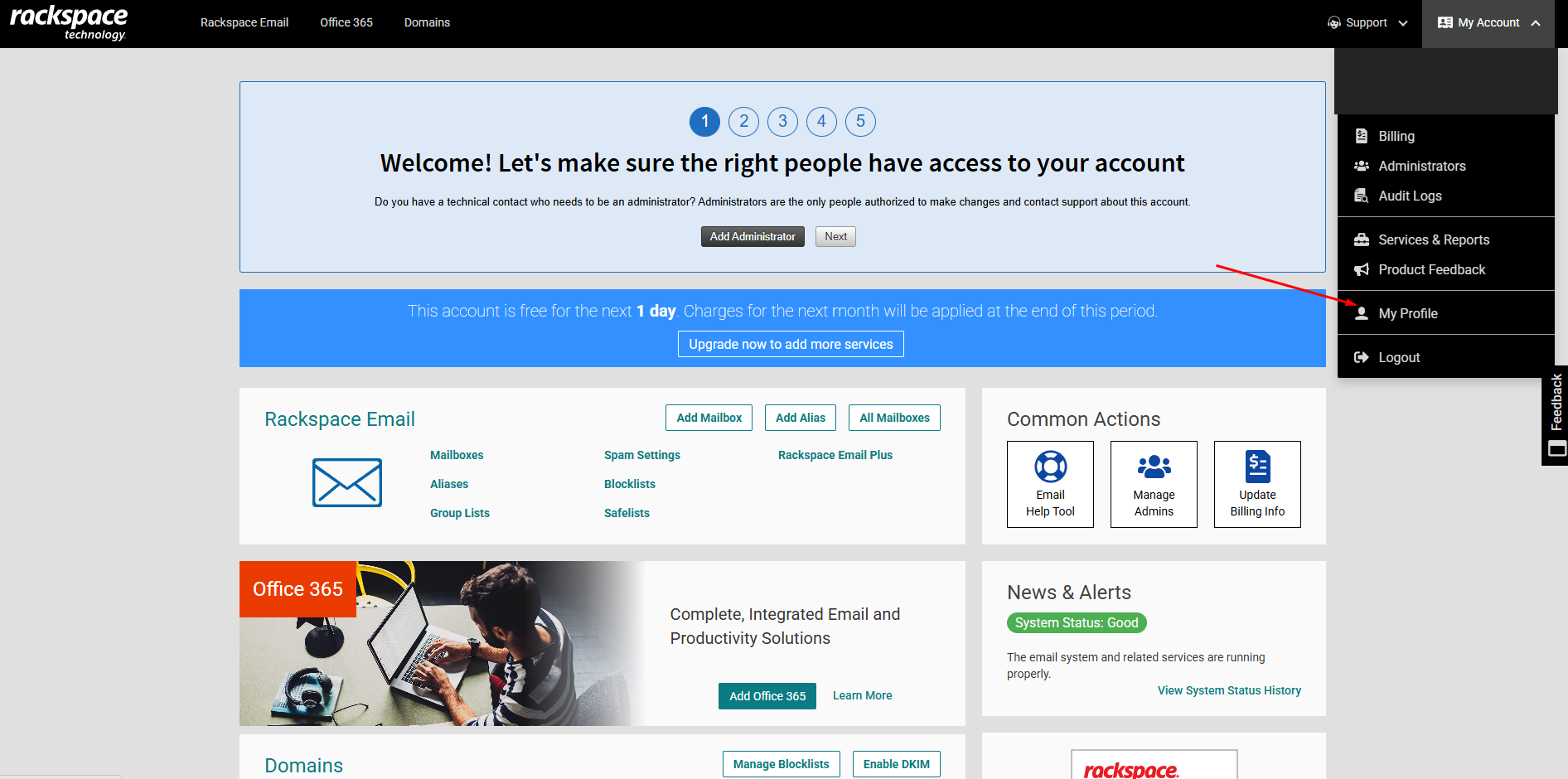
In Rackspace, open My Account and select My Profile.
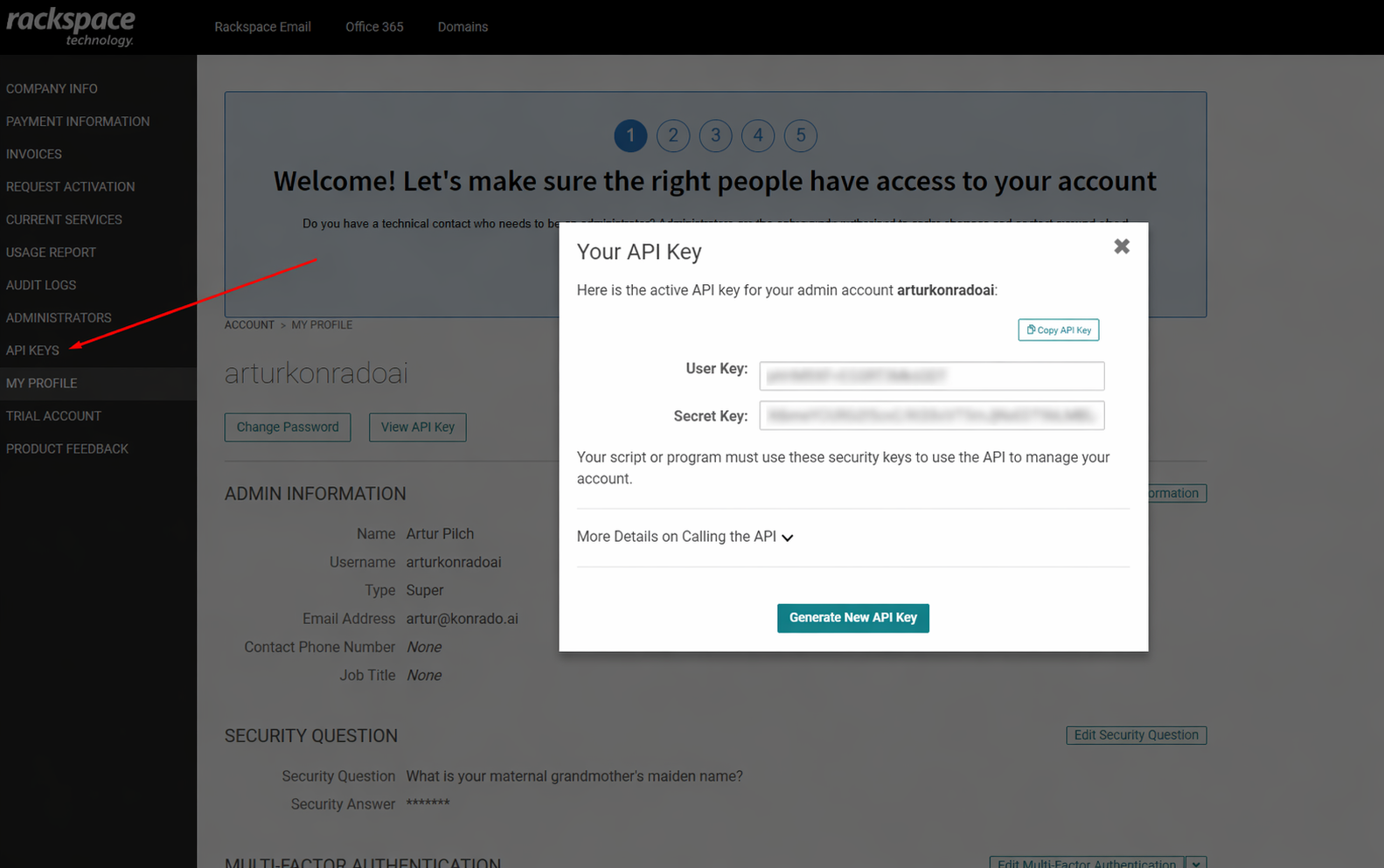
In My Profile, open API Keys and copy the User Key and Secret Key. Never use your control panel password. Read Rackspace's API key guide for the details.
Connect in Konrado
Open Workspace SettingsIntegrations, click Add integration and choose Rackspace Cloud Office.
| Field | What to enter |
|---|---|
| Integration Name | A name for your team, such as Rackspace |
| Customer Account Number | me, the account the keys belong to. Read the reseller notes if you resell |
| User Key | Your Rackspace API user key |
| Secret Key | Your Rackspace API secret key |
| WHMCS Server ID | Leave it blank for a single account. Read about several accounts |
Click Test Connection. A green box confirms that the keys can read the account. Click Connect.
For resellers
- Connect once, with
me. Use your reseller keys. Konrado looks for the ticket's domain across all your subaccounts, then reads the subaccount that owns it. - One set of reseller keys covers every subaccount. You do not need keys or an integration per customer.
More than one Rackspace account
Add one integration per Rackspace account, each with its own keys. A reseller's subaccounts are not separate accounts here: they come with the reseller's integration.
When WHMCS sells the same product from two Rackspace accounts, only the WHMCS server tells them
apart, for example server 15 and server 8. Set WHMCS Server ID on each integration so every
lookup goes to the right account. Once you connect a second account, every Rackspace integration
needs one. To find the ID in WHMCS admin, open Setup › Products/Services › Servers and
click the server: the ID is the id in the page address.
Check it works
The account is on the Integrations page as Connected, with the type Rackspace Cloud Office. Konrado tests the connection again every hour. Open the row and the Tools tab lists the 19 lookups.
If something is wrong
| What you see | What to do |
|---|---|
| Rackspace rejected the credentials. Check the user key and secret key. | Copy the keys again from My Profile › API Keys. Not the control panel password |
| Rackspace customer account was not found. | Enter me, or check the account number you typed |
| Rackspace API rate limit exceeded. Try again in a minute. | Rackspace allows 120 calls a minute per user key. Wait, then test again |
| Rackspace API request timed out. | Try again. If it keeps happening, check Rackspace's status page |
| Connecting more than one Rackspace account requires a WHMCS server ID on every Rackspace integration, so tickets route to the correct account. | Set WHMCS Server ID on every Rackspace integration |
| DKIM or alias data is missing | Check that the account can see that domain or mailbox in Rackspace |
| Konrado never uses Rackspace on a ticket | Check that the ticket's WHMCS service uses a Rackspace module and has the right domain |
Remove the integration
Open Workspace SettingsIntegrations, open the row menu (three dots) and choose Delete. Then revoke the API keys in Rackspace if nothing else uses them.
To stop for now and keep the settings, choose Disconnect instead.
Last updated on