

DirectAdmin API
Connect DirectAdmin to Konrado.AI over HTTP or HTTPS with a dedicated Login Key

Use DirectAdmin API when Konrado.AI should read hosting context directly from the panel and you do not want to install the Konrado.AI server agent.
DirectAdmin API and DirectAdmin with the server agent are separate integrations. Adding DirectAdmin API does not change or replace an existing directadmin agent installation.
Version Compatibility
| Compatibility level | DirectAdmin version |
|---|---|
| Tested end to end by Konrado.AI | 1.707 and 1.708 |
| Supported | 1.670 or later on the current or stable update channel |
| Not supported | 1.669 and earlier, legacy-license builds with a reduced feature set, and alpha builds |
The minimum supported version is DirectAdmin 1.670. The integration combines long-standing /CMD_API_* calls with the newer JSON /api/* interface for account discovery, file search, mail logs, session information, and server health. DirectAdmin 1.647 documents the move of server information to new API endpoints, while 1.670 documents the backend search flow used for global user and domain discovery. We therefore use 1.670 as the conservative floor for the complete integration instead of assuming that legacy API availability is sufficient.
There is no fixed maximum version. DirectAdmin actively extends the JSON API, and the exact OpenAPI contract supported by a server is available from its /static/swagger.json. Keep DirectAdmin on the current or stable channel and run Test Connection after upgrades. A server older than 1.670 may connect or expose partial data, but Konrado.AI does not claim full compatibility with it.
See DirectAdmin's API modes and per-server OpenAPI specification, version 1.647 API changes, version 1.670 backend search changes, and update channels.
What It Can Do
Konrado.AI automatically detects whether the Login Key belongs to an admin, reseller, or user account. Every lookup stays within the account scope DirectAdmin grants to that credential.
| Tool | Support context it can read |
|---|---|
| Account | Account type, plan, usage, limits, reseller relationship, and domains |
| Website | Document root, FTP accounts, subdomains, domain pointers, DNS records, and SSL status |
| Mailboxes, forwarders, autoresponders, filters, and up to 24 hours of recent delivery logs | |
| Databases | Databases visible to the matched DirectAdmin account |
| Files | A bounded listing of the matched website's public_html tree and its FTP accounts |
| Server | CPU, memory, filesystems, load, services, and uptime; available only with an admin Login Key |
The tools are bound to the account and domain matched from the ticket or billing context. A user key can read only that user. Admin and reseller keys can inspect accounts within the scope DirectAdmin exposes to them.
What It Cannot Do
| Not supported | Why this matters |
|---|---|
| Create, suspend, delete, or modify DirectAdmin accounts | The integration provides context for support replies only |
| Change DNS, SSL, mailboxes, forwarders, databases, files, FTP accounts, or server services | Konrado.AI uses read operations and does not apply customer-impacting changes |
| Read mailbox message contents or reveal passwords | Credentials and private message content are not support context |
| Access accounts outside the Login Key's DirectAdmin role | DirectAdmin permissions remain authoritative |
| Connect to a private endpoint | The configured panel hostname must resolve to a public IP address |
Security Model
Create a dedicated DirectAdmin Login Key for Konrado.AI. Do not enter the DirectAdmin account password. The Login Key is write-only in Konrado.AI responses: after it is saved, the dashboard and API do not return its value.
The connection enforces the following safeguards:
- Both
http://andhttps://DirectAdmin URLs are accepted. - The hostname must resolve to public IP addresses; private, loopback, link-local, carrier-grade NAT, and multicast ranges are rejected.
- For
https://URLs, standard TLS certificate verification applies. - Requests use the shared generated-client HTTP transport.
- Sensitive values are redacted from connection errors.
Prefer HTTPS, especially when the panel is reached over the public internet. Plain HTTP does not encrypt the DirectAdmin username, Login Key, or API responses in transit.
If you restrict the Login Key by source IP, allow the Konrado.AI static IP addresses. When removing the integration, revoke its Login Key in DirectAdmin as well.
Ticket Examples
- "Which DirectAdmin user owns example.com, and is that account over quota?"
- "Does the DNS zone or SSL status explain why the customer's website is unavailable?"
- "Do recent DirectAdmin mail logs show why messages for this domain are failing?"
- "Which databases and FTP accounts are visible for this website?"
- "Is the server under memory, storage, load, or service pressure?"
Prerequisites
- Access to Konrado.AI Integrations.
- A public DirectAdmin hostname reachable over HTTP or HTTPS. For HTTPS, use a certificate trusted by standard clients.
- Inbound access from the Konrado.AI static IP addresses to the DirectAdmin API port, normally
2222. - A DirectAdmin admin, reseller, or user account with a dedicated Login Key.
- A connected ticketing or billing integration that can associate the ticket with a domain or service.
Create a DirectAdmin Login Key
- Sign in to DirectAdmin as the account Konrado.AI should use.
- Open User Level > Login Keys. If the menu item is not visible, open
/CMD_LOGIN_KEYSdirectly on your panel. - Click Create Key and give it a recognizable name such as
Konrado AI. - Leave Allow HTM disabled so the key can be used only for API requests.
- Set an appropriate expiry and unlimited requests, or a limit high enough for ongoing support lookups.
- If you use Allowed IPs, enter the Konrado.AI static IP addresses, one per line.
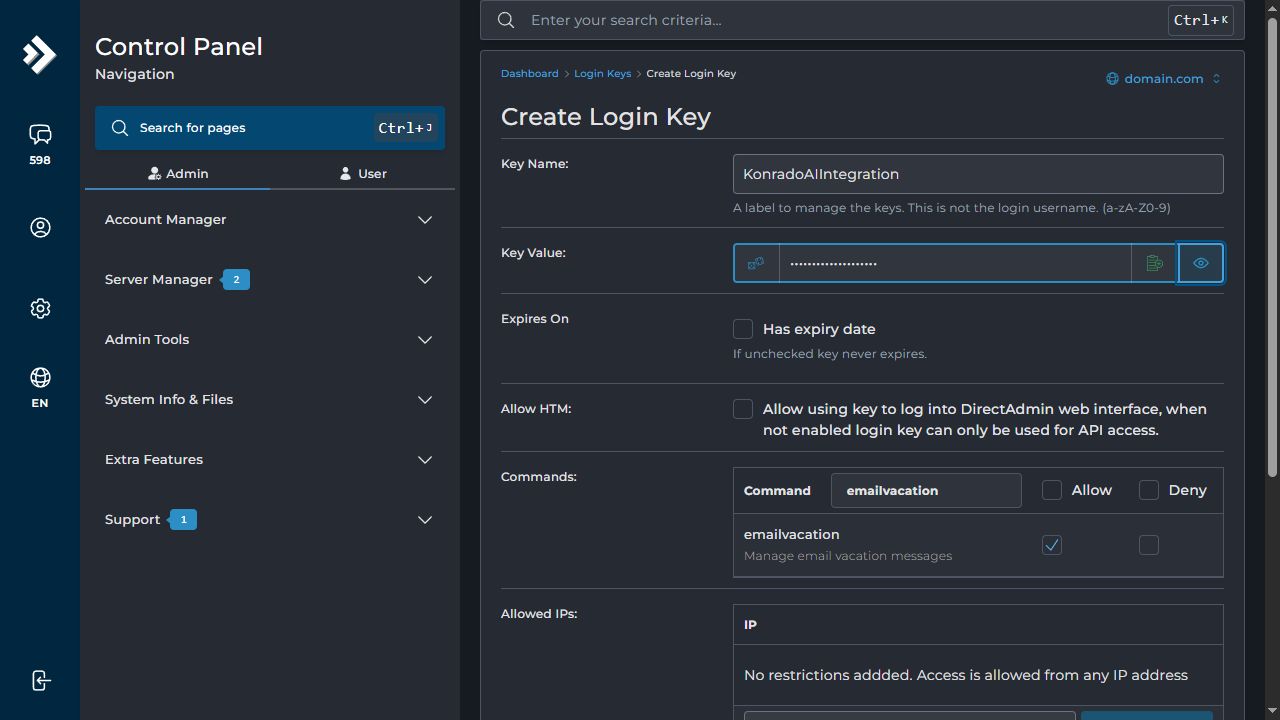
In Commands, search for each permission below and select Allow for the exact matching command:
| # | Permission |
|---|---|
| 1 | emailvacation |
| 2 | domain-tls |
| 3 | email-logs |
| 4 | filemanager |
| 5 | db-show |
| 6 | resource-usage |
| 7 | search |
| 8 | system-info |
| 9 | CMD_API_FILE_MANAGER |
| 10 | CMD_API_FTP |
| 11 | CMD_API_DATABASES |
| 12 | CMD_API_SHOW_USER_USAGE |
| 13 | CMD_API_SHOW_USER_CONFIG |
| 14 | CMD_API_EMAIL_FILTER |
| 15 | CMD_API_EMAIL_AUTORESPONDER |
| 16 | CMD_API_EMAIL_FORWARDERS |
| 17 | CMD_API_EMAIL_POP |
| 18 | CMD_API_SSL |
| 19 | CMD_API_ADDITIONAL_DOMAINS |
| 20 | CMD_API_DOMAIN_POINTER |
| 21 | CMD_API_SUBDOMAINS |
| 22 | CMD_API_DNS_CONTROL |
| 23 | CMD_API_DNS_ADMIN |
| 24 | CMD_API_DOMAIN |
| 25 | CMD_API_SHOW_DOMAINS |
| 26 | CMD_API_SHOW_RESELLERS |
Select only the exact result. For example, allow resource-usage, not global-resource-usage; search, not CMD_AJAX_SEARCH; CMD_API_FTP, not its settings or show variants; and CMD_API_DOMAIN, not CMD_API_DOMAIN_OWNERS or CMD_API_DOMAIN_POINTER. Do not allow CMD_LOGIN_KEYS or CMD_API_LOGIN_KEYS.
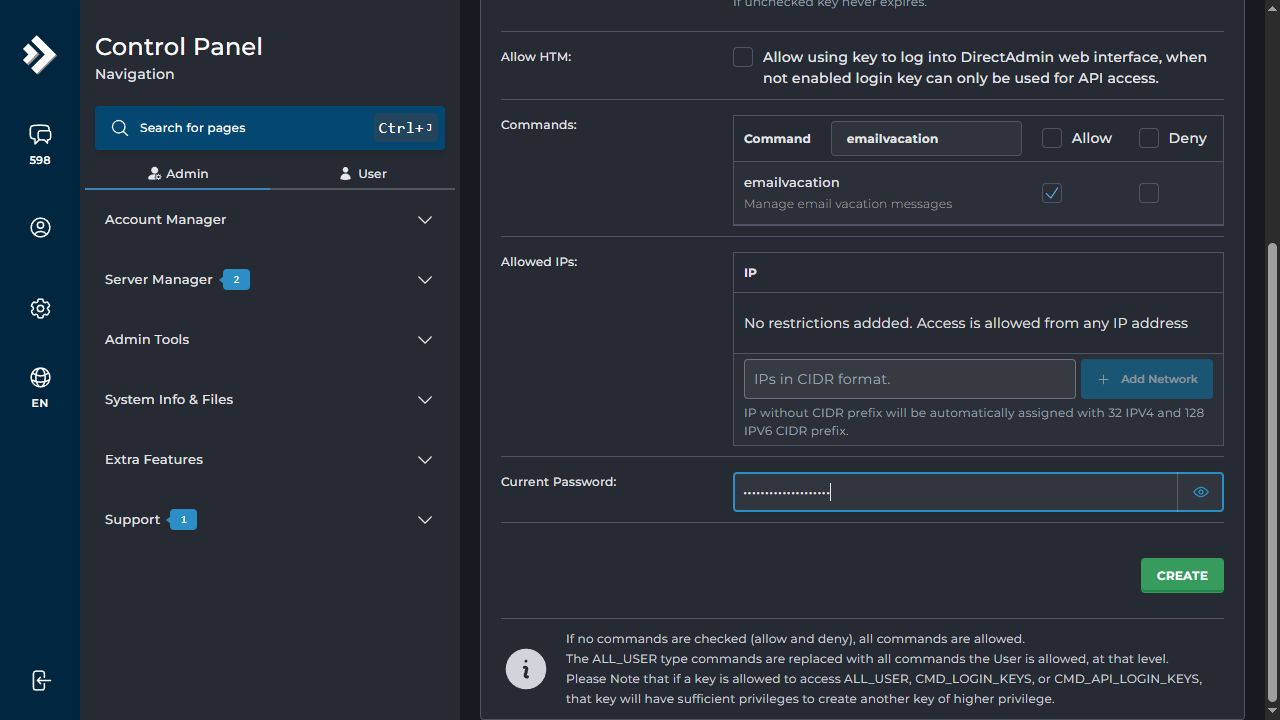
Enter the account's current password and click Create. DirectAdmin displays the Login Key only once after creation or rotation. Copy it immediately and store it in a password manager.
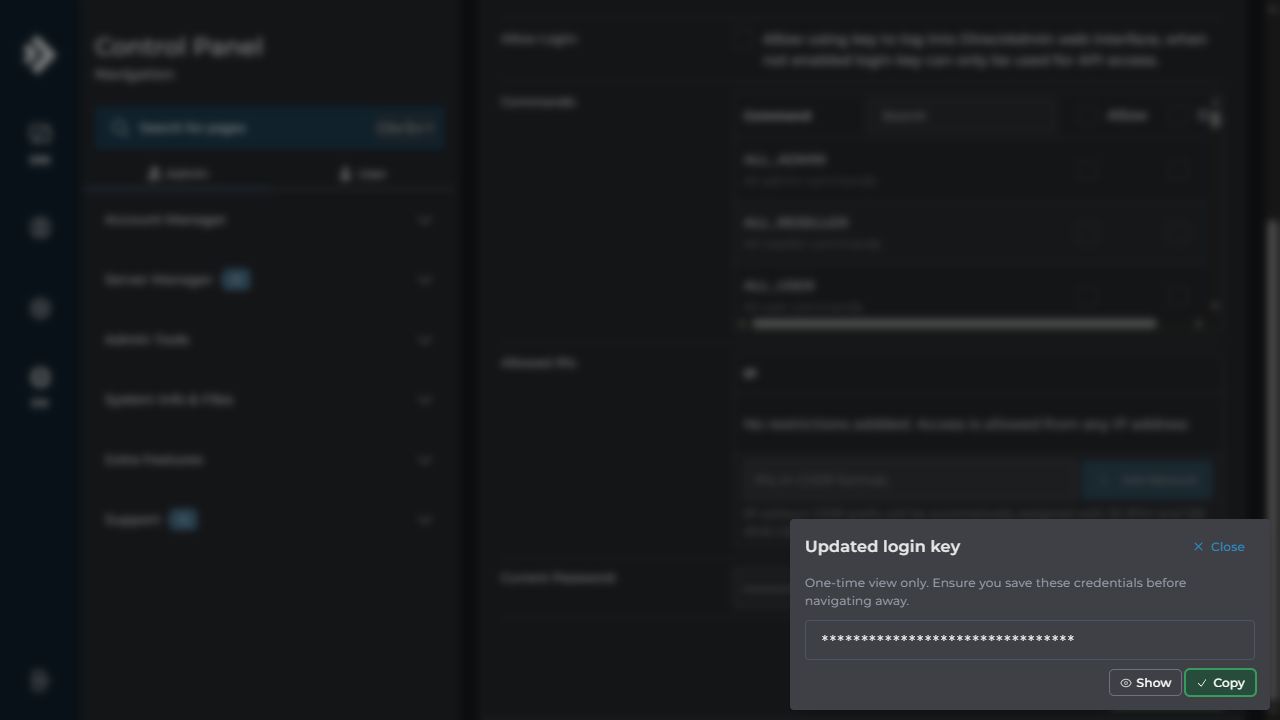
Never reveal the Login Key in documentation, tickets, or screenshots. The example above is intentionally masked. If the one-time value is lost, rotate the key instead of sharing the DirectAdmin account password.
DirectAdmin documents the available restrictions in Creating a Login Key and recommends dedicated Login Keys for API access.
The Login Key belongs to the DirectAdmin username that created it. Enter that same username in Konrado.AI. A key created by admin must be paired with admin, not with a customer or reseller username.
Connect DirectAdmin API
In Konrado.AI, open Integrations > Applications and click Add Integration. Choose DirectAdmin API, not the legacy DirectAdmin option marked Quick install.
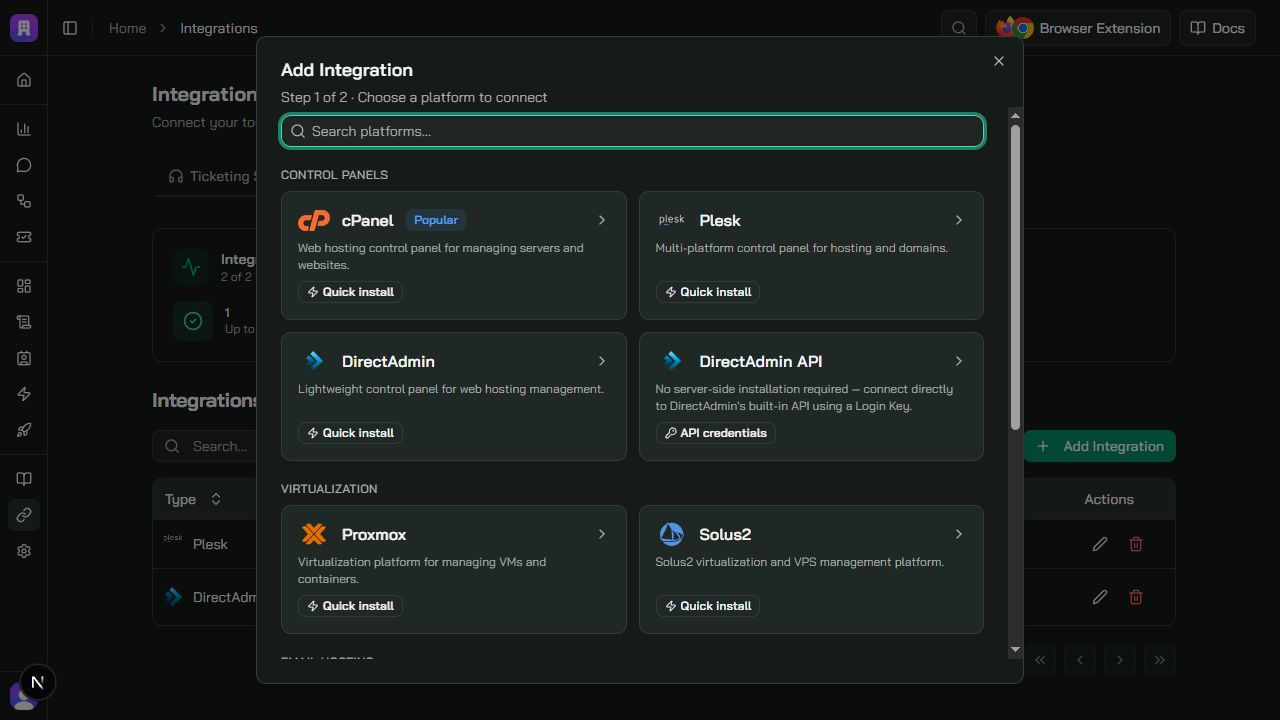
Enter the connection details:
| Field | What to enter |
|---|---|
| Integration Name | A descriptive name such as DirectAdmin EU or Production panel |
| DirectAdmin URL | The public panel URL, for example https://panel.example.com:2222 or http://panel.example.com:2222 |
| Username | The DirectAdmin account that created the Login Key |
| Login Key | The dedicated key generated in DirectAdmin |
If the URL does not include a port, Konrado.AI uses port 2222. Use HTTPS whenever possible. Do not include credentials, query parameters, or a fragment in the URL.
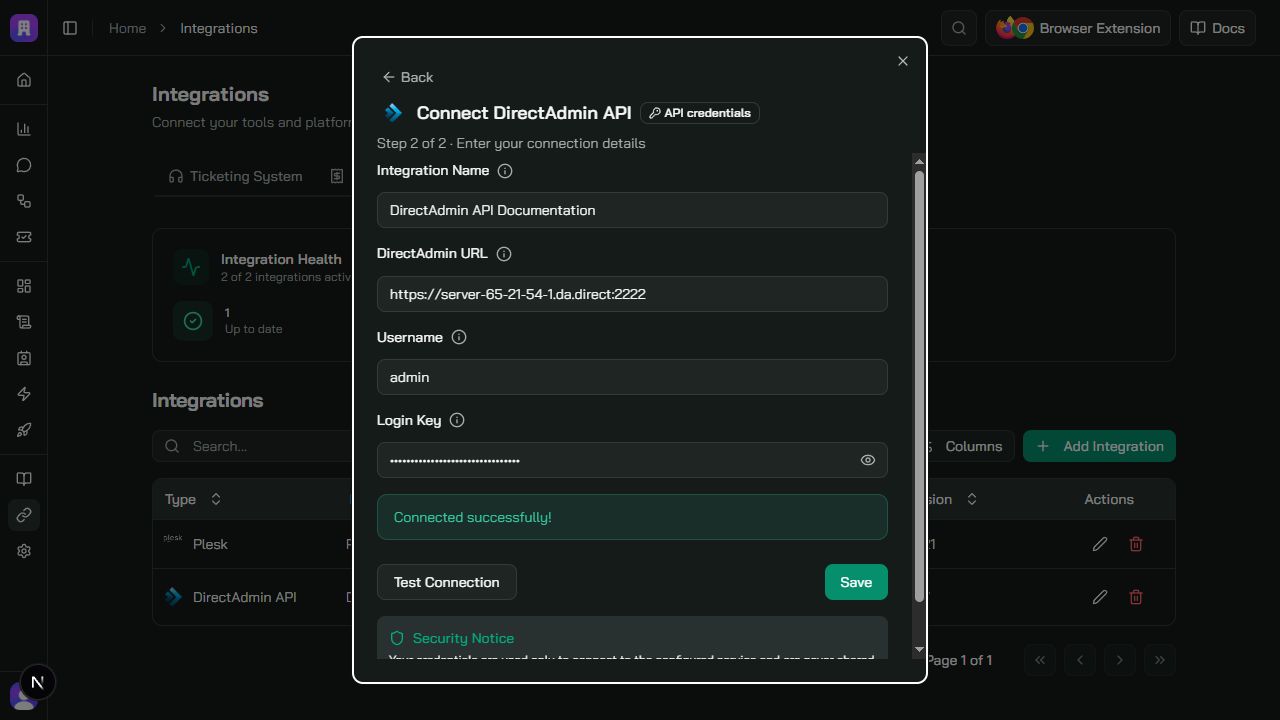
Click Test Connection. A successful test confirms the credentials, detects the DirectAdmin account type, and reads the panel version. Click Save to add the integration.
Verify the Connection
The Applications table should show DirectAdmin API, the panel hostname, a Connected status, and the detected DirectAdmin version.
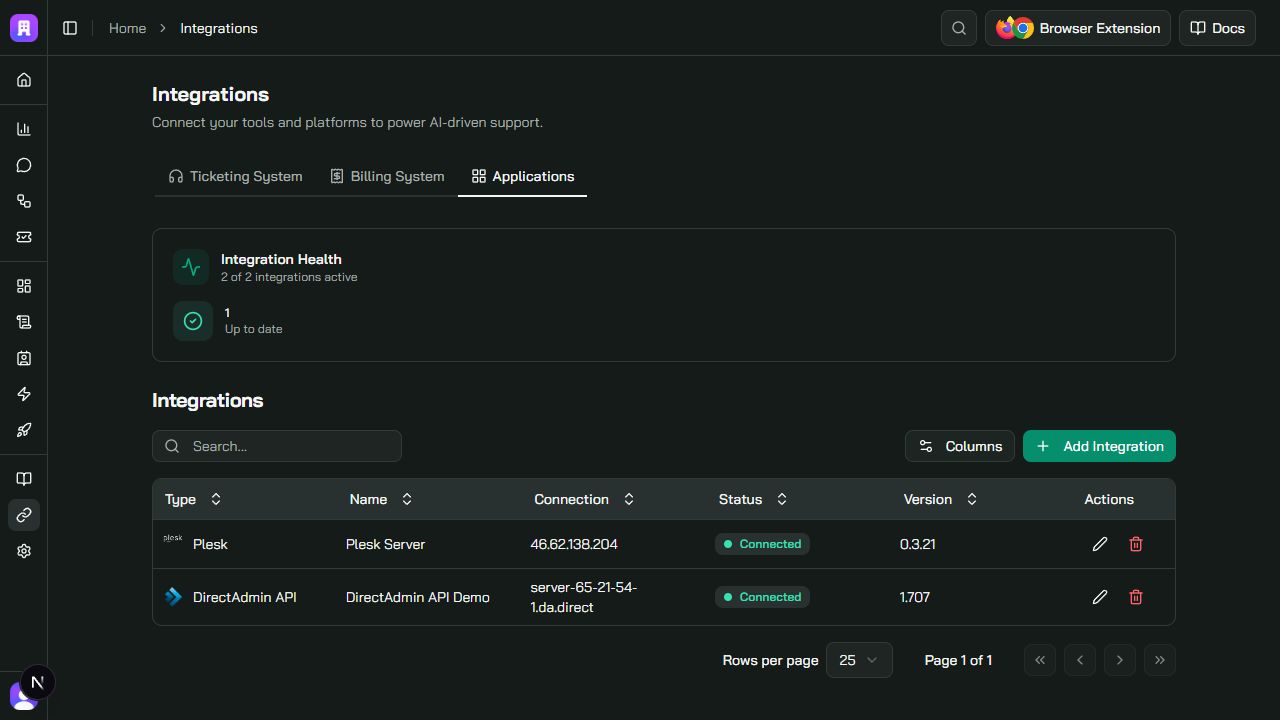
When editing the integration later, leave Login Key empty to keep the stored key. Enter a new value only when rotating or replacing the credential.
Troubleshooting
| Issue | What to check |
|---|---|
| DirectAdmin URL is rejected | Use a complete public http:// or https:// panel URL without credentials, query parameters, or a fragment |
| TLS verification failed | For an HTTPS URL, install a valid certificate for the DirectAdmin hostname and include the complete certificate chain |
| Host resolves to a private address | Use a public DNS name that resolves only to public addresses; private and split-horizon targets are rejected |
| Authentication fails | Confirm the username owns the Login Key and that the key was copied completely |
| Access is forbidden or some context is missing | Review the Login Key command restrictions and the DirectAdmin role that owns the key |
| Connection times out or is unavailable | Confirm the panel and port are publicly reachable and allow the Konrado.AI static IP addresses in the firewall and Login Key |
| Server health is unavailable | Server CPU, memory, filesystem, service, and uptime context requires an admin Login Key |
| Wrong domain or account is selected | Confirm the ticketing or billing integration maps the ticket to the correct service and domain |
Remove
Delete the DirectAdmin API integration in Konrado.AI, then delete or revoke its dedicated Login Key in DirectAdmin. No server-agent uninstall command is needed.