

Remote Agent
Run a small relay inside your network that forwards MCP requests to the hosts you allow.

Remote Agent is a small relay you install on a server you control, inside your network. It checks every request against its API key. When a request names an internal MCP server you allow, the relay forwards it there. It logs what it did. One public address can then front several private MCP servers.
Konrado reaches a private server through the relay with a Custom MCP server connection that carries the target's name and token. The Remote Agent connection itself reaches only the relay's own tools today, and those give Konrado nothing to use.
How it works
The relay answers on /mcp and /sse. Every request needs its API key:
Authorization: Bearer <API_KEY>A request with no target headers stays on the relay itself. A request that carries both target headers goes on to that MCP server:
Target-Host: <target-host>
Target-Token: <target-token>
The relay checks Target-Host against the HOSTS allowlist. It then connects to
http://<host>/mcp, or to the host's internalHost, and sends Target-Token there as the bearer
token. It passes on what the target answers, unchanged. The relay refuses a request with only one
of the two headers.
What the relay can do
| Feature | How it helps |
|---|---|
| Reach private MCP servers | One relay fronts internal MCP servers, without exposing each one |
| Route by name | Map a public target name to an internal host:port |
| Allowlist targets | HOSTS limits which targets the relay forwards to |
| Keep MCP sessions | It forwards the target's sign-in, cookies, session headers and streamed answers |
| Show its traffic | The dashboard lists recent requests, their status, duration, target and why one was blocked |
What Konrado cannot do
| Not possible | Why |
|---|---|
| Reach a target through the Remote Agent connection | That connection holds the relay's address and API key only, with no target headers. Connect each target as a Custom MCP server instead |
| Make an MCP server read-only | Each target decides what its own tools do |
| Get past a target's sign-in | A forwarded request still needs a valid target token |
| Find internal MCP servers on its own | Targets must be named in the request, and listed in HOSTS when the list is not empty |
| Forward plain web apps or other paths | The relay carries MCP traffic on /mcp and /sse only |
| Replace your firewall | You decide which networks reach the relay and its dashboard |
Use HOSTS as an allowlist. An empty HOSTS=[] forwards to any target, which suits a test, not
production. Treat API_KEY and every target token as secrets. The dashboard has no sign-in of its
own, and the relay serves plain HTTP. Open the port only to trusted networks, or put the relay
behind your own access control.
Before you start
- Root SSH access to the machine that runs the relay, with Python 3.10 or newer,
curl,unzipand systemd. - Outbound access from that machine to the target MCP servers.
- A free TCP port. The relay and its dashboard use
8001unless you change it. - Port
8001open to Konrado's IP addresses (see the list).
Connect
Copy the install command
Open Workspace SettingsIntegrations, click Add integration and choose Remote Agent. The sheet shows three steps and the install command. Click the copy button next to it. The sheet hides your key on screen, but the copied command contains it, so treat it like a password.
bash <(curl -s https://repo.konrado.ai/remote-agent/init.sh) --api-key=YOUR_KEY --callback-url=https://app.konrado.ai/api/integrations/servers/installRun it as root
Log in to the machine over SSH as root and paste the command. It asks no questions. The installer
creates /opt/KonradoAiRemoteAgent and the user konrado-mcp-remote-agent, installs the relay and
starts konrado-mcp-remote-agent.service. Then it generates the API_KEY and reports back to
Konrado. To use another port than 8001, add --port=8002 (or yours) at the end of the command.
Wait for the connection
The sheet reads Listening for your server… and checks every 5 seconds. When the relay reports back it shows Connected successfully. Click Done. Running the command again is safe.
Set the allowlist
Open the dashboard at http://<SERVER_IP>:8001/dashboard and fill in HOSTS under
Configuration. See the settings for what each field does.
Reach a private MCP server
For each private MCP server, add a Custom MCP server in Konrado that points at the relay.
Open the custom server form
Open Workspace SettingsIntegrations, click Add integration and choose Custom MCP server.
Point it at the relay
| Field | What to enter |
|---|---|
| Name | The target's name, such as Billing tools |
| Server URL | The relay's address, http://<SERVER_IP>:8001/mcp |
| Authentication | Custom headers |
| Request headers | Authorization with Bearer <API_KEY>, Target-Host with the target's host as HOSTS lists it, and Target-Token with the target server's own token |
The relay's API_KEY sits in /opt/KonradoAiRemoteAgent/.env. The Remote Agent row in Konrado
shows it too, under API Key.
Test and add
Click Test Connection. Tick I trust this server. My agents will be able to call its tools. and click Add server.
Konrado sends the three headers with every request, and the relay forwards each request to the
target. The target's tools then work like any custom MCP server's: Konrado takes only the ones
marked readOnlyHint: true, and they are not tied to one customer's service.
Read the Custom MCP server page for the details.
The relay serves plain HTTP, so the headers travel unencrypted. To encrypt them, put the relay
behind your own HTTPS proxy and use its https:// address as the Server URL.
The dashboard
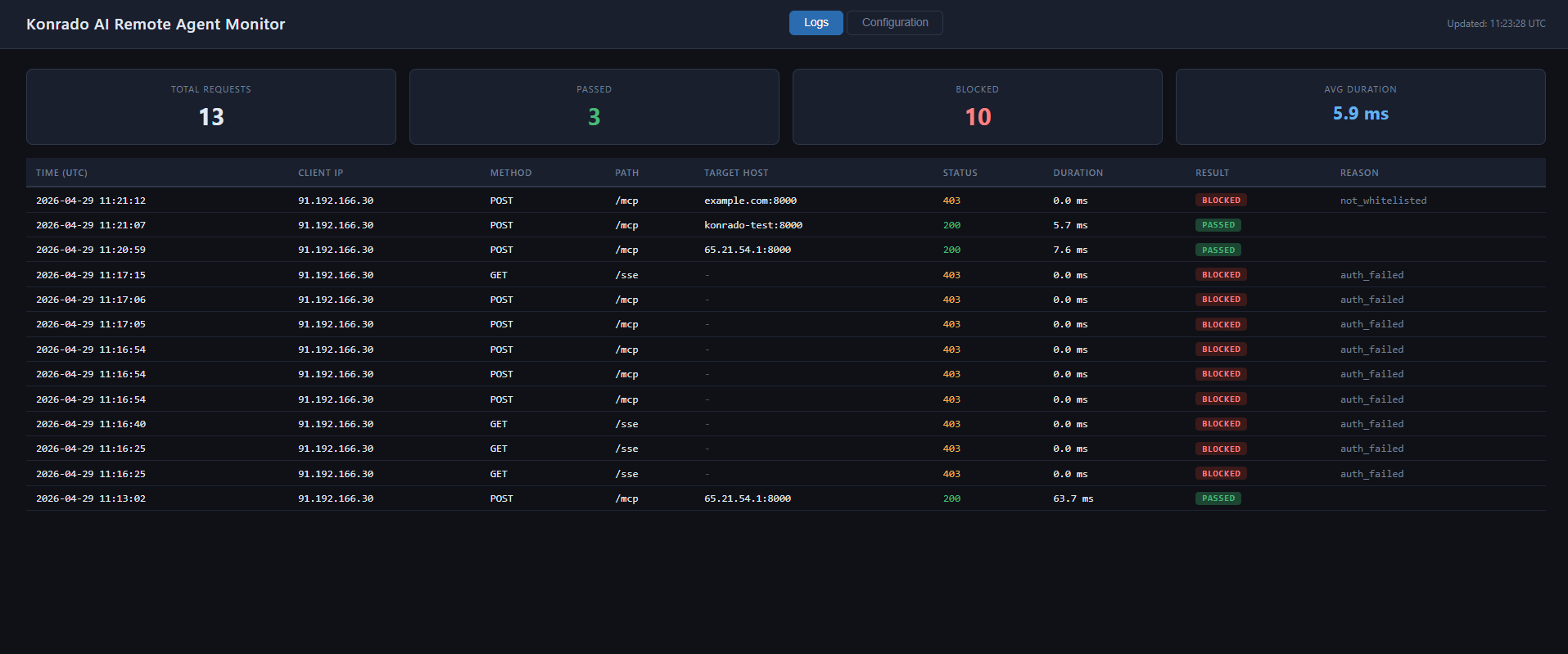
The Logs tab shows recent requests, status codes, durations, whether each passed or was blocked, the target host and why a request was blocked.
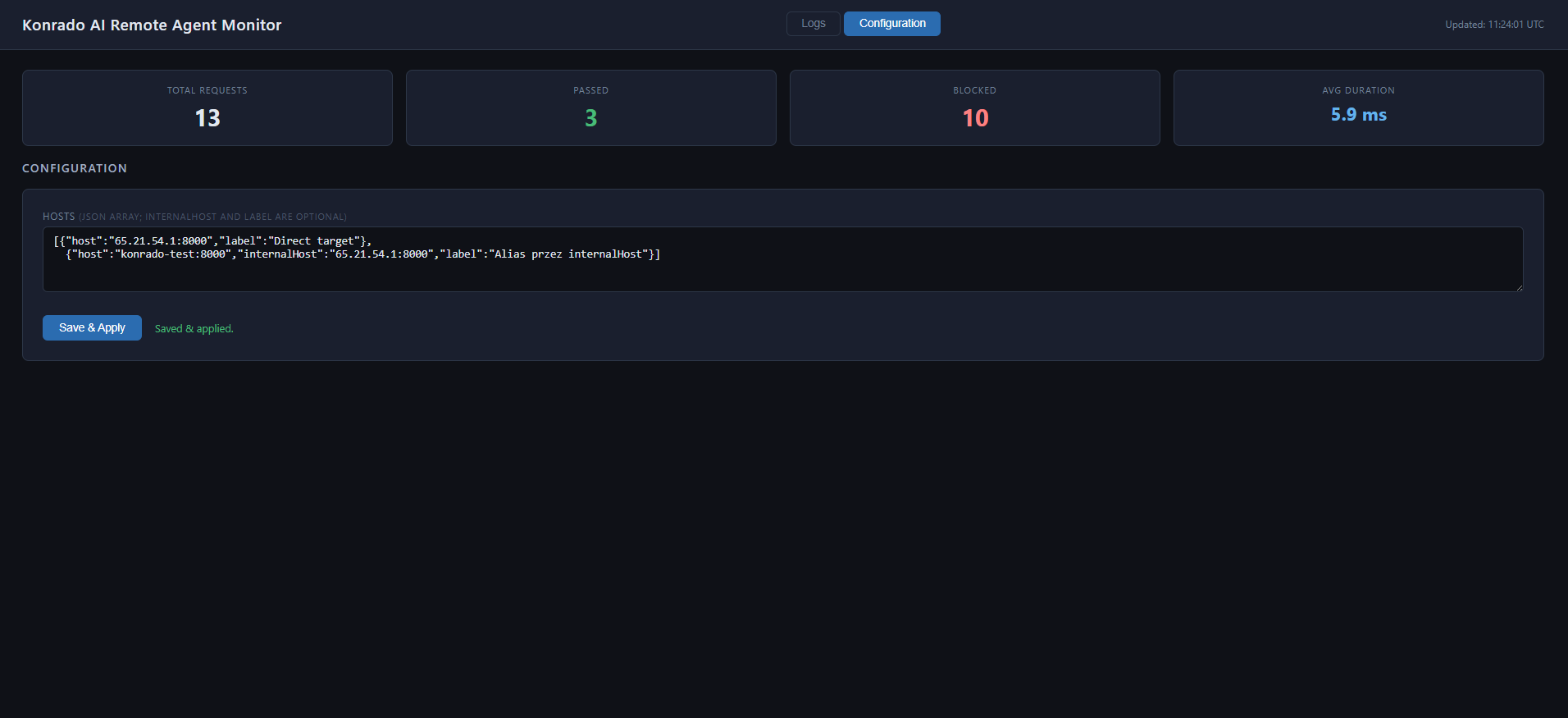
The Configuration tab edits HOSTS and saves it to the relay's .env file.
If you change SERVER_PORT later, restart the service and open the new port in your firewall.
Konrado still calls the old address, so open the Remote Agent row in Konrado and change its
Server URL to the new port.
Settings
The relay reads these from its .env file:
| Setting | What it is |
|---|---|
API_KEY | The bearer token Konrado and other clients use to reach the relay |
SERVER_BIND_IP_ADDRESS | The address it listens on, usually 0.0.0.0 |
SERVER_PORT | The port it listens on, usually 8001 |
HOSTS | A JSON list you edit in the dashboard. Empty, it forwards to any Target-Host. Filled in, it allows only the hosts listed and can map them |
Each HOSTS entry can hold:
| Field | What it is |
|---|---|
host | Required. The value accepted from the Target-Host header |
internalHost | Optional. The internal host:port the relay connects to when Target-Host matches host |
label | Optional. A name for your team, such as cPanel EU clients |
HOSTS='[
  {"host":"203.0.113.20:8000","label":"Direct target"},
  {"host":"konrado-test:8000","internalHost":"203.0.113.20:8000","label":"Alias through internalHost"}
]'
Check it works
The relay is on the Integrations page as Connected, with the type Remote Agent and its version. Konrado tests the connection again every hour. You can also check the relay itself:
curl http://<SERVER_IP>:8001/healthIt answers {"status": "healthy", "service": "Konrado AI Remote Agent"}. To test a route, send an
MCP request with both target headers:
curl -i -X POST http://<SERVER_IP>:8001/mcp \
  -H "Authorization: Bearer <API_KEY>" \
  -H "Target-Host: <target-host>" \
  -H "Target-Token: <target-token>" \
  -H "Content-Type: application/json" \
  -d '{"jsonrpc":"2.0","id":1,"method":"initialize","params":{"protocolVersion":"2024-11-05","capabilities":{},"clientInfo":{"name":"curl","version":"1.0"}}}'
If something is wrong
| What you see | What to do |
|---|---|
| The dashboard does not open | Check that konrado-mcp-remote-agent.service runs and that your network reaches the port |
403 with Missing Authorization header or Invalid API key | Send Authorization: Bearer with the relay's API_KEY |
| Host '…' is not on the allowed HOSTS list | Add the host to HOSTS, exactly as the request sends it in Target-Host |
| A request with one target header fails | Send both Target-Host and Target-Token |
| The relay's own answer instead of the target's | The request carried no target headers. Check the Custom MCP server's Request headers |
| Connected, but Konrado uses no tool from the target | Konrado takes only tools marked readOnlyHint: true. A Konrado plugin behind the relay marks them on Plesk only |
| The target is not reached | Check the entry's internalHost and that the relay's machine reaches the target |
502 or a connection error from the target | Check that the target MCP server is up and answers on /mcp |
| Connection error in the install step | Run the commands below on the relay's machine, then run the install command again |
systemctl status   konrado-mcp-remote-agent.service
journalctl         -u konrado-mcp-remote-agent.service --since "15 minutes ago" --no-pager
systemctl restart  konrado-mcp-remote-agent.service
ss -ltnp | grep ':8001'
Update the relay
When a new version is out, the row on the Integrations page shows Update to v…. Konrado cannot update the relay for you: click it, then run the command it shows on the relay's machine:
bash /opt/KonradoAiRemoteAgent/scripts/update.shRemove the integration
Open Workspace SettingsIntegrations, open the row menu (three dots) and choose Delete. Then, if nothing else uses the relay, remove it from its machine as root:
systemctl disable --now konrado-mcp-remote-agent.service
rm /etc/systemd/system/konrado-mcp-remote-agent.service
systemctl daemon-reload
rm -rf /opt/KonradoAiRemoteAgent
userdel konrado-mcp-remote-agent
groupdel konrado-mcp-remote-agent
Last updated on